


Participant
October 13, 2023
Question

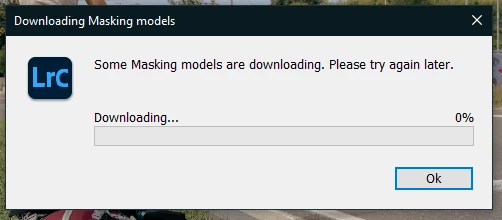
P: error : "Some masking models are downloading. Please try again later"

  • October 13, 2023
  • 12 replies
  • 129353 views

So, when I try to apply a preset, the preview works, but when I click on it, I got this message, with a downloading bar stuck at 0%

I've tried to reinitialize preferences, but nothing changes (I just lost my presets).


Never had this problem before

I'm using LRC v13.0, on a win10 64bits PC
 

12 replies

Evenesis Events
Participant
May 5, 2026

If u are logged in, make a sign out and re login with your account
check inbound and outbound rulles in the firewall

those 2 options work for me

mckyyyyyy
Participant
May 4, 2026

Open Adobe Lightroom, then go to the Help menu and sign in to Adobe Creative Cloud.
Once signed in, the download automatically start from 0% and continue until it finishes.

Participant
March 3, 2025
lightriom photo
Participant
February 13, 2025

Log into the adobe creative cloud from lightroom app under the help menue then sign in


Participant
November 25, 2024

has anyone fixed this? in my case i checked the outbound rules on my firewall. turns out, i disabled LRC because i was using a cracked version before.

Known Participant
November 25, 2024

Adobe support fixed it for me, finally. 

Known Participant
November 25, 2024

anything you learned or can share about the fix?


Participant
October 25, 2024

Hey! I've just downgraded LRC trough the creative cloud app and it imediatily worked for me, i've tried the login/logout tip, but it doesn't worked, now using the 14.0 version

Known Participant
October 26, 2024

posted above in this thread last month, i was conisitently getting the error message in LRC 13, : "some masking models failed to download. please try again later", when using presets, gave up trying to fix it with the suggested solutions (none of which worked for me) and hoped it would be addressed in an update. well, i updated to LRC 14.0.1 yestereday and now not only do the presets still not work and give the same error message but i now get that error message when i simply try to copy and paste edit settings from one picture to another, even when there are no masks in the copied settings.  extremely frustrating as copy/paste picture settings are used all the time. 

Known Participant
October 26, 2024

I'm having the same experience. We've gone from being customers to being paying beta testers. It's really awful.

Participant
September 22, 2024

Had the same issue, sign in with your account then downloading starts.


Known Participant
September 22, 2024

I assume you mean sign into Creative Cloud.app, correct? I tried that, tried logging out and then back in, did a re-start, etc and it didn’t work for me. Is there anything more to it that I’m not thinking of?

 
Thanks!
Participant
September 13, 2024

you need ti sign in into the Adobe account


Known Participant
September 13, 2024

nope, being signed in doesn't solve the problem here either.  the presets still don't work. same problem, same error message no matter how long you wait while you're signed in:

"some masking models failed to download. please try again later."

i've given up and am not wasting any more time with it. hoping perhaps a future update will fix the problem.

Participant
July 3, 2024

Good day! Ladies and Gents. I have found a solution, I have the same problems as all of you you just need to download adobe creative cloud and wait for it to install. once downloaded open the creative cloud app and sign in. once signed in open adobe lightroom or lightroom room classic. there click the preset that needs to download the masking models. When downloaded there will be a green pop up bar in top and that means its done.


Participant
August 5, 2024

Did Nothing for me...Is this what we pay for?????

Participant
October 29, 2023

Just had the same problem.

You have to log in and it will be fix 🙂

Participant
November 5, 2023

yes, you are right, it is working after you are SIGNED IN in Lightroom


Participant
December 7, 2023

Nope. signed in to Lightroom as I type this (and to my account on the Adobe site, for extra measure) and nothing happening. 0%