


Participant
June 14, 2022
Answered

P: Gray / Negative image display in the Develop module

  • June 14, 2022
  • 65 replies
  • 64708 views

Bonjour,

Je viens d'installer la dernière version de Lightroom Classic (11.4) sous Windows 11 et mes fichiers RAW ne peuvent plus s'afficher correctement dans le module "Développement". Je ne rencontre pas le problème dans les autres module, l'affichage de la miniature est bon, tout comme l'histogramme qui semble cohérent. Seul l'affichage dans la zone de travail est blanc (cf. copie d'écran dessous). 

__________________________________________

Hello,

I just installed the latest version of Lightroom Classic (11.4) on Windows 11 and my RAW files can no longer display correctly in the "Develop" module. I don't encounter the problem in the other modules, the thumbnail display is good, as is the histogram which seems consistent. Only the display in the working area is white (see screenshot below).
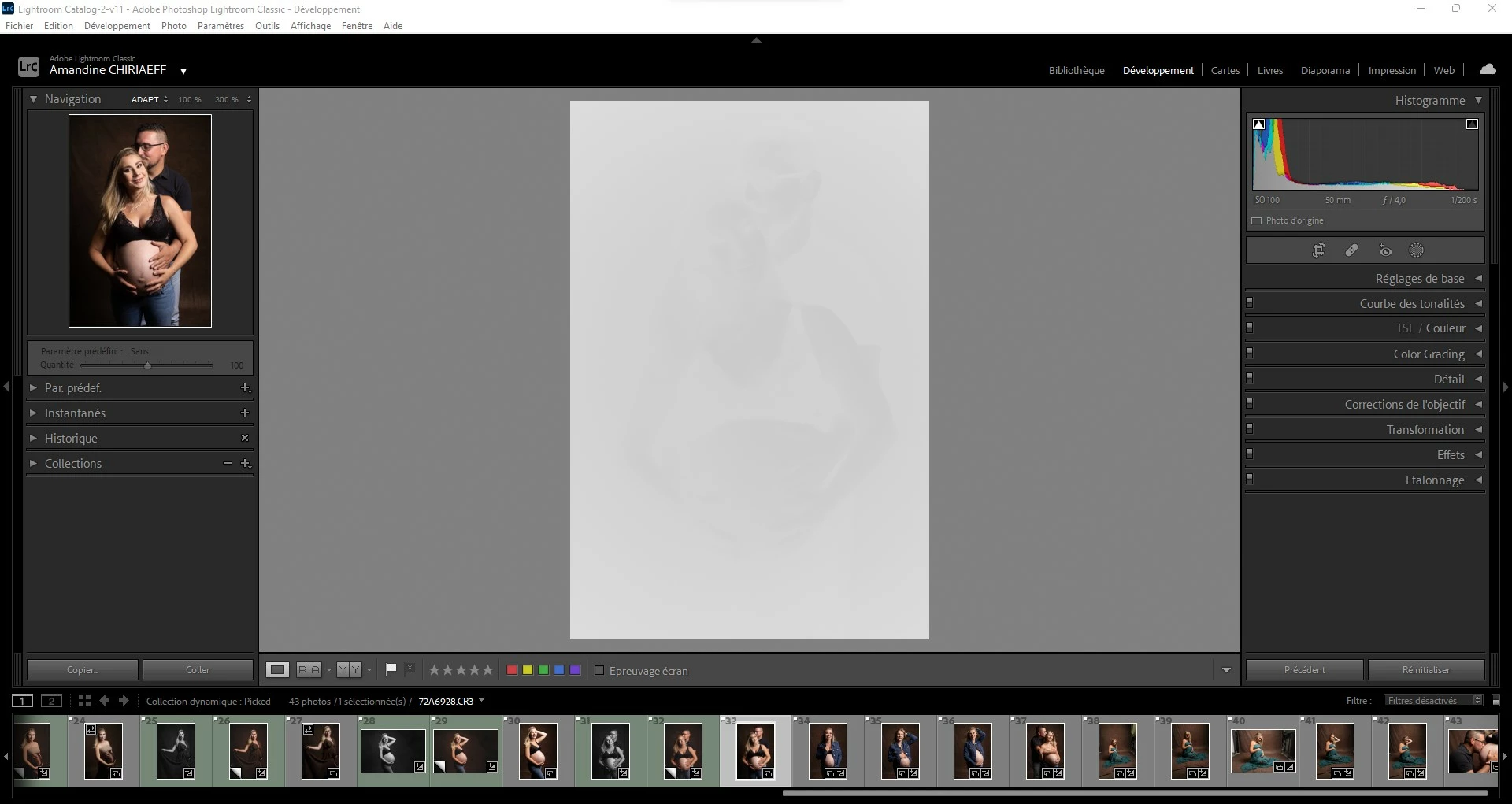
This topic has been closed for replies.
Correct answer AxelMatt

I've heard about this issue for two users here in the forum.

Please try to update the driver for your graphic card.


See also here: Gelöst: Re: P: Gray image display in the Develop module - Adobe Support Community - 13006731


65 replies

chresten kruchov
Participant
June 21, 2022

I have just lazily sounded the new lightroom version, but devollopmodual does not work when I slate from the library, a white screen appears where I can just glimpse the motif. What is wrong? it is urgent I have several major tasks that need to be completed. Can I switch back to the old version?
is there anyone who can help

Participating Frequently
June 21, 2022

Try to disable the GPU.  Edit> Preferences > Performance, and set graphics processor to off.

That solved the problem for me.

Christoph

Participating Frequently
June 21, 2022

Hallo Leute

Ich habe seit gestern auf LR classic ein Problem.

Fotos im Bibliothekmodus sehen wie bisher aus.

Im Entwicklungsmodus sehen sie aber wie Negativfotos aus.

Ich habe es bei meinem Bruder getestet, dort wird alles richtig angezeigt.

Vermutlich habe ich irgendwas verstellt bei den Einstellungen.

Kann mir jemand helfen?

Gruss

Christoph

Participating Frequently
June 22, 2022

Problem gelöst.

Bearbeiten> Voreinstellungen> Leistung  dann Grafikprozessor auf aus stellen.

Wenn das hilft muss man den Treiber der Grafikkarte updaten.

Ich habe vorgängig mal alle Treiber gesichert.

Christoph

CliffJennings
Participant
June 20, 2022

The solution I found by downloading & updating my Nvidia was successful!!. I suggest the the developers put this suggestion on the download site for upgrades as my inbox is filling up with responses!!

David Franzen at Work
Adobe Employee
Adobe Employee
June 21, 2022

Can you tell me what GPU model you have and what version of the GPU driver did you have installed when you saw the problem. It's very useful to know which versions of GPU drivers are known to cause problems. Thanks for your help.

Kanaiaupune
Participating Frequently
June 21, 2022

This is the GPU and Driver I have installed that is currently working on my system:

GPU: NVIDIA GeForce GTX 960M

DRIVER: 31.0.15.1640


Hope this helps someone~

Participant
June 20, 2022

After update to version 11.4 no color in Development mode, in Library and photostip there is color


heinzk25987254
Participant
June 20, 2022

Beim Importieren die Entwicklungseinstellung kontrollieren ist  ev. auf einem SW preset eingestellt.

Vermutlich beim update auf 11.4 verstellt.

Participant
June 20, 2022
Hallo
es könnte in diese Richtung gehen. Ich war auf PS und habe zurückgesendet
zu LR- War ok, aber beim Bewegen der Werte schwappte es zwischen B/E und
Farbe.

Jetzt auf Ihren Vorschlag hin ging ich zu de Presets und bin wieder im
Problem, Foto auf B/W oder Tiefenfilter wenn unbearbeitet.
Sehe aber nicht welcher Filter aktiv sein könnte-
Nichts ist "highlighted"
Participant
June 19, 2022

I recently just got back into photography with my canon eos rp and took pictures at an event. I re-did my lightroom subscription and imported the pictures, but everytime I go to develop mode the picture is completely white washed. I tried opening up old pictures and the same thing.


I've been chatting with Adobe support and they remote controlled my screen, made a new catalog, even removed the old settings so it was like a fresh install but everytime we go to develop mode the pictures are gray. He tried messing with my computer settings too but no such luck.


It's weird that if I click the before and after in develop mode I can see the original picture and using other software shows the cr3 is fine, but what setting could make it completely grey?

Participant
June 19, 2022

Participating Frequently
June 19, 2022

Same problem for me after upgrading to LR 11.4. I had to disable the GPU. I have an NVIDA GeForce GTX 960M (quite old), driver version 23.21.13.8873. No updates seem to be available from the manufacturer's site. Thankyou

Kanaiaupune
Participating Frequently
June 19, 2022

I too have the NVIDIA GeForce GTX 960M. I disabled the GPU, uninstalled the Driver, then reinstalled the "new" Driver (pretty sure it's the same one) and it seemed to work. I hope you can get it to work as well~ 

Participating Frequently
June 20, 2022

Hi. May I ask what "kind" of drivers do you use, Studio or Game Ready? Thank you!

Participant
June 19, 2022

I have exactly the same problem that occurred immediately after installing version 11.4

JohanElzenga
Community Expert
Community Expert
June 19, 2022
quote

I have exactly the same problem that occurred immediately after installing version 11.4


By @Yuliya0D45


So follow the advice in this thread.


-- Johan W. Elzenga
Participant
June 19, 2022

У меня точно такая же проблема, которая возникла сразу после установки версии 11.4


Participant
June 19, 2022

Just updated Lightroom classic to v11.4, all i see is a gray screen in the develop module with a very light silhouette of the image. I can see all images just fine in the library module. I'm working on 5DMK4 raw files. 


I noticed that if I go to Settings-->Process version-->Version 4, I can see the images, but if I try to make any edits, I get the gray screen again. Also under Process version the current version is listed as Version 5? 


My operating system is Windows 10 Home


My work is at a standstill until this is fixed. 

Participant
June 19, 2022

I HAVE THE SAME PROBLEM AFTER THE LAST UPDATE

Participating Frequently
June 19, 2022

Hello,


When I have started up Lightroom Classic,  my photos appear in gray rectangles in the developing module.


They are displayed correctly in the library module.


Lightroom Classic is working on an Windows (10) laptop, and was 2 days ago updated to version 11.4.

Before that the update LC worked fine. Today I changed my colorprofile with the help op 1X-rite.


How can I solve this problem?

TheDigitalDog
Inspiring
June 19, 2022

First, try disabling GPU in the Preferences (Performance preferences). Any better?
If turning OFF GPU works, it's a GPU bug and you need to contact the manufacturer or find out if there's an updated driver for it. 
Also see: https://helpx.adobe.com/photoshop/kb/acr-gpu-faq.html

Author “Color Management for Photographers" & "Photoshop CC Color Management/pluralsight"
Participating Frequently
June 19, 2022

Thnx , you have nailed the problem. After turning of GPU it worked again. And after updating my NVIDIA driver it worked again when I turned on the GPU momde.


Many thnx, great work