


Participant
June 14, 2022
Answered

P: Gray / Negative image display in the Develop module

  • June 14, 2022
  • 65 replies
  • 64707 views

Bonjour,

Je viens d'installer la dernière version de Lightroom Classic (11.4) sous Windows 11 et mes fichiers RAW ne peuvent plus s'afficher correctement dans le module "Développement". Je ne rencontre pas le problème dans les autres module, l'affichage de la miniature est bon, tout comme l'histogramme qui semble cohérent. Seul l'affichage dans la zone de travail est blanc (cf. copie d'écran dessous). 

__________________________________________

Hello,

I just installed the latest version of Lightroom Classic (11.4) on Windows 11 and my RAW files can no longer display correctly in the "Develop" module. I don't encounter the problem in the other modules, the thumbnail display is good, as is the histogram which seems consistent. Only the display in the working area is white (see screenshot below).
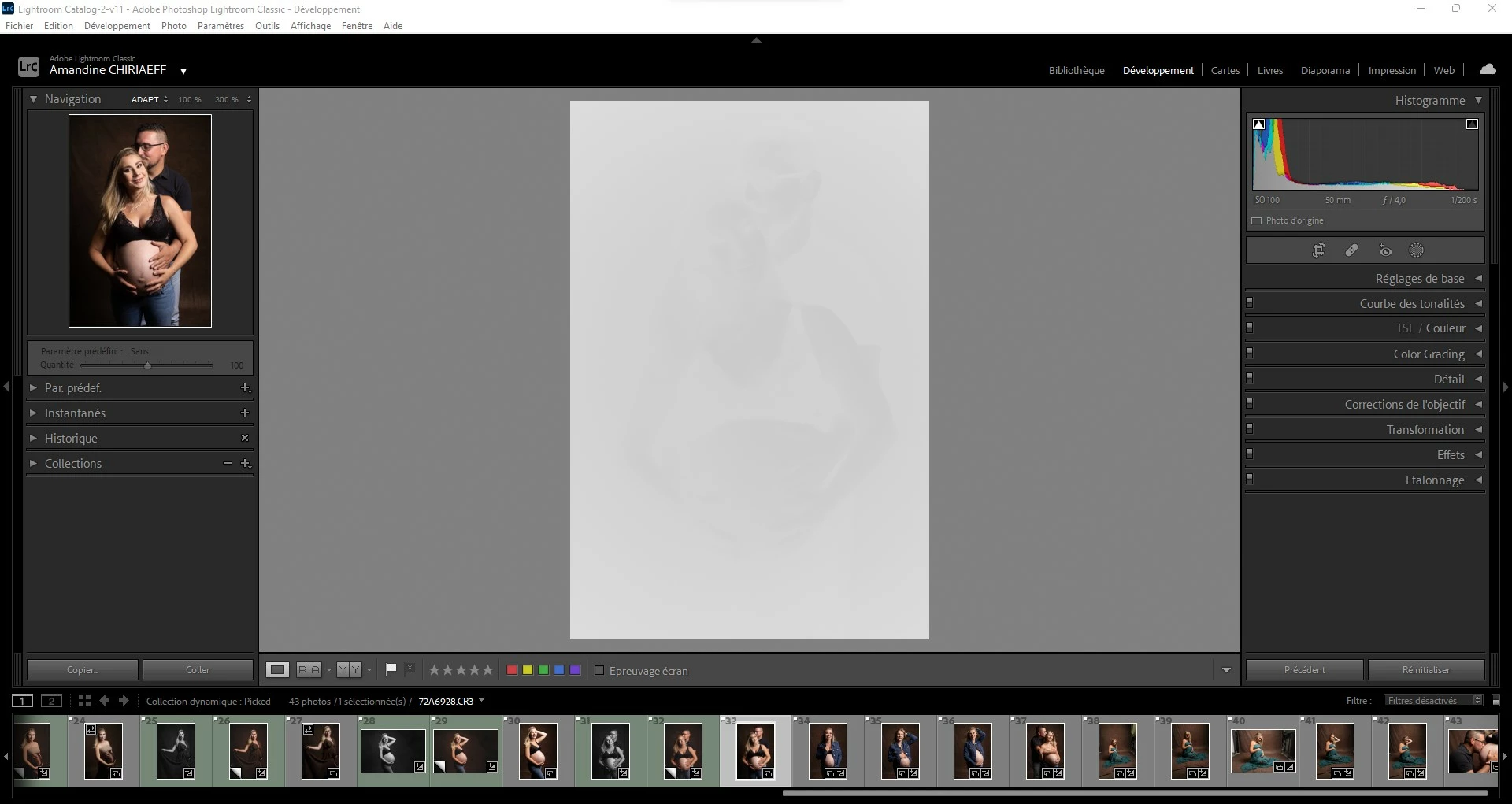
This topic has been closed for replies.
Correct answer AxelMatt

I've heard about this issue for two users here in the forum.

Please try to update the driver for your graphic card.


See also here: Gelöst: Re: P: Gray image display in the Develop module - Adobe Support Community - 13006731


65 replies

heinzk25987254
Participant
June 19, 2022

Habe folgendes Problem:

Beim Laden von der Kamera in LRC werden die RAW Fotos  im Entwickeln Modul automatisch auf Schwarz/Weiss gesetzt.

Ist das ein Bug oder eine Einstellungssache?

Edition Windows 11 Home

Version 21H2

Installiert am     ‎21.‎04.‎2022

Betriebssystembuild     22000.739

Leistung             Windows Feature Experience Pack 1000.22000.739.0


Prozessor           11th Gen Intel(R) Core(TM) i9-11900H @ 2.50GHz   2.50 GHz

Installierter RAM            32.0 GB (31.6 GB verwendbar)

Geräte-ID           2AF9F12F-14D2-440F-958E-99F27E9FF2FB

Produkt-ID         00342-20786-96262-AAOEM

Systemtyp          64-Bit-Betriebssystem, x64-basierter Prozessor

Stift- und Toucheingabe             Unterstützung für Stifteingabe

Kanaiaupune
Participating Frequently
June 19, 2022

Curious if anyone has come across this. I went into LRC to edit, and when I clicked the DEVELOP Tab above, the image looks like a faint NEGATIVE. I can see the image below and in the NAVIGATOR Section to the left. It's never done this before. I'll upload a screen shot. I was thinking I may have inadvertantly clicked something, but I just opened the program and hadn't done a thing yet.

JohanElzenga
Community Expert
Community Expert
June 19, 2022

Looks like a GPU issue. Turn off the use of the GPU in Preferences- Performance. If this works, then check if there are updates for your graphic card drivers. If so, try the GPU again after you updated the drivers.


Another possibility is a corrupted monitor profile. Temporarily change it to a different profile (like sRGB) to see if that solves it.


-- Johan W. Elzenga
Konpasu.de
Participant
June 19, 2022

Thank you. I had the same problem since the update. This solution worked for me.

Participant
June 17, 2022

Heelo i see white page and cannot see my foto. How can i return order view?

Per Berntsen
Community Expert
Community Expert
June 20, 2022

Go to Edit > Preferences > Performance, and set Use Graphics Processor to Off.

If that fixes the issue, your graphics driver, is probably out of date, and needs updating.

After updating, try to turn the Graphics processor back on.

Participant
June 20, 2022

Thank you. I speak with support, say that it is bag in new version and i need to use old version some time


Rikk Flohr_Photography
Community Manager
Community Manager
June 17, 2022

All of the customers reporting this issue are using Windows. For each of you, as a test, please go to Edit>Preferences>Performance and disable GPU then restart your instance of Lightroom Classic. 

Does the problem go away? 

If so, then you will need to check your Video Card Manufacturer's website for an updated driver. Perform a clean install of the latest video driver. Go back to Edit>Preferences>Performance and renable GPU. 


If not: then post back here that "Turning off GPU and restarting has no effect"

If the problem is no longer there, great. Please post here and let us know. 

If you are still experiencing the problem post back here with your

  • GPU/Video Card Model 
  • GPU Driver Version Number


I will me marking this answer correct so that it appears at the top of this thread so that newcommers will hopefully see it immediatly. 


Rikk Flohr: Adobe Photography Org
thorstenmbacke
Participant
June 18, 2022

Thanks a lot, that was exactly the problem. After the driver update everything is working.

Participant
June 17, 2022

My images on import in the Library module look fine, but when I go over to the Develop module, the image whites out almost entirely. I can get it to come back, but have to manually select Settings/Process Version and choose 4, instead of current (5). I have to do this every time I make an adjustment /edit, not just once. This is not a usable work around, any ideas how to fix this so I can edit my images?

TheDigitalDog
Inspiring
June 17, 2022

First, try disabling GPU in the Preferences (Performance preferences). Any better?
If not, recalibrate and build a new ICC display profile, the old one might be corrupted.
If you are using software/hardware for this task, be sure the software is set to build a matrix not LUT profile, Version 2 not Version 4 profile.
Also see: https://helpx.adobe.com/photoshop/kb/acr-gpu-faq.html

Author “Color Management for Photographers" & "Photoshop CC Color Management/pluralsight"
Participant
June 16, 2022

Since the newest update I have lost all access to my past images. What is going on? I can see them in the library but when i try to ckick on the develop tab its all white.

JP Hess
Inspiring
June 16, 2022

Try turning off GPU acceleration in the Lightroom preferences to see if that fixes the problem. If it dies then check to see if there is an update for your graphics driver that will resolve the issue. It's also possible that simply resetting the Lightroom preferences could fix the problem.

thorstenmbacke
Participant
June 16, 2022

Hallo, seit dem neuesten Update werden die Bilder im Entwickeln Modus nur noch als eine Art Negativ in Scharz/Weiß angezeigt. Nach dem Ändern der Prozessversion auf Version 4 (unter Einstellungen) wird das Bild wieder richtig angezeigt. Hat jemand Abhife?

Ged_Traynor
Community Expert
Community Expert
June 16, 2022

Moving thread to the Lightroom Classic forum from Photoshop ecosystem


Participant
June 16, 2022

Is anyone else having problems after applying the latest update to Lightroom Classic. Images are displaying fine in the Library but when I click on the Develope module all I see is white with a faint outline of the image.

AxelMatt
Community Expert
AxelMattCommunity ExpertCorrect answer
Community Expert
June 16, 2022

I've heard about this issue for two users here in the forum.

Please try to update the driver for your graphic card.


See also here: Gelöst: Re: P: Gray image display in the Develop module - Adobe Support Community - 13006731


My System: Intel i7-8700K - 64GB RAM - NVidia Geforce RTX 3060 - Windows 11 Pro 25H2 -- LR-Classic 15 - Photoshop 27 - Nik Collection 8 - PureRAW 5 - Topaz Photo
CliffJennings
Participant
June 15, 2022

I downloaded a new Nvidia driver (it took awhile as I'm on W-Fi in a Health Care facility). This solved the problem.

gilcole
Participant
June 16, 2022

I just udated to the latest version of Lightroom Classic and now when I go to the Developemnt module the phot's show up as a negative picture.

DdeGannes
Community Expert
Community Expert
June 16, 2022

Please provide some additional info, see the screen capture for the forum guidelines.


Regards, Denis: iMac 27” mid-2015, macOS 11.7.10 Big Sur; 2TB SSD, 24 GB Ram, GPU 2 GB; LrC 12.5,; Lr 6.5, PS 24.7,; ACR 15.5,; (also Laptop Win 11, ver 24H2, LrC 15.0.1, PS 27.0; ) Camera Oly OM-D E-M1.
jimc22320203
Participant
June 15, 2022

I have ths exact same issue, which happend  immediately after installing version 11.4