


Participant
June 16, 2025
Answered

P: How do I batch edit Denoise (June Update) (LrC 14.4 & LrD 8.4)

  • June 16, 2025
  • 48 replies
  • 51981 views

Lightroom Classic versjon: 14.4 
Operativsystem: Mac OS 15


As of this new version I am not able to denoise a batch of photos, only individual ones. Can't find any guidance as to how this can be fixed. Hope you can help me, thanks.

Correct answer Ian Lyons

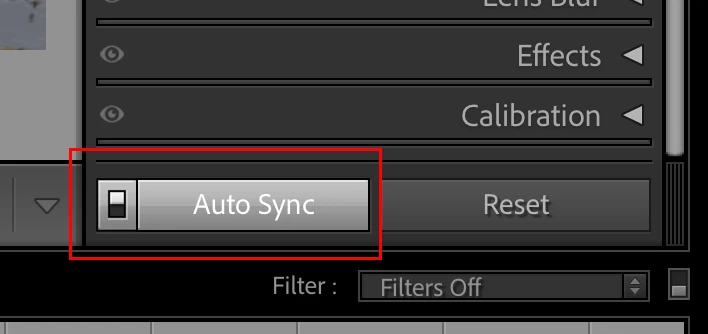
Select the images to be Denoised, enable Auto Sync, then click on the Denoise checkbox. You can use the slider below the Denoise checkbox to fine tune the amount of noise reduction applied to all or individual images in real time.


48 replies

Participant
July 2, 2025

With the new update, I like the new Denoise feature but now I can't seem to find out to batch enhance multiple photos (right click > Enhance) at the same time. I've been having to select Denoise on each photo which is super inconvenient. Is there a new way to do this or did Adobe get rid of that feature? This is Lightroom not the LR Classic program. 

Participant
July 2, 2025

This is Version 8.4 I'm using currently

Participant
July 2, 2025

Oh my Mac, when I leave the computer and the screen goes to sleep, all denoising processing stops.. why is that? I have to keep my screen awake for LrC to keep working on batch denoising images.

Participating Frequently
July 2, 2025

This new way is the biggeat time wasting update I have ever seen it constantly wants to update AI settings. There has to be a faster easier program out there to edit raw photos. 

Participant
June 30, 2025

After updating to the latest update, my denoise worked perfectly in lightroom classic. now it will not work at all. I click the denoise button, it starts processing, then stops without finishing. i go to reclick the denoise box, and it makes a check and then takes it away immediately. when it was working, when i checked denoise, it would also check raw details. it does not do this anymore. i can click raw details first, and then denoise and it will process to reveals the slider, but it doesn't actually change the photo's noise level.

nikunj.m
Community Manager
Community Manager
June 30, 2025

Hi, thanks for reaching out, and we're sorry about the trouble! 

Please go to the Help menu in Lightroom Classic, then System Info, and copy the text. You can share the info with us by either pasting it as a reply here or in a text file and sharing the file with us. 

What format are the images in? Did you start experiencing this behavior after any specific change to the system? 

You can try to reset the preferences of Lightroom using the steps mentioned here: https://adobe.ly/3IaEfMF


Thanks,
Nikunj

Participant
July 4, 2025

I am having the exact same problem as Rob. The denoise buttons now look different and there is the raw details now which i did not have before. I am unable to select how much denoise to apply (it is stuck on 50) and then after attempting to denoise, i get an error message. 

Participant
June 30, 2025

Okay, solved this. You can paste it in batch form but after you copy the denoise setting from the first photo, click on the library view, then shift select all the photos you want to paste to, once they are selected then go up to photo, click develep settings, then hit paste settings, then it will work. I don't know why it must be from the library menu but it worled that way. 


Legend
June 30, 2025

@colby30312130wkgk 


That's one way to paste to a selection.


Try reading the Accepted Answer in this thread:


https://community.adobe.com/t5/lightroom-classic-discussions/p-how-do-i-batch-edit-denoise-june-update-lrc-14-4-amp-lrd-8-4/m-p/15372388#M406561 


and the pinned reply by @Rikk Flohr: Photography 


The new Denoise is a setting, just like Exposure or Contrast. Yes, it stops users from continuing to work, which is very bad when large numbers of photos are involved; applying the Denoise Amount to a selection is also bad and looks like a bug. Both issues demonstrate a very poorly thought out design.


For everyone complaining here about not being able to apply the Denoise setting to a selection of photos in Develop, try learning how to use Lightroom Classic.


How did any of those posting here ever paste anything to a selection of photos? The ignorance shown here, and in other related threads, by photographers at all levels is astounding.


LeMarkD
Participating Frequently
July 26, 2025

I think you misunderstood what problem he's saying his solution solves. There's an issue that even though the Denoise setting pastes to all the photos you've batch selected, it doesn't actually start doing the denoise processing on any of them. This is a problem I have too.

Participant
June 29, 2025

I used to be able to go to Grid View and apply the denoise effect to every picture I selected, but I can't anymore. Did it get removed in an update? 

Jo_Gryniewicz
Participant
June 28, 2025

I called them and it seems it's a driver issue. They said to update my NVIDIA drivers which I did, but it didn't immediately help so I just went back to the previous version. Will test it when I don't have thousands of pictures to denoise...

Participant
June 27, 2025

I used the updated version of AI denoise in lightroom classic today and the photos it was used on will not batch export. They will only export one-by-one, which is a huge inconvenience. Not only did using AI denoise take twice as long as it used to, but now having to export individually is a huge time consumer. Anyone else have this issue or luck fixing it?

Legend
June 28, 2025

@Chelsea23674501dz7h 


What do you mean by 'export'?

Participant
June 28, 2025

You can't be serious...

Participant
June 27, 2025

Warum wurde nur die Verbessern Funktion da raus genommen wo sie einfach sinn gemahct hat wenn man mehrere Fotos bearbeiten will. Jetzt sitz ich hier und muss auf jedes einzelne Foto klicken und das auswählen. Der Optimale Workflow ist gestorben. 

LeMarkD
Participating Frequently
June 28, 2025

You can roll back to the previous version under the apps tab of the creative cloud app, click the three dots on Lightroom and click other versions, select version 3.8.1

Participant
June 26, 2025

アップデートする前は写真の一覧で右クリックすると「強化」からAIを使用してディテールを維持しながらノイズ除去できたが、アップデートしたら「強化」が無くなってしまった為、複数の写真を選択して一度にノイズ除去することができなくなってしまった。

複数の写真を一度にAIを使用してノイズ除去する方法を教えて下さい。

Ian Lyons
Community Expert
Community Expert
June 26, 2025

@航太吉56239573 


At top of thread, see the answer marked correct and other marked as Pinned Reply.