
Participating Frequently
June 20, 2026
Answered

P: Lightroom Denoise suddenly stopped working

  • June 20, 2026
  • 117 replies
  • 1580 views

Hi everyone,

I'm having an issue with the latest version of Lightroom CC on a MacBook M5 Pro running macOS Tahoe 26.5.1. (I was experiencing the same problem on 26.5 and decided to update hoping it would fix it, but unfortunately it didn't.)

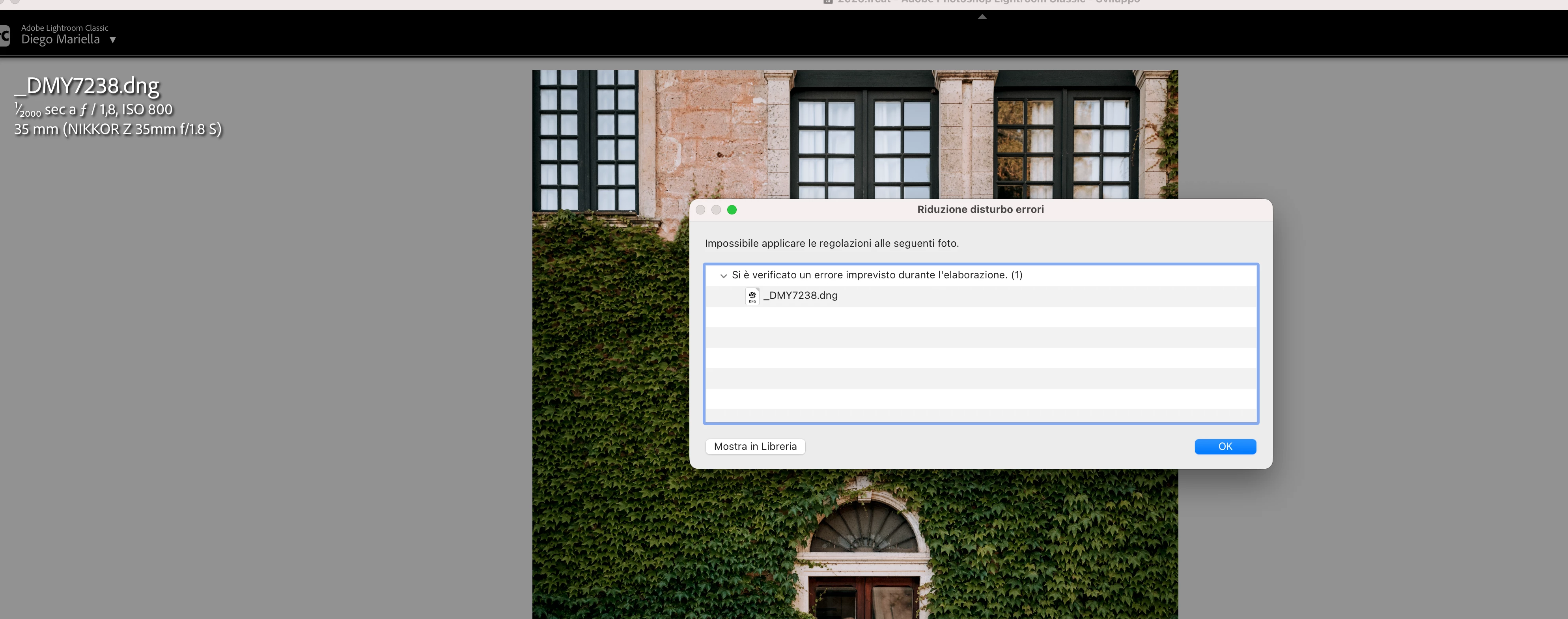
Since this morning, it's been impossible to to use Noise Reduction, even though my internet connection is working perfectly. I've already updated both Lightroom CC and macOS, cleared the cache, and optimized the catalog, but I keep getting this error screen whenever I try to use Noise Reduction.

Has anyone experienced the same issue or knows how to fix it? Any help would be greatly appreciated. Thanks! 🙏
 

    Correct answer Sameer K

    Hi All! Lightroom Classic v15.4.1 is now available for downlaod via the Creative Cloud desktop app with the following critical bug fiixes for the issue reported in this thread and the other: 


    Thanks!
    Sameer K

    117 replies

    marcB836
    Participant
    June 20, 2026

    Adobe Lightroom Classic

    Version 15.3.1 Camera Raw 18.3

    Version [202605261338-e36f8566]

    dj_paige
    Legend
    June 20, 2026

    What software are you using? What version NUMBER of that software? (we need the version NUMBER and not words like “latest” or “up-to-date”)

    marcB836
    Participant
    June 20, 2026

    Adobe Lightroom Classique

    Version 15.3.1 Camera Raw 18.3

    Version [202605261338-e36f8566]


    marcB836
    Participant
    June 20, 2026

    bonjour depuis hier la fonction Réduire le bruit ne fonction plus 
    je suis sur un MacBoock 16” 2024
    puce : Apple M4 Max
    memoire : 64 Go 
    SSD : 2 To
    MacOS : 26.5.1

    dj_paige
    Legend
    June 20, 2026

    Please clarify … there is no software named Lightroom CC. You are either using Lightroom (Lr icon) or Lightroom Classic (LrC icon). Which are you using? Also please tell us the version NUMBER (we need the version NUMBER and not words like “latest” or “up-to-date”)

    Participating Frequently
    June 20, 2026

    Hi, you are right, it’s lightroom Classic version 15.3.1 and camera raw 18.3

    Participant
    June 20, 2026

    when trying to denoise an image I get “an unexpected error occurred while processing” This happens every time no matter where the images are stored. They are on multiple external drives

    tgweber
    Inspiring
    June 20, 2026

    Perhaps this might be a workaround.

    I am on a M4 Mac mini, running OS 26.5. I unfortunately updated PS and CameraRaw today, but could not find LrC 15.4. So, I went back to editing in LrC 15.3.1, and Denoise stopped working.

    In trying to fix the issue, I notice there was a CameraRaw folder in my ...

    /Library/Application Support/Adobe

    ... folder, so I pull it out onto my Desktop and restarted LrC.


    Denoise was started working again!

    Hope this might be of some help.

    AndrewZander
    Participant
    June 22, 2026

    Unfortunately, this solution did not work for me.

    Adobe Employee
    June 20, 2026

    Updating to latest LrC version 15.4 would most likely solve the issue.

    はまぐち
    Participant
    June 20, 2026

    Thank you.

    I am currently using Lightroom Classic 15.3.1 and Camera Raw 18.4.0.2608.

    However, Lightroom Classic 15.4 is not yet available in my Creative Cloud app.

    Is there any way to access 15.4 now, or should I wait for the rollout?

    (ありがとうございます。
    現在 Lightroom Classic 15.3.1 と Camera Raw 18.4.0.2608 を使用しています。
    ただし Creative Cloud にはまだ Lightroom Classic 15.4 が表示されません。
    15.4を今入手する方法はありますか?それとも配信を待つ必要がありますか?)

    Adobe Employee
    June 20, 2026
    SPBaldwin
    Participant
    June 21, 2026

    Not really helpful - would appreciate the HOW as opposed to the WHAT I need to do. 

    JohanElzenga
    Community Expert
    Community Expert
    June 21, 2026

    The link in some another answer here is not correct, you need camera raw 18.3, not 18.5 (which does not exist yet). Try this: download Camera Raw 18.3 from here (Mac) - https://download.adobe.com/pub/adobe/photoshop/cameraraw/mac/18.x/CameraRaw_18_3.dmg

    Run the installer and DO NOT update in Creative Cloud - make sure auto updates are turned off before you start.

    -- Johan W. Elzenga
    はまぐち
    Participant
    June 20, 2026

    私も同じ症状が発生しています。

    環境

    ・MacBook Air M4
    ・24GB RAM
    ・macOS Sequoia 15.7.3
    ・Lightroom Classic 15.4

    試したこと

    ・環境設定リセット
    ・新規カタログ作成
    ・Lightroomへのフルディスクアクセス許可
    ・新規RAWファイルでのテスト

    いずれも改善せず、AI Denoise実行時に予期しないエラーが発生します。

    また、他環境では同じRAWファイルで正常にDenoiseできているため、RAWファイル自体の破損ではなさそうです。


    Hello,

    I am experiencing the same issue with AI Denoise.

    Environment

    • MacBook Air M4
    • 24GB RAM
    • macOS Sequoia 15.7.3
    • Lightroom Classic 15.4

    What I have already tried

    • Reset Lightroom preferences
    • Created a new catalog
    • Granted Full Disk Access to Lightroom Classic
    • Tested with a newly imported RAW file

    The issue still occurs and Denoise fails with an unexpected error.

    Known Participant
    June 20, 2026

    Ultimately, I solved my problem by messing around with the macOS user.

    I renamed the user to something else, including the home folder of that user. That messed up a few programs, including Dropbox. Then I renamed the user and its home folder to the old names and restarted the Mac. Again I had to rectify some hiccups in other programs, but now LrC's Denoise worked again!

    Side note: Denoise now also works for DNG filles with lossy compression, which is great!

    yamato713108855
    Community Expert
    Community Expert
    June 20, 2026

    リリース直後で報告例が少ないですが、似た症状の方がいました。

    社員スタッフが対応しているので、こちらのスレッドにぶら下がって情報提供して対応してもらったらいいと思います。

    絶対に出るわけではなさそうなので、再現条件がわかればいいのですが。


    はまぐち
    Participant
    June 20, 2026

    情報ありがとうございます🙇‍♂️

    とりあえずご案内頂いたところにも書き込みしてみました。