
Participating Frequently
June 20, 2026
Answered

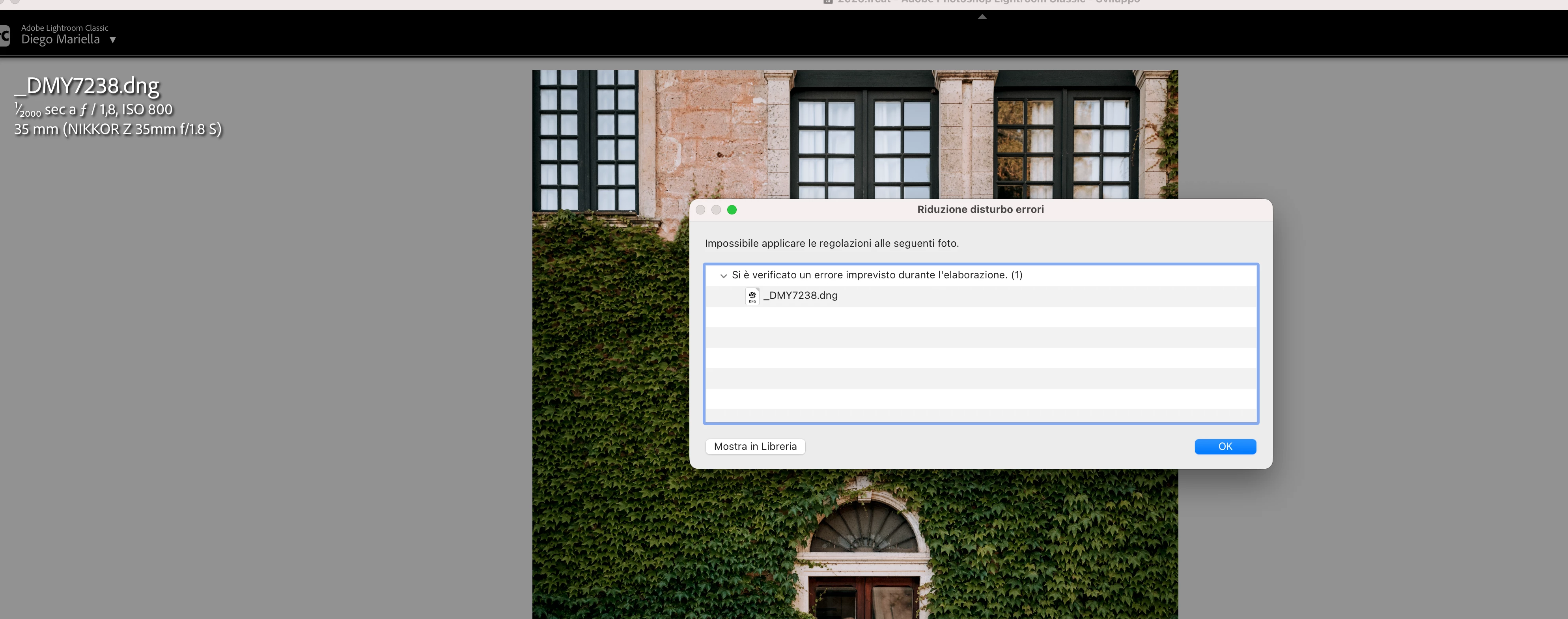
P: Lightroom Denoise suddenly stopped working

  • June 20, 2026
  • 117 replies
  • 1597 views

Hi everyone,

I'm having an issue with the latest version of Lightroom CC on a MacBook M5 Pro running macOS Tahoe 26.5.1. (I was experiencing the same problem on 26.5 and decided to update hoping it would fix it, but unfortunately it didn't.)

Since this morning, it's been impossible to to use Noise Reduction, even though my internet connection is working perfectly. I've already updated both Lightroom CC and macOS, cleared the cache, and optimized the catalog, but I keep getting this error screen whenever I try to use Noise Reduction.

Has anyone experienced the same issue or knows how to fix it? Any help would be greatly appreciated. Thanks! 🙏
 

    Correct answer Sameer K

    Hi All! Lightroom Classic v15.4.1 is now available for downlaod via the Creative Cloud desktop app with the following critical bug fiixes for the issue reported in this thread and the other: 


    Thanks!
    Sameer K

    117 replies

    yamato713108855
    Community Expert
    Community Expert
    June 20, 2026

    Lightroomのカタログを新規作成して、そちらに新たにファイルを読み込んでも症状は変わらないでしょうか?

    Macなので、利用環境が変わってアクセス権の設定が外れてしまったとかあれば、そちらも確認してみてください。

    はまぐち
    Participant
    June 20, 2026

    本当に何度もごめんなさい。

    新規カタログを作成しても同じエラーが

    でる状況です。

    新規カタログでも解消されない

    環境設定再生成でも失敗

    Photoshop camera rawでは問題なく動作

    となります🙇‍♂️

    yamato713108855
    Community Expert
    Community Expert
    June 20, 2026

    @はまぐち さん、こんにちは。

    読み込んでいる画像を一旦Lightroomから削除して、再度読み込み直しをしても症状は変わらないでしょうか?

    はまぐち
    Participant
    June 20, 2026

    試しましたが改善しませんでした。

    RAWをLightroomから削除し、再インポートしましたが同じエラーが発生します。

    この問題は複数のRAWファイルで発生しています。

    また、同じRAWファイルをPhotoshop Camera Raw 18.4で直接開くとAI Denoiseは正常に動作します。

    AI Masking、Enhance Details、Super Resolutionも正常です。

    Lightroom ClassicのAI Denoiseのみ失敗します。

    yamato713108855
    Community Expert
    Community Expert
    June 20, 2026

    新しいバージョンにアップデートして、新しいバージョンで発生する不具合なら、ロールバックする事で解消する可能性はあります。
    ロールバックして改善しないという事は、インストールされているアプリ側に何か起きているという事だと思います。
    環境設定ファイルを削除してアプリの再インストールを試してみてください。
    環境設定ファイルはアプリを削除しても残るので、これがおかしなことになっていると複数のバージョンで同じような症状が発生する場合があります。

    はまぐち
    Participant
    June 20, 2026

    Environment

    - MacBook Air M4
    - macOS 15.7.3
    - Lightroom Classic 15.3.1

    Issue

    AI Denoise fails immediately with the following error:

    "Unexpected error occurred while processing (1)"

    What I have tested

    - The issue occurs with multiple RAW files
    - Mac has been restarted
    - Rolled back Lightroom Classic from 15.3.1 to 15.3 (same result)
    - AI Masking works normally
    - Enhance Details works normally
    - Super Resolution works normally
    - Previously generated Denoise DNG files open and edit correctly
    - Only AI Denoise fails

    Additional information

    AI Denoise was working normally yesterday. This issue first appeared after updating today.

    Has anyone experienced the same issue or found a solution?

    Thank you.


    はまぐち
    Participant
    June 20, 2026

    環境

    ・MacBook Air M4
    ・macOS 15.7.3
    ・Lightroom Classic 15.3.1

    症状

    AIノイズ除去を実行すると直後に

    「処理中に予期しないエラーが発生しました。(1)」

    と表示され、ノイズ除去が実行できません。

    確認済み事項

    ・複数のRAWファイルで発生
    ・Mac再起動済み
    ・Lightroom Classic 15.3へロールバックしても改善なし
    ・AIマスク(風景、空、被写体選択)は正常
    ・RAWディテールは正常
    ・スーパー解像度は正常
    ・過去に作成したAIノイズ除去済みDNGは正常に開ける
    ・ノイズ除去のみ失敗する

    昨日までは正常にAIノイズ除去を使用できていました。
    本日アップデート後に初めて実行したところ発生しました。

    同様の症状が発生している方、または解決方法をご存じの方がおられましたらご教示ください。

    Rikk Flohr_Photography
    Community Manager
    June 18, 2026

    Thank you for the two sample files. 
     

    I downloaded both of them and imported them into an LrC 15.4 catalog. I’ve attempted Denoise on both files, and they both complete successfully.  I can also select both and run Denoise in batch, and both complete successfully.

    I am unable to reproduce your issue. 

    I am testing using a Mac M4 running Tahoe 26.5.1

    Rikk Flohr: Adobe Photography Org
    Known Participant
    June 18, 2026

    That's sad. Most likely my problem is caused by the older hardware of an M1 Mac Studio?

    Rikk Flohr_Photography
    Community Manager
    June 18, 2026

    It puts us firmly in the check out your system, unfortunately. 

    This procedure works for both Lightroom Classic and Lightroom Desktop.

    If you are using Lightroom Desktop, it can change your local storage location. Please review this setting after resetting preferences. 

    Reset Procedure:

    1. Close Lightroom.

    2. Hold down [Alt/Opt]+[Shift] while restarting Lightroom.

    3. Overwrite the Preferences when prompted by the dialog.

    4. Close Lightroom.

    5. Restart Lightroom.


    If that doesn’t work:

    Clean Lightroom Install Procedure

    Close Lightroom

    Restart the computer

    Use the Adobe Creative Cloud App to uninstall Lightroom

    Restart the computer

    Install Lightroom via the Creative Cloud App without launching any other programs.

    Restart the computer

    Launch Lightroom

    Wait 5 minutes

    If that fails to correct the issue, the next test is to attempt the same using a different OS User ID to see if it works. A corrupt OS User Profile would be revealed by this test. 


    Rikk Flohr: Adobe Photography Org
    Rikk Flohr_Photography
    Community Manager
    June 18, 2026

    Greetings,

    I saw your post on Victoria’s blog. Thank you for reaching out to us here. 


    Is it possible to share one file from both of your cameras that exhibit the issue.  Please upload to a sharing service and DM me the link. 


    Thanks!

    Rikk Flohr: Adobe Photography Org
    Known Participant
    June 18, 2026

    Thanks, DM'ed you with the files requested.

    Known Participant
    June 18, 2026

    When checking the "Denoise" checkbox in Lightroom Classic 15.4, an error occurs:

    This occurs for a raw file from the Sony ILCE-7RM4 as well as for a raw file from the Leica Q3.

    Lightroom Classic 15.4

    macOS Tahoe 26.5.1

    Apple Mac Studio 2022 (M1)

    Here is a screenshot of the Performance of the Lightroom Classic Preferences: