
Participating Frequently
June 20, 2026
Answered

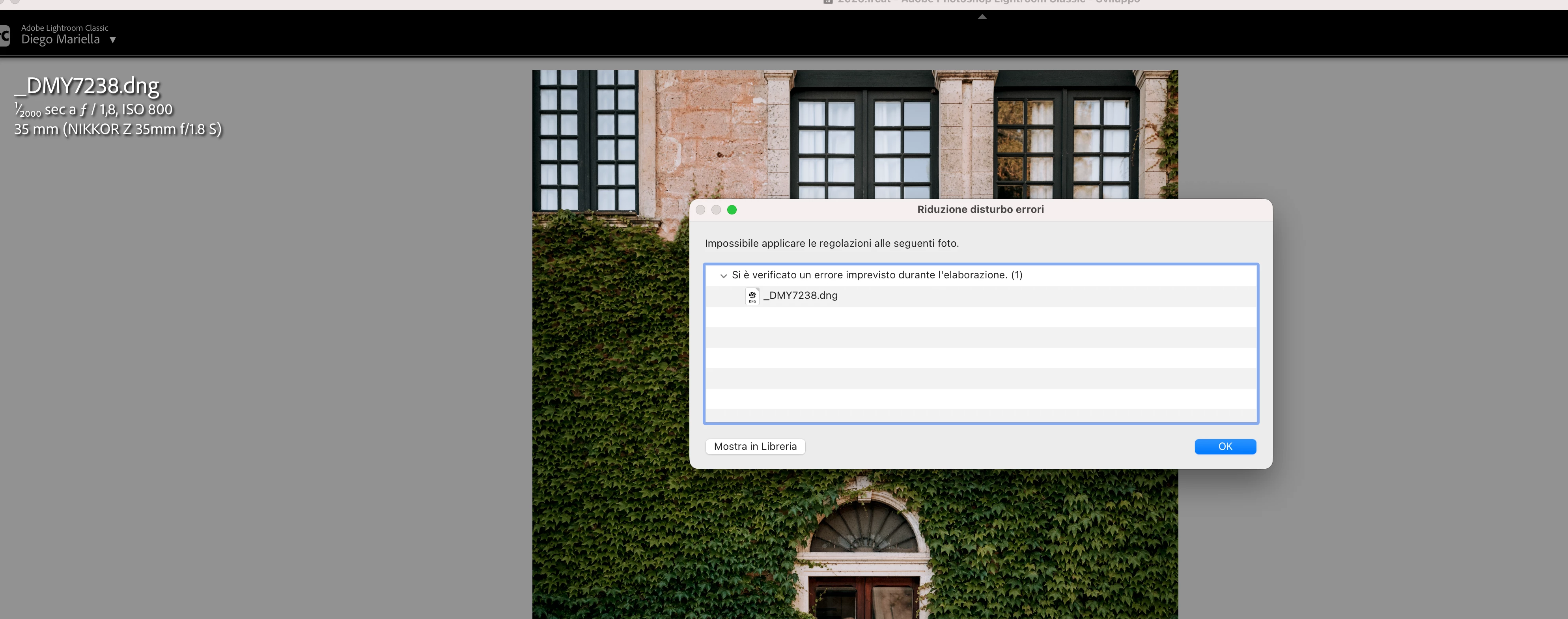
P: Lightroom Denoise suddenly stopped working

  • June 20, 2026
  • 117 replies
  • 1530 views

Hi everyone,

I'm having an issue with the latest version of Lightroom CC on a MacBook M5 Pro running macOS Tahoe 26.5.1. (I was experiencing the same problem on 26.5 and decided to update hoping it would fix it, but unfortunately it didn't.)

Since this morning, it's been impossible to to use Noise Reduction, even though my internet connection is working perfectly. I've already updated both Lightroom CC and macOS, cleared the cache, and optimized the catalog, but I keep getting this error screen whenever I try to use Noise Reduction.

Has anyone experienced the same issue or knows how to fix it? Any help would be greatly appreciated. Thanks! 🙏
 

    Correct answer Sameer K

    Hi All! Lightroom Classic v15.4.1 is now available for downlaod via the Creative Cloud desktop app with the following critical bug fiixes for the issue reported in this thread and the other: 


    Thanks!
    Sameer K

    117 replies

    federicoskog
    Participant
    June 21, 2026

    adobe ha segnalato il malfunzionamento solo per gli utenti apple con alcuni RAW di alcune fotocamere e sono causate dall'ultima versione di camera raw con lo sviluppo apple silicon.

    MODO PER RISOLVERE NEL FRATTEMPO CHE RILASCINO UNA NUOVA VERSIONE compatibile:

    • REINSTALLARE PENULTIMA VERSIONE DI LIGHTROOM

    • ENTRARE IN libreria > application support > plug in > spostare camera raw nel cestino (ovviamente eliminare materiale nel cestino)

    riavviare.

    SCARICARE DA QUI LA VERSIONE DEL 26 MAGGIO:

    https://adobe-camera-raw.it.uptodown.com/mac

    riavviare tutto.

    danielerossiphoto
    Participant
    June 21, 2026

    Per ora è risolto così (grazie), speriamo arrivi tempestivamente la soluzione “ufficiale e definitiva” di Adobe...

    ameliof87413256
    Participant
    June 21, 2026

    Stesso problema…………...

    danielerossiphoto
    Participant
    June 21, 2026

    Stesso problema: che succede?

    West+Oak+Dog+Photography
    Participant
    June 21, 2026

    Thank you for posting! I am having the same problem as well. Will try the fix listed. 

    rhilaw
    Participant
    June 21, 2026

    Word of caution on this fix, whilst it works beautifully to fix the denoise issue it creates another issue with colour profile issues between lighroom and photoshop if you’re editing in both.  Just wasted hours troubleshooting what the issue was and it was the mismatch between Lightroom/Photoshop and CameraRaw 

    tgweber
    Inspiring
    June 21, 2026

    Thank you for your word of caution. I need to clarify something in regards to your caution.

    There are two suggested fixes in this post: mine, which suggests removing CameraRaw folder from /Library/Application Support/Adobe, and another post suggesting reinstalling ACR version 18.3.

    Which post are you referring to?

    If it is mine, I need to put a warning out on my post(s). Also, I apologize for causing your troubles.

    yamato713108855
    Community Expert
    Community Expert
    June 21, 2026

    Lightroom Classicで編集途中のデータをCamera RAWで編集する方法をブログにまとめました。
    ノイズ除去だけCamera RAWで処理できると思いましたが、データの互換性の問題がある可能性があるとの事ですので、念のためリンクは削除させていただきます。


    Camera RAW18.4に問題があるようなので、CameraRAWを手動削除して18.3を手動インストールで改善するという情報が出ていました。

    あいあいあいちゃん
    Participant
    June 22, 2026

    ブログどちらから拝見できますか?

    yamato713108855
    Community Expert
    Community Expert
    June 23, 2026

    @あいあいあいちゃん さん、

    こちらで公開しています。
    Lightroom ClassicとCamera RAWは同世代のバージョンで行ってください。

    https://tokyophotostudio.hatenablog.jp/entry/2026/06/22/011837

    Participant
    June 21, 2026

    I Have the same problem can’t use the denoise. Got the LRC from last backup that didn’t worked

    JohanElzenga
    Community Expert
    Community Expert
    June 21, 2026

    The problem is camera raw 18.4. Lightroom Classic has its own built-in version of camera raw, so it should not use anything from the plugin, but apparently it still does when doing Denoise and runs into an incompatibility as the result. Read the entire thread, the solution has already been posted: you need to install camera raw 18.3 manually (and turn off auto updates to avoid 18.4 being installed again).

    -- Johan W. Elzenga
    Participant
    June 22, 2026

    I have this issue but I dont have camera raw installed.

    JohanElzenga
    Community Expert
    Community Expert
    June 21, 2026

    I assume you use MacOS? There are already lots of posts about this problem. Try this: download Camera Raw 18.3 from here (Mac) - https://download.adobe.com/pub/adobe/photoshop/cameraraw/mac/18.x/CameraRaw_18_3.dmg

    Run the installer and DO NOT update in Creative Cloud - make sure auto updates are turned off before you start.

    -- Johan W. Elzenga
    TheWildPhotographer
    Participant
    June 21, 2026

    même chose depuis 2jours …
    J’ai tout réinitialisé les caches etc. 

    Je n’ai pas encore tout réinstallé mais si vous l’avez fait… 
    Alors , un gros bug sur les serveurs Adobe ?


    JohanElzenga
    Community Expert
    Community Expert
    June 21, 2026

    You have to reinstall camera raw 18.3. Download Camera Raw 18.3 from here (Mac) - https://download.adobe.com/pub/adobe/photoshop/cameraraw/mac/18.x/CameraRaw_18_3.dmg

    Run the installer and DO NOT update in Creative Cloud - make sure auto updates are turned off before you start.

    -- Johan W. Elzenga
    Community Expert
    June 21, 2026

    See here:

    and check if it’s help.


    My System: Intel i7-8700K - 64GB RAM - NVidia Geforce RTX 3060 - Windows 11 Pro 25H2 -- LR-Classic 15 - Photoshop 27 - Nik Collection 9 - PureRAW 6 - Topaz Photo AI