
Participating Frequently
June 20, 2026
Answered

P: Lightroom Denoise suddenly stopped working

  • June 20, 2026
  • 117 replies
  • 1533 views

Hi everyone,

I'm having an issue with the latest version of Lightroom CC on a MacBook M5 Pro running macOS Tahoe 26.5.1. (I was experiencing the same problem on 26.5 and decided to update hoping it would fix it, but unfortunately it didn't.)

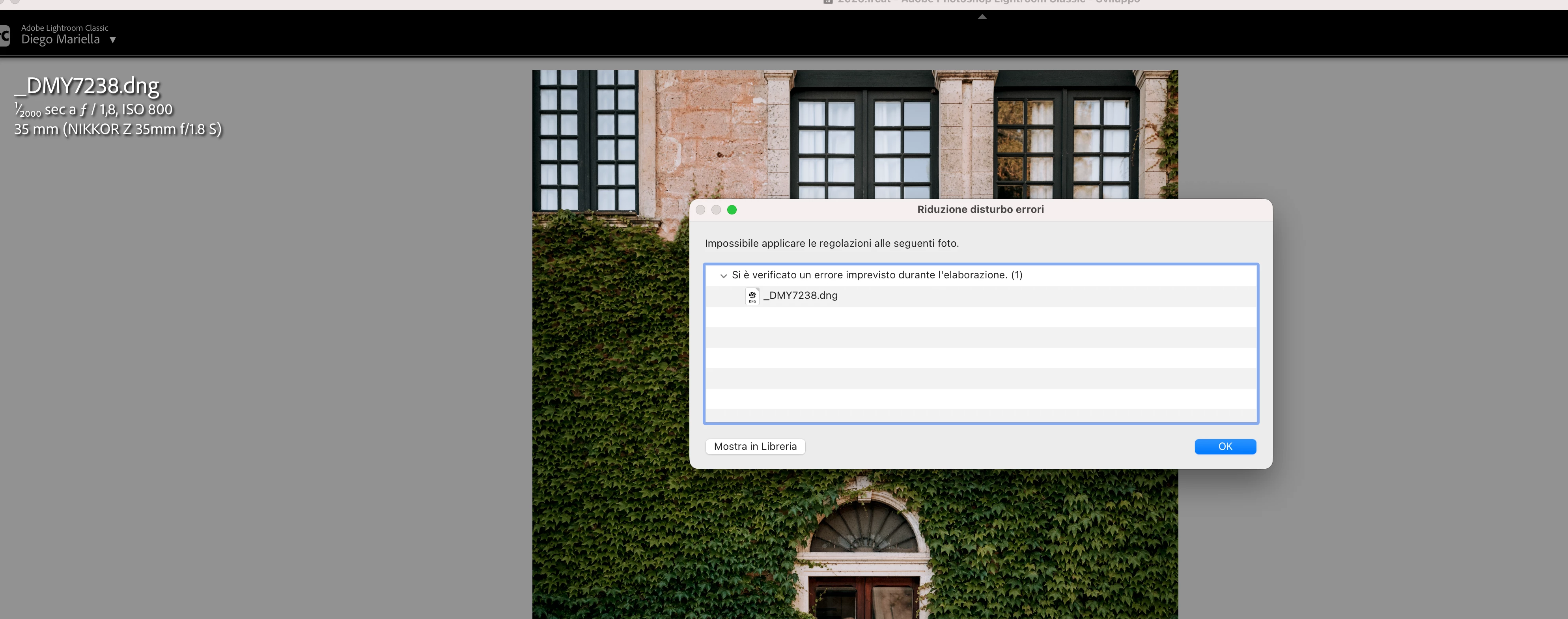
Since this morning, it's been impossible to to use Noise Reduction, even though my internet connection is working perfectly. I've already updated both Lightroom CC and macOS, cleared the cache, and optimized the catalog, but I keep getting this error screen whenever I try to use Noise Reduction.

Has anyone experienced the same issue or knows how to fix it? Any help would be greatly appreciated. Thanks! 🙏
 

    Correct answer Sameer K

    Hi All! Lightroom Classic v15.4.1 is now available for downlaod via the Creative Cloud desktop app with the following critical bug fiixes for the issue reported in this thread and the other: 


    Thanks!
    Sameer K

    117 replies

    kimberg
    Participant
    June 21, 2026

    When applying denoise to a photo, an error screen comes up and says “Failed to apply adjustments to the following photo. An expected error occurred while processing.”

    I’ve updated the apps and still having the issue. 

    heeeeya
    Participant
    June 21, 2026

    まさに私も本件にあたっております。

    おかしいと思ったのは、午前中には途中までAIノイズ除去できていたのに、午後になったらできなかったこと。その間アプリのアップデートはございませんでした。


    私も同じくもう1台のPCでは問題なくできておりますが、メインのMacBookではできずおりますね。

    私には致命的でもあり、MacBookを初期化して試しても治らなかったのですが、皆様が記載している通り不具合でしょうね。早く改善できますように。。

    yutakachii
    Participant
    June 21, 2026

    15.4は不具合で公開停止中とのことですが、

    皆さんと同じく、昨日あたりからできなくなり、2つコンピューターのうち1つは出来ていたものの

    もう一方も出来なくなりました。

    私は仕事での納品が出来ずにいます。

    クライアントにはAdobeの不具合で作業進まずって、報告しましたらデザイナーや他のカメラマン百名近くも同じ状況にある事が分かりました。


    早急な対応を望みます。


    JohanElzenga
    Community Expert
    Community Expert
    June 21, 2026

    Sounds like this is Lightroom Classic. If so, then you posted in the wrong forum. There are multiple threads about this in the Lightroom Classic forum, with a solution that seems to work for everyone who tries it. If you download Camera Raw 18.3 from here (Mac) - https://download.adobe.com/pub/adobe/photoshop/cameraraw/mac/18.x/CameraRaw_18_3.dmg

    Run the installer and DO NOT update in Creative Cloud - make sure auto updates are turned off before you start - until Lightroom Classic 15.4 is released (the update was pulled again due to a serious bug). If you use Lightroom desktop, then this will still most likely solve this issue.

    -- Johan W. Elzenga
    JohanElzenga
    Community Expert
    Community Expert
    June 21, 2026

    You did not post any info, but if you are using a Mac, then try this: download Camera Raw 18.3 from here (Mac) - https://download.adobe.com/pub/adobe/photoshop/cameraraw/mac/18.x/CameraRaw_18_3.dmg

    Run the installer and DO NOT update in Creative Cloud - make sure auto updates are turned off before you start.

    -- Johan W. Elzenga
    JohanElzenga
    Community Expert
    Community Expert
    June 21, 2026

    If you are using a Mac, then try this: download Camera Raw 18.3 from here (Mac) - https://download.adobe.com/pub/adobe/photoshop/cameraraw/mac/18.x/CameraRaw_18_3.dmg

    Run the installer and DO NOT update in Creative Cloud - make sure auto updates are turned off before you start.

    -- Johan W. Elzenga
    JohanElzenga
    Community Expert
    Community Expert
    June 21, 2026

    Try this: download Camera Raw 18.3 from here (Mac) - https://download.adobe.com/pub/adobe/photoshop/cameraraw/mac/18.x/CameraRaw_18_3.dmg

    Run the installer and DO NOT update in Creative Cloud - make sure auto updates are turned off before you start.

    -- Johan W. Elzenga
    JohanElzenga
    Community Expert
    Community Expert
    June 21, 2026

    You posted in the wrong forum. There are multiple threads about this in the Lightroom Classic forum, with a solution that seems to work for everyone who tries it. If you download Camera Raw 18.3 from here (Mac) - https://download.adobe.com/pub/adobe/photoshop/cameraraw/mac/18.x/CameraRaw_18_3.dmg

    Run the installer and DO NOT update in Creative Cloud - make sure auto updates are turned off before you start - until Lightroom Classic 15.4 is released (the update was pulled again due to a serious bug).

    -- Johan W. Elzenga
    maruneboy
    Participant
    June 21, 2026

    Hello Johan, 

    I appreciate the correction + inform. 

    After taking your advice, everything seems to have resolved itself and ‘Denoise’ is working again. 

    Thank you for your work. 

    Fight for your joy + stay kind. 


    JohanElzenga
    Community Expert
    Community Expert
    June 21, 2026

    You posted in the wrong forum. There are several threads about this in the Lightroom Classic forum, with a solution that seems to work for everyone who tries it. If you download Camera Raw 18.3 from here (Mac) - https://download.adobe.com/pub/adobe/photoshop/cameraraw/mac/18.x/CameraRaw_18_3.dmg

    Run the installer and DO NOT update in Creative Cloud - make sure auto updates are turned off before you start - until Lightroom Classic 15.4 is released again (it was pulled due to a serious bug).

    -- Johan W. Elzenga
    Participant
    June 21, 2026

    I thought I was writing to Lightroom. I didn't even realize my message was going into a community!  My LRC system shows that I already have Camera Raw 18.3.

    JohanElzenga
    Community Expert
    Community Expert
    June 21, 2026

    Lightroom Classic uses its own built-in version of camera raw, so that version number is irrelevant. You need to reinstall the 18.3 camera raw plugin, as described.

    -- Johan W. Elzenga
    JohanElzenga
    Community Expert
    Community Expert
    June 21, 2026

    If you download Camera Raw 18.3 from here (Mac) - https://download.adobe.com/pub/adobe/photoshop/cameraraw/mac/18.x/CameraRaw_18_3.dmg

    Run the installer and DO NOT update in Creative Cloud - make sure auto updates are turned off before you start - until Lightroom Classic 15.4 is released.
     

    -- Johan W. Elzenga
    jmb5121
    Participant
    June 21, 2026

    Thanks! That solved the problem.