
Participating Frequently
June 20, 2026
Answered

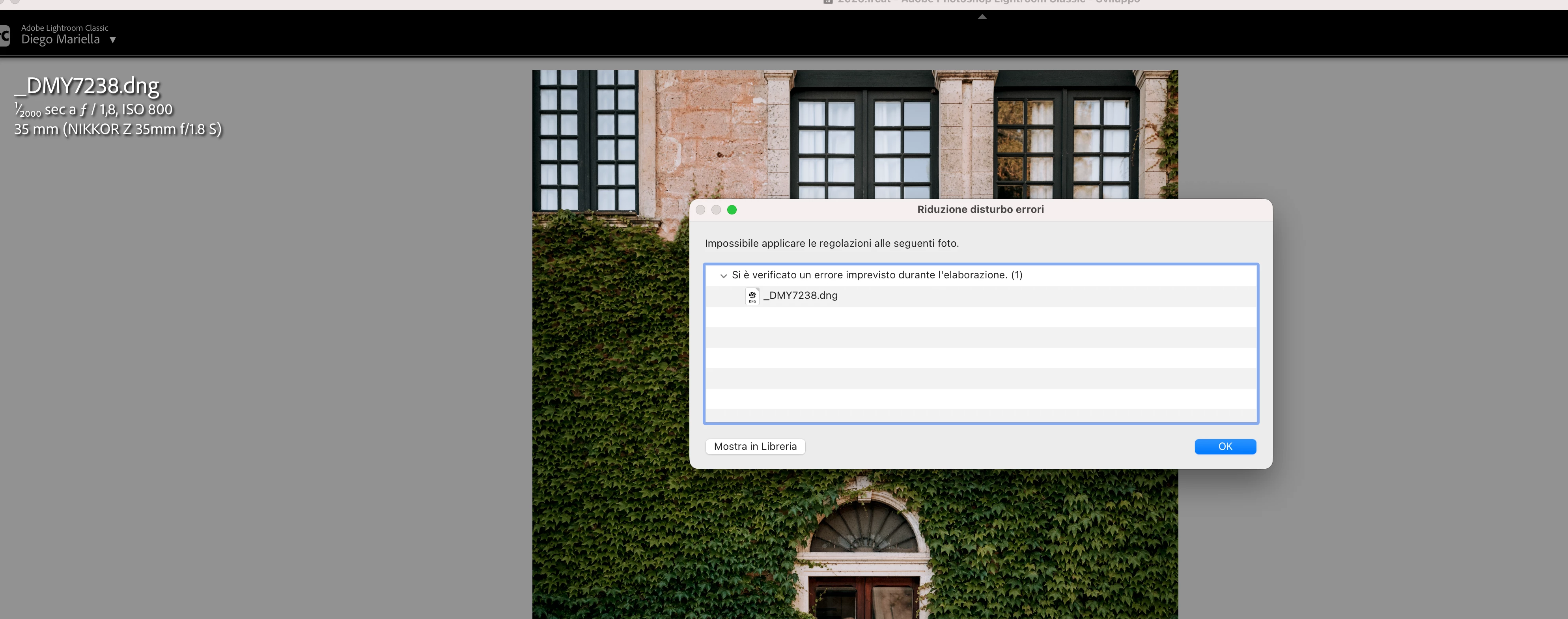
P: Lightroom Denoise suddenly stopped working

  • June 20, 2026
  • 117 replies
  • 1543 views

Hi everyone,

I'm having an issue with the latest version of Lightroom CC on a MacBook M5 Pro running macOS Tahoe 26.5.1. (I was experiencing the same problem on 26.5 and decided to update hoping it would fix it, but unfortunately it didn't.)

Since this morning, it's been impossible to to use Noise Reduction, even though my internet connection is working perfectly. I've already updated both Lightroom CC and macOS, cleared the cache, and optimized the catalog, but I keep getting this error screen whenever I try to use Noise Reduction.

Has anyone experienced the same issue or knows how to fix it? Any help would be greatly appreciated. Thanks! 🙏
 

    Correct answer Sameer K

    Hi All! Lightroom Classic v15.4.1 is now available for downlaod via the Creative Cloud desktop app with the following critical bug fiixes for the issue reported in this thread and the other: 


    Thanks!
    Sameer K

    117 replies

    JohanElzenga
    Community Expert
    Community Expert
    June 21, 2026

    Try this. It appears to work for all who try it. If you download Camera Raw 18.3 from here (Mac) - https://download.adobe.com/pub/adobe/photoshop/cameraraw/mac/18.x/CameraRaw_18_3.dmg

    Run the installer and DO NOT update in Creative Cloud - make sure auto updates are turned off before you start - until Lightroom Classic 15.4 is released.

    -- Johan W. Elzenga
    HEN77
    Participant
    June 21, 2026

    J’ai le même problème avec Lightroom classic 15.3 (une erreur inattendue s’est produite lors du traitement (1). Impossible d’utiliser la réduction de bruit. Je n’ai pas compris comment procéder ?

    JohanElzenga
    Community Expert
    Community Expert
    June 21, 2026

    This appears to work. If you download Camera Raw 18.3 from here (Mac) - https://download.adobe.com/pub/adobe/photoshop/cameraraw/mac/18.x/CameraRaw_18_3.dmg

    Run the installer and DO NOT update in Creative Cloud - make sure auto updates are turned off before you start - until Lightroom Classic 15.4 is released.

    -- Johan W. Elzenga
    Known Participant
    June 21, 2026

    Was too late for me. Mind you, updating to V15.4 and after that reverting to V15.3.1 led to an incorrigible mess: still Denoise failing, unable to have LrC recognize my custom camera and lens profiles, and maybe even more.

    I made a backup of my macOS Data Volume immediately before updating. Phew! I restored that backup and now everything's working again, LrC V15.3.1 like before. Adobe messed up bigtime here.

    JohanElzenga
    Community Expert
    Community Expert
    June 21, 2026

    If you had already updated to 15.4, then you could have continued to use it, except for the buggy duplicates finder. The update was pulled, but Adobe did not advise anyone who already updated to revert to 15.3.1 as far as I know. Everything else would have worked fine. Anyway, you solved it in a different way. Just do not update Camera Raw again, because that’s what causes the Denoise problem. Turn off automatic updates if you have this on.

    -- Johan W. Elzenga
    bertk17663668
    Participant
    June 21, 2026

    thanks its working  perfect 

    June 21, 2026

    LRC. en MAC. ultima version de LRC.    

    まろまろくん
    Participant
    June 21, 2026

    私の知り合いに、バージョン確認したら、15.4だと言われましたが、

    私のバージョンは最新にしても、15.3.1にしかならないので、それが原因かと思いますが、

    できないとおっしゃってる方は、バージョンどうなっていますか??

    yamato713108855
    Community Expert
    Community Expert
    June 21, 2026

    @まろまろくん さん、

    15.4はデータ互換性の問題が確認されたため一旦公開を停止しています。

    利用されている方は、再度公開になるまで古いバージョンをお使いください。

    まろまろくん
    Participant
    June 21, 2026

    そうだったんですね、、、
    もしかしたら、それが原因だったのかもしれませんね、

    早く再公開されてほしいです、、

    Ian Lyons
    Community Expert
    Community Expert
    June 21, 2026

    There are a number of similar reports from past few days. The thread linked below provides a potential solution. See the reply marked as ‘Correct Answer’.


    https://community.adobe.com/questions%2D675/lightroom%2Dcc%2Ddenoise%2Dissue%2D1628761?postid=7688398#post7688398

    IsaBI
    Participant
    June 21, 2026

    anche a me da ieri sera e sto letteralmente impazzendo!

    Participant
    June 21, 2026

    l’unico modo per farlo funzionare è stato andare sul  folder
    /Library/Application Support/Adobe
    e cancellare la cartella camera raw.
     
    Ora funziona, in attesa che adobe rilasci la versione con la patch

    Participant
    June 21, 2026

    same here. Fantastic, I’m paying for a product that’s not working. I need to go on with my workflow, I have people waiting for it. we need to be able to go back to previous version and restart to work


    ignaciog25375503
    Participant
    June 21, 2026

    Y que se supone que tenemos que hacer, esperar a la actualización o ellos lo solucionan antes??