
Participating Frequently
June 20, 2026
Answered

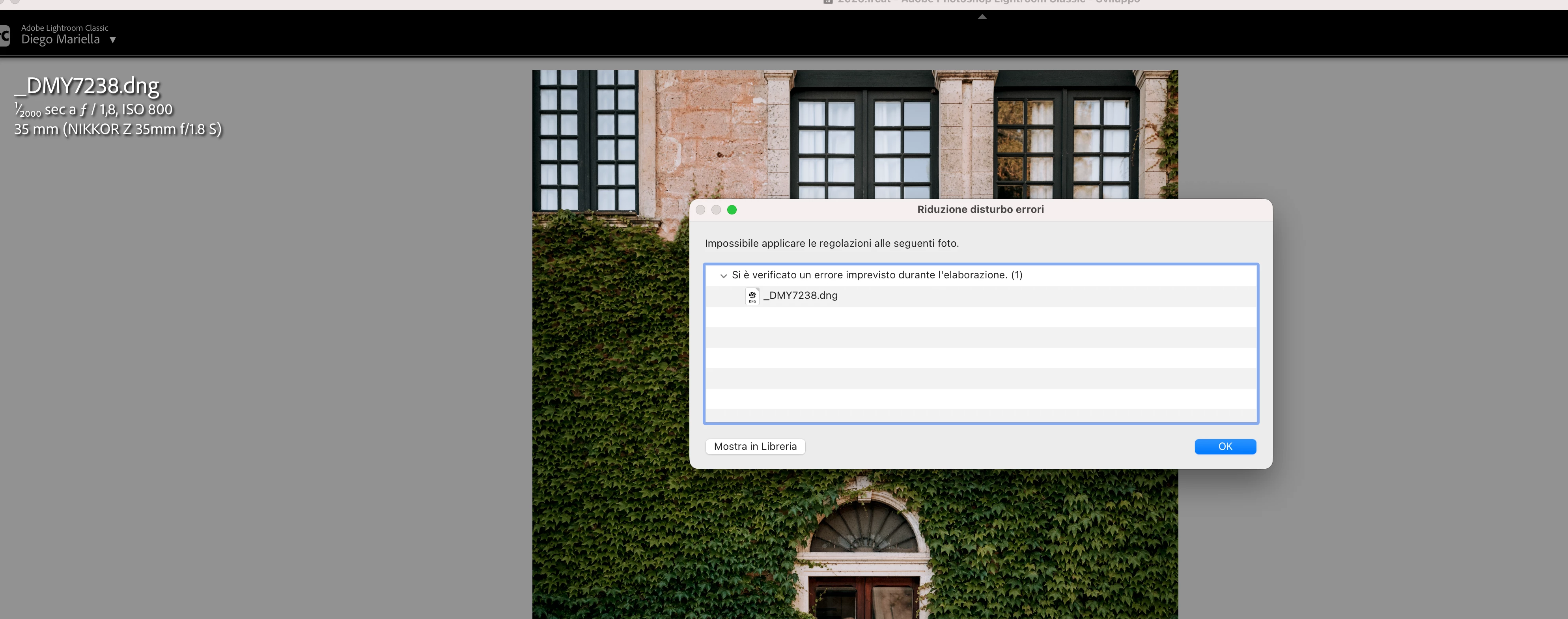
P: Lightroom Denoise suddenly stopped working

  • June 20, 2026
  • 117 replies
  • 1557 views

Hi everyone,

I'm having an issue with the latest version of Lightroom CC on a MacBook M5 Pro running macOS Tahoe 26.5.1. (I was experiencing the same problem on 26.5 and decided to update hoping it would fix it, but unfortunately it didn't.)

Since this morning, it's been impossible to to use Noise Reduction, even though my internet connection is working perfectly. I've already updated both Lightroom CC and macOS, cleared the cache, and optimized the catalog, but I keep getting this error screen whenever I try to use Noise Reduction.

Has anyone experienced the same issue or knows how to fix it? Any help would be greatly appreciated. Thanks! 🙏
 

    Correct answer Sameer K

    Hi All! Lightroom Classic v15.4.1 is now available for downlaod via the Creative Cloud desktop app with the following critical bug fiixes for the issue reported in this thread and the other: 


    Thanks!
    Sameer K

    117 replies

    Participant
    June 21, 2026

    Hi - 

    The DeNoise feature on Lightroom Classic is not working.  The last update I did was 15.3.1.  No current updates are available that I can see.  I’ve tried it on a few different photos in a couple of different folders.  It’s not working on anything I tried.

    Google AE is saying “users on versions 15.3 and earlier may experience "Denoise model version mismatch" errors, requiring an update to version 15.4 or later.”  

    If this is true, I don’t see how to update to 5.4 or higher.

    Can someone help?  Thanks.  


    Jan Noto

    jmb5121
    Participant
    June 21, 2026

    Lightroom Classic version 15.3.1 on a Macbook Pro running macOS Tahoe 26.5.1

    When I select Denoise, an error is returned immediately “an unexpected error occurred while processing. (1).

    Same problem with raw files from Sony A7iv, A7v, A7cr.

    Files have not had any processing done prior to this step.

    Tried restarting my Mac and also restarting Lightroom. No Change.

    Joan29540354t4c3
    Participant
    June 21, 2026

    .

    maruneboy
    Participant
    June 21, 2026

    Suddenly, No Event - Unable to Use Denoise on any new or previously uploaded images. 

    Troubleshooting Steps

    • Creative Cloud > Check for Updates - None Available (Lightroom Classic - 15.3.1) + Updated Today (Camera Raw - 18.4 )
    • Uninstalled Lightroom Classic + Reinstalled Lightroom Classic (Issue Persists) 
    • Menu > Preferences > Performance >  Use Graphics Processor (Off) > Restart Computer (Issue Persists) 
    • Menu > Preferences > Performance > Catalog Settings > Optimize Catalog > Restart Computer (Issue Persists) 
    tahneelc
    Participant
    June 21, 2026

    Denoise button will sometimes will let me click the button but then doesn't do anything or stay selected. If I refresh then sometimes I will get an error message. Nothing has changed with my computer, my new MacBook Pro software was just updated and it didn't fix it. My files are in raw format so it's not the format of my images. It's only happening with these photos I'm trying to upload and work on today.

    Sunao_taka
    Participant
    June 21, 2026

    私も同じ状況です。

    昨夜からノイズ除去がエラーで実行されず、、


    M1のMacBook Airを使用しています。

    yamato713108855
    Community Expert
    Community Expert
    June 21, 2026

    @Rikk Flohr_Photography 

    Many users find that creating a separate user account does not resolve their issue.

    Further investigation is needed.


    まろまろくん
    Participant
    June 21, 2026

    こんにちは!私も全く同じ状況です!
    昨日の夜中から。。。
    M4 pro (Mac miniの メモリ48gb)を使ってます!

    あいあいあいちゃん
    Participant
    June 21, 2026

    私も同じ状況で記載してある事試しましたが結局エラーで困っています。

    Galdypr
    Participating Frequently
    June 21, 2026

    My MacBook Pro is M4, 24GB of memory.