


Participant
November 5, 2021
Answered

P: Local Adjustment (Masking) Sliders are affecting entire image

  • November 5, 2021
  • 37 replies
  • 51359 views

Hello, i can't seem to make the new masking tool to work correct.

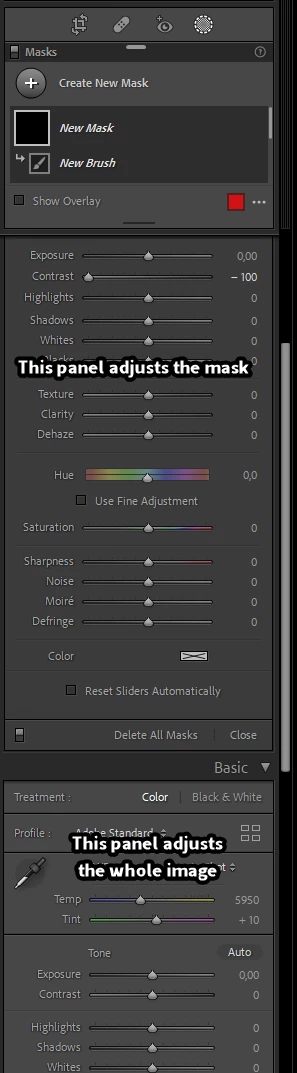
When i make an adjusment, by brush, auto select or any other tool the mask shows up in my image, red by default, and when i make a change in the Basic-panel, the adjustments will be applied over the whole image and not just the masked part.
Is this a bug or am i doing something nog correct?
Help please... 🙂

 

Correct answer Per Berntsen

Sounds like you are using the Basic panel (adjusts the whole image) instead of the local adjustments panel.

Scroll up to see it.


37 replies

Participant
March 30, 2022

Lightroom Classic

V-11.2

PC

Example:  I used the radial gradiant to add to a small part of the image.  When I tried to change exposure, to just that part of the image, it instead applied the change to the entire image.  

I have had this happen on multiple occasions recently and wonder if it is a bug.....

If I am doing something incorrectly, please help?

Thank you....

AxelMatt
Community Expert
Community Expert
March 30, 2022

Are the changes applied to the whole image. or outside the area of the radial gradient? There's a checkbox "Invert" to change whether adjustments affect the area inside or outside of a radial gradient.

Highlight parts of a photo with radial gradients | Adobe Photoshop Lightroom tutorials


If this doesn't help, please try resetting the preferences of Lightroom Classic:

https://helpx.adobe.com/lightroom-classic/help/setting-preferences-lightroom.html

It's recommended to backup your preferences before you reset the preferences to the default settings: 

https://helpx.adobe.com/lightroom-classic/kb/preference-file-and-other-file-locations.html

My System: Intel i7-8700K - 64GB RAM - NVidia Geforce RTX 3060 - Windows 11 Pro 25H2 -- LR-Classic 15 - Photoshop 27 - Nik Collection 8 - PureRAW 5 - Topaz Photo
Participant
March 26, 2022

Hi, please can anyone help me?.

When I make any selection of a photo (sky, subject, etc.), and try to make adjustments on the selection, it makes them on the whole photo and not on the selected area. Has it happened to anyone?. How can I solve it?. Thank you

Michael J. Hoffman
Community Expert
Community Expert
March 26, 2022

Look at the second "correct answer" to this thread. You are making your adjustments in the Basic panel rather than the local adjustments panel. You may have inadvertently collapsed the local adjustments panel and may need to click the triangle to expand it again. 

Participant
March 26, 2022

Thaks a lot!!!!!.

Known Participant
March 24, 2022

Hi, I have Lightroom Classis on two PCs, when I go to create a mask in Lightroom Classic, say using radial-gradient the mask doe not recognise either the normal mask or invert, meaning when I make an adjustments everything adjusts. It works great on one PC but not the other.


Anything that may help


David

Known Participant
March 24, 2022

Fantastic as simple as that, thank you.


Is it possible to draw around a subject also rather than using a pre-selected shaped tool?

Rob_Cullen
Community Expert
Community Expert
March 24, 2022

The Brush Tool!


Regards. My System: Windows-11, Lightroom-Classic 15.1.1, Photoshop 27.3.1, ACR 18.1.1, Lightroom 9.0, Lr-iOS 10.4.0, Bridge 16.0.2 .
Kathrin purespective
Participant
March 1, 2022

Hallo, ich habe seit gestern ein Problem mit der Maskierungsfunktion in Lightroom Classic. Das Maskieren an sich funktioniert einwandfrei. Möchte ich dann aber den maskierten Bereich bearbeiten (z.B. Belichtung anpassen), wird diese Anpassung auf den gesamten Bildbereich angewendet - und nicht nur auf den maskierten Bereich. Auch die Maskierungsfarbe bleibt bestehen (die verschwindet ja normalerweise, wenn man die Regler betätigt). Was mache ich falsch - und wer kann helfen?


Lightroom Classic Version 11.2

Betriebssystem: Windows 10

Desktop Rechner


Ruurd van Dijk
Participating Frequently
March 1, 2022

You are working in the wrong slider-panel. You work in the Basic Panel, which applies to the wole image, not in the Masking Panel (collapsed, maybe?)!!

Participant
February 26, 2022

Thanks so much everyone, this did the trick! 

Known Participant
February 25, 2022

Bonjour,


Avant que quelqu'un m'en fasse la remarque, j'avais mis à jour Lr mais on m'avait conseillé de revenir à la version précédente au regard de mon souci. Ce qui n'a rien changé.


1/ Depuis les nouveaux magnifiques calques de masques mis en place avec les mises à jour (ironie), j'ai beau inverser les masques, vérifier que tout est cliqué/sélectionné, etc. Aucun de mes masques ne fonctionne correctement : toutes mes modifications impactent l'entièreté de la photo. Je ne peux plus faire de modification localisée, que ce soit avec le filtre radial ou linéaire. En revanche, ça fonctionne sur l'autre lightroom, mais je ne retrouve pas certaines fonctionnalités et je ne comprends pas l'intérêt de ce Lightroom par rapport à l'autre...

Du coup : si quelqu'un peut m'en donner la raison, il doit y avoir quelque chose que je n'ai pas bien fait… : mais quoi ?


2/ Là aussi, depuis cette mise à jour (de "&@), Lightroom classic se met en tête de convertir tous les paramètres prédéfinis au format XMP, ce qui met 2 ans à peu près. Bon, j'exagère : le temps d'écrire le paragraphe plus haut, quelques minutes...

Pour être honnête, j'ai récupéré pas mal de ces presets sur internet, que je n'ai pas encore essayé : et la version d'avant ne me les mettait pas à jour de façon systématique comme cela... Une idée ?


Merci à tous ceux qui auront la gentillesse de me dépanner, et merci par avance de votre bienveillance.


A bientôt !


PS : J'ai essayé de vous aider en capturant un écran de chaque problème. 

Community Expert
February 25, 2022

Il faut re-ouvrir le panneau (qui est a ce moment presque caché) ou se trouvent les controles localisés: plus bas, ce sont les modifications globaux qui se voient et qu'on donc utilise par erreur. Ce panneau restera ouvert.

Known Participant
February 25, 2022

Non mais Richard OF LONDON : I LOVE YOU !!!

Je n'aurais jamais prêté attention à cette petite flèche, pourtant, j'avais suivi la mini formation de la mise à jour. Alors j'ai du loupé cette étape CRUCIALE ! Quelle idée de faire deux panneaux, c'est pas possible...


Merci beaucoup Richard, de votre promptitude : je vais pouvoir enfin réutiliser Lr Classic tout de suite. Quel soulagement (je ne trouvais pas l'option "ouvrir en tant que calque dans Ps" sur l'autre version par exemple...), que de temps perdu, merci encore !

Participant
February 25, 2022

Hi, I am trying to edit photos and use the gradiant mask a lot. Unfortunately since the last update, when I create the gradient mask, and I would try to brighten that part of the mask, it wont recognise the adjustment only on the mask but always on the entire photo as if no mask was applied. Obviously super annoying. Thanks for any help!!!

Peru Bob
Community Expert
Community Expert
February 25, 2022

I've moved this from the Using the Community forum (which is the forum for issues using the forums) to the LR forum so that proper help can be offered.

Participant
February 21, 2022

I too am having this same issure which seems to have started with the latest update to LRC.

Rob_Cullen
Community Expert
Community Expert
February 21, 2022

So if you are not going to read the Correct Answers, or read any 'Update News' -here is a summary of possibilities-


1) You have opened the 'Masking' palette of Tools, but NOT yet selected one of the Tools. (Brush, Gradient, etc)


2) You have scrolled too far down the Right-side of the screen and are looking at the 'Basic' panel sliders.


3) You have the Tool panels in a 'Collapsed' state, thus hiding the sliders. Click on the 'triangles' to expand the panels.

When you click on the Brush 'triangle' the adjustments for the Brush will show as-

When you click on the Effects 'triangle' all the Sliders that affect the current TOOL will show-


4) Then you must actually apply the (Masking tool) to the image (eg. Brush on the image or draw a Gradient), then adjust sliders for the Effect of that Tool.

2021-10 MASKING TOOL Oct2021 (J Kost)


Regards. My System: Windows-11, Lightroom-Classic 15.1.1, Photoshop 27.3.1, ACR 18.1.1, Lightroom 9.0, Lr-iOS 10.4.0, Bridge 16.0.2 .
Frank DeBonis
Inspiring
February 15, 2022

I can't seem to revisit an existing mask in a Lightroom Classic file and edit the parameters. Regardless of the mask in place, any parameter changes affect the entire document as if no mask exists.


Lightroom Classic version: 11.2 [ 202201281441-a5b5f472 ]
Operating system: Windows 10 - Business Edition
Version: 10.0.19043
Application architecture: x64
System architecture: x64

Per Berntsen
Community Expert
Per BerntsenCommunity ExpertCorrect answer
Community Expert
February 15, 2022

Sounds like you are using the Basic panel (adjusts the whole image) instead of the local adjustments panel.

Scroll up to see it.


Participant
February 10, 2022

In the masking mode. The entire screen changes. Not just the selcted area


Rob_Cullen
Community Expert
Community Expert
February 10, 2022

See the Correct answers, and other posts that answer this.


Regards. My System: Windows-11, Lightroom-Classic 15.1.1, Photoshop 27.3.1, ACR 18.1.1, Lightroom 9.0, Lr-iOS 10.4.0, Bridge 16.0.2 .