


Participant
November 5, 2021
Answered

P: Local Adjustment (Masking) Sliders are affecting entire image

  • November 5, 2021
  • 37 replies
  • 51359 views

Hello, i can't seem to make the new masking tool to work correct.

When i make an adjusment, by brush, auto select or any other tool the mask shows up in my image, red by default, and when i make a change in the Basic-panel, the adjustments will be applied over the whole image and not just the masked part.
Is this a bug or am i doing something nog correct?
Help please... 🙂

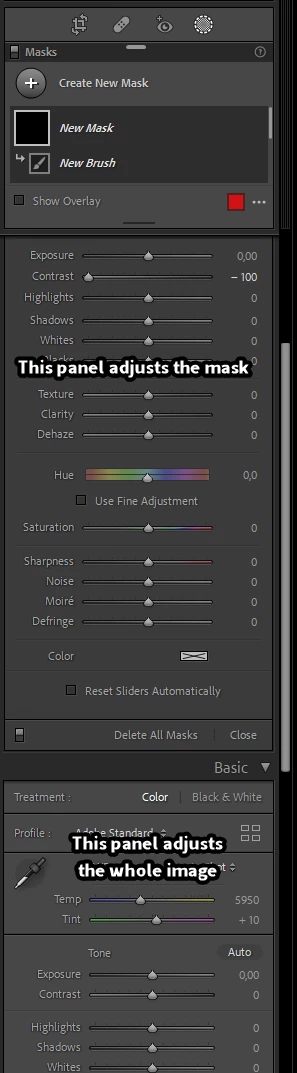
 

Correct answer Per Berntsen

Sounds like you are using the Basic panel (adjusts the whole image) instead of the local adjustments panel.

Scroll up to see it.


37 replies

Inspiring
January 11, 2022

Lightroom classic 11.1

When using the mask in Lightroom and making adjustment, Lightroom ignores my selection and changes the whole image.


I have Lightroom on two computers, only one behaves like this.  The other doesn’t.  I have check my settings in both and they seem the same.

GoldingD
Legend
January 11, 2022

See above guidance on this user error


Participant
January 9, 2022

I just updated my LR Classic and now the Masking Feature is not working correctly.  ie. I have a photo of a bird and choose "Subject"  It does show the bird is chosen but when I try to make changes, the changes are applied to the entire photo.  I have been working with new Masking features for quite some time and this has never happened.  It started when I updated.

Community Expert
January 9, 2022

You're likely manipulating thew wrong sliders and have accidentally moved away from the panel for the adjustments for the mask edit and are manipulating the settings for the entire image:

Participant
January 14, 2022
That's exactly what I did. The "Effect" box is new and I didn't realize I
had to go there to make the changes. It is new, right? I'm still trying
to figure out what exactly the change really is. As least I know where to
go now. Thanks so much.

--
Participant
January 7, 2022

Buenaas noches!

Tengo un problema a la hora de usar una máscara en Lr, ya sea que intente con el pincel, Degradado radial o cualquiera de las opciones, no me permite realizar los ajustes sobre esa área seleccionada.

Por ejemplo al seleccionar con el pincel si me sale en rojo pero cuando cambio la exposición lo hace sobre toda la imagen,


Necesito ayuda urgentemente,

Gracias


Jessica C.

GoldingD
Legend
January 7, 2022

Why are so many getting tripped up into this?

Ah well, plenty if answers (actually one answer, repeatedly) above.


Participant
January 6, 2022

I've been successfully using the cool masking feature, but today when I click on a new mask, subject, brush, etc. nothing happens. It masks the subject, but when I try and light up the exposure, it lights up everything. When I click on brush, I can't go to my brushes.... I've done something, but I have no clue what...

dj_paige
Legend
January 6, 2022

Plenty of correct answers in this thread. Scroll up.

Participant
January 3, 2022

Happy new year one and all.

I'm after some help please with LR's new masking tool and selective editing of photos.

I've always struggled with selective editing and even watching a YouTube tutorial still cant get the results i seek.

I have a photo with a dark background that has a big bright spot (to the left of the beak in the attached) that i am looking to darken down, i am currently opening picture in the develop mode and then clicking on the new masking tool, i then follow these steps.

1) Choose brush and adjust brush for , size feather etc.

2) Paint over the bright spot and can see the overlay covering what i want to work on

3) I then try and use the regular sliders and its at this point i start to struggle, i assumed (seems incorrectly) that when i start to edit i am editing just what has been selected/masked but it appears the whole image is affected, so again another assumption if i invert the mask so that everything i don't want adjusted is masked then the area i want to adjust is the only area affected but again it appears everything gets adjusted.

I suspect a schoolboy error but i just cant work it out, if anyone can help i would be grateful or does anyone else know a simple way to selectively edit please?

dj_paige
Legend
January 3, 2022

I then try and use the regular sliders and its at this point i start to struggle, i assumed (seems incorrectly) that when i start to edit i am editing just what has been selected/masked but it appears the whole image is affected


This is because you are adjusting the sliders in the Basic panel and not the sliders in the new Masking panel. You may have (accidentally) collapsed the Masking panel sliders. If so, click on the triangle in the Masking panel:


Participant
January 3, 2022

I cant believe the speed in getting a reply, thanks very much, very much a schoolboy error but in my defence i am new to LR's masking tool. 

Excellent 🙂 

Mariana Venter
Participant
December 30, 2021

Latest LR update

Since latest update I am struggling with the new tools. If I select subject and change exposure for example the complete photo change. Invert, same problem. I can't highlight a spesific area and only that area is affected, what am I doing wrong?

dj_paige
Legend
December 30, 2021

You are using the wrong slider if the entire photo changes. You must be using the sliders under "Basic", instead of using the slider associated with the mask, which may not be visible if you have (accidentally) collapsed the mask sliders. Click on the triangle in the mask section to show the mask sliders.


Mariana Venter
Participant
December 30, 2021
I am using the slider under Basic, I don't know what is going on, not even
my friends can figure this one out.
I even uninstalled LR yesterday and re-installed it but it's still the
same.
Inspiring
December 28, 2021

When I select sky in the new Lightroom, release 11.1 on Win 10, my sliders still affect the whole picture.  I also have reset sliders automatically selected.  I select the masking icon in Lightroom, click the select sky option, my sky turns pink, when I start to adjust the sliders, like for Dehazing

1.  The pink does not go away

2.  The slider affects the whole picture.


It's almost as if I have nothing masked.  Am I doing something wrong?


Thanks.

Inspiring
December 28, 2021

Never mind, I figured it out.  I didnt realize there are sliders  specific to the mask.  I had them closed.  So I was changing the main sliders.

Participant
November 26, 2021

J'utilise Windows 10

Lorsque j'applique un masque sur ma photo (ciel, objet, dégradé...) les réglages de bases s'sppliquent sur toute la photo et non pas seulement sur le masque. Pourquoi?

GoldingD
Legend
November 26, 2021

You are probably accidentally moving sliders in the Basic Panel as opposed the the Masks adjustment panel. You might have clicked on the triangle upper right in that panel, thereby collapsing it and displaying an amount slider.


Or, you could be confusing the mask overlay with modifications.


In the screenshot below, a Mask has been selected, And the correct adjustment panel is visible.


Now, note the triangle indicated in the screenshot below


If you click on it, the adjustment panel will disappear, replaced with an amount slider, and the Basic Panel will be where you thought the sliders for the mask were. As such, you could be making adjustments in the wrong panel. cluck that triangle again, to revert.


Participant
November 21, 2021

i I hope someone can help, I am mid project and all of a sudden if I try to use my adjustment tools on a small area it affects the whole photo, the pin automatically goes to the corner and I cannot control where the adjustment tool is placed. if there are not edits to the pictures the adjsutment tool works fine, but if paste an edit it disappears, help!

AxelMatt
Community Expert
Community Expert
November 21, 2021
My System: Intel i7-8700K - 64GB RAM - NVidia Geforce RTX 3060 - Windows 11 Pro 25H2 -- LR-Classic 15 - Photoshop 27 - Nik Collection 8 - PureRAW 5 - Topaz Photo
Inspiring
January 21, 2022

Resetting the preferences fixes the problem. Same in Photoshop.

Participating Frequently
November 16, 2021

Recently, the new Masks feature has stopping peopelry.  When I selct a specifc mask choice or new mask th folowing happens:

1. The red mask overlay does not go away when a specific edit choice is selected and applied, ie. exposure, etc.

2. When an edit choice is adjusted, it makes a global edit and not the selected area only.

3. The regular Basics edit panel does not change to the dedicated one as it did when Masks is selcted, as if it was never slected.

4. I have reinstalled the program and it still not working properly.


Thank You,


Gregg

JohanElzenga
Community Expert
Community Expert
November 16, 2021

You are using the global sliders rather than the mask sliders. Perhaps your mask sliders got collapsed. Click on the white triangle to expand them.


-- Johan W. Elzenga
Participating Frequently
November 16, 2021

Thank you so much Johan, I had a feeling it might be soemthing simple like this.  I ws driving my self crazy last night.  I'll try it when I get home and let you know.


Gregg