Participant
August 9, 2021
Answered

P: (Mac) Camera Raw Mismatch being reported from LrC 11.4.1

  • August 9, 2021
  • 29 replies
  • 46699 views

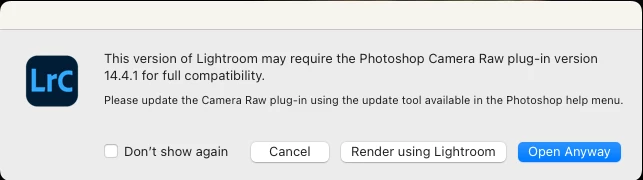
Just updated Lightroom Classic to 14.4.1.  Tried to send a raw file fr LRC to Photoshop 23.4.1 and got a popup window saying I should install Camera Raw 14.4.1.  I opened up Creative Cloud and checked that I have the latest Camera Raw 14.4 installed and there's no 14.4.1 update.  So is this a new bug?


This topic has been closed for replies.
Correct answer Rikk Flohr_Photography

With the August releases of Camera Raw and the Lightroom Desktop/Classic, this should no longer be an issue. Update these applications as soon as they are available in your Creative Cloud App.


This is actually an LrC bug.  Classic should be recognizing (Mac) CR 14.4 as compatible with (Mac) LrC 11.4.1. It isn't so we've logged a bug against LrC for future instances where there is an X.y.z vs X.y mismatch. 

Workarounds:

For now, the error message appearing is a mistake. Until the LrC bug is fixed or until the next release when the ACR and LrC versions will be in sync again, you have a few options:

  1. There is no harm in choosing the 'Open Anyway" option as the versions are actually compatible.
  2.  In the event of large volume processing, it is probably best to check the "Do not show this again" option in the dialog. 
  3.  For Mac customers only, you can choose to revert to the 11.4 version via your Creative Cloud app and this will eliminate the mismatch dialog. 

 

29 replies

Participant
August 12, 2022

Quisiera por que me sale siempre que paso una foto de LR a PS un cartel de Pluging de Camera RAW? y como lo puedo solucionar ?

brucekorb
Inspiring
August 12, 2022
Porque los cabrones Adobe no quiere molestarse con una nueva versión
para corregir un mensaje desconcertante
- Bruce
Participant
August 12, 2022

got the same problem and still is!

Wieni
Participant
August 6, 2022

Hi,

I installed the latest versions of Photoshop, LRC and for certain reasons Photoshop Elements on my Mac.  Each software now ses a different version of Camera RAW, which by the way means that it is installed 3 times on my Mac :-(. Elements uses 14.1.0.993, PS uses 14.4.0.1121 and LRC 14.4.1. When exporting a file from LRC to PS LRC asks me to update CR in PS. I downloaded the newest version from the Adobe homepage and thought that would be 14.4.1. But it was the version used by Photoshop.  After installing the downloaded version I still have the situation that I have 3 CR versions on my Mac.  Any idea how I can update CR in all applications so that they use the same version of CR?

TheDigitalDog
Inspiring
August 6, 2022

Not sure about Elements (sorry, don't use it) but otherwise, Photoshop, Bridge, and LR would only 'require' one version that they would host. LR doesn't even 'need' ACR except when you use the Edit in Photoshop command which hands off the raw and instructions (edits) to ACR to render into Photoshop. This is why this 'bug' is under discussion (LR and ACR are not on parity). 

Author “Color Management for Photographers" & "Photoshop CC Color Management/pluralsight"
Participant
July 31, 2022

Why are Lightroom and Photoshop constantly interrupting me with this message. When I check for updates, it tells me I'm fully up to date with my Version 14.4.

TheDigitalDog
Inspiring
July 31, 2022

It's a bug with the last version of LR/ACR on Mac, there was never a 14.4.1 release so LR 'thinks" ACR which renders the raw from LR (when you use Edit in Photoshop) is due for a newer version. Just click Open Anyway for the time being. Then LR will render the image and hand it off to Photoshop instead of expecting ACR to do so. 

Author “Color Management for Photographers" & "Photoshop CC Color Management/pluralsight"
Participant
July 18, 2022

Hi everyone. I'm rather confused and wonder if someone can help. I have the Adobe Cloud version of PS, ACR, LR and Bridge. All of a sudden whenever I try to open an image in PS from lightroom I get a pop up box saying I need ACR version 14.4.1 for full compatibility. This happens regardless of if I select "open in PS", Open as a smart object in PS" or open as layers in PS" (if I want to open several images). According to Adobe cloud all the apps are up to date. Any experiencing the same issue? I'm on a Mc Pro laptopThanks in advance

cmgap
Community Expert
Community Expert
July 18, 2022

Please scroll to the correct answer for more information about this known bug. Hopefully it's on the fast track to (just do it track).

Participating Frequently
July 16, 2022

How do I get rid of this msg? I have the creative cloud subscription and my apps are up to date. I've attached a screenshot of what pops up when I want to take a photo from LR to PS

Joy2yadrshawnie
johnrellis
Genius
July 17, 2022

This is a know bug -- see the correct answer at the top of this thread for an easy workaround:

https://community.adobe.com/t5/lightroom-classic-discussions/p-mac-camera-raw-mismatch-being-reported-from-lrc-11-4-1/td-p/13037547

johnrellis
Genius
July 17, 2022
Participant
July 15, 2022

When I right click on image in Lightroom Classic to edit in Photoshop it states "the version of Lightroom may require the Photoshop Camera Raw plug-in version 14.4.1 for full compatibility"


All Adobe apps are up to date including Camera Raw, which is at 14.4.1.  


Why is this message being received.


I am using a MacBook pro.


Thank you for your time.

AxelMatt
Community Expert
Community Expert
July 15, 2022
My System: Intel i7-8700K - 64GB RAM - NVidia Geforce RTX 3060 - Windows 11 Pro 25H2 -- LR-Classic 15 - Photoshop 27 - Nik Collection 8 - PureRAW 5 - Topaz Photo
Legend
July 15, 2022

Or look at the pinned Correct Answer from an Adobe employee that explains the bug.

susanl7866380
Inspiring
July 14, 2022

I know there have been many problems with two different versions of Camera Raw on Mac's.  I have posted about the problem myself.  Today however, creative cloud said I had updates to PS, LrC and Camera Raw.  As you can see from the screenshot, the update for CR is for the version I already have installed not the version needed to make it compatible with LrC's version.


I have a Macbook Pro 16" OS Monterrey v. 12.4

LrC v. 11.4.4 with Camera Raw v. 14.1.1

PS 23.4.1

Camera Raw 14.4

Is this another glitch in the attempt to fix the last problem?

Participant
July 10, 2022

Of the 2 choices "render in LR or Open Anyway; which is best to use?  What does ender in LR mean?

Participant
July 7, 2022

Recently, I've been getting this error indicating that I don't have the correct camera raw installed. However, in the CC desktop app, it shows that everything is up to date and there are no available updates. This started occuring with the latest updates.


System config;

15" Macbook Pro, 2018

2.6Ghz Intel i7

Radeon Pro 560x 4GB

32GB RAM


In addition, when sending photos from lightroom into photoshop, lately it's been super buggy with bizarre things like selections disappearing and areas not able to be selected with no visible error message attached.

Please address, thanks!

Participant
July 7, 2022