Participant
August 9, 2021
Answered

P: (Mac) Camera Raw Mismatch being reported from LrC 11.4.1

  • August 9, 2021
  • 29 replies
  • 46699 views

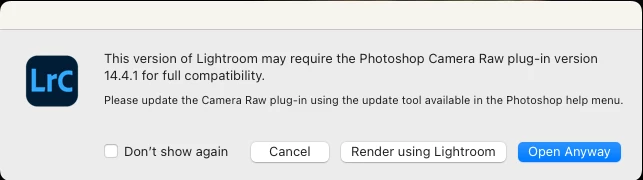
Just updated Lightroom Classic to 14.4.1.  Tried to send a raw file fr LRC to Photoshop 23.4.1 and got a popup window saying I should install Camera Raw 14.4.1.  I opened up Creative Cloud and checked that I have the latest Camera Raw 14.4 installed and there's no 14.4.1 update.  So is this a new bug?


This topic has been closed for replies.
Correct answer Rikk Flohr_Photography

With the August releases of Camera Raw and the Lightroom Desktop/Classic, this should no longer be an issue. Update these applications as soon as they are available in your Creative Cloud App.


This is actually an LrC bug.  Classic should be recognizing (Mac) CR 14.4 as compatible with (Mac) LrC 11.4.1. It isn't so we've logged a bug against LrC for future instances where there is an X.y.z vs X.y mismatch. 

Workarounds:

For now, the error message appearing is a mistake. Until the LrC bug is fixed or until the next release when the ACR and LrC versions will be in sync again, you have a few options:

  1. There is no harm in choosing the 'Open Anyway" option as the versions are actually compatible.
  2.  In the event of large volume processing, it is probably best to check the "Do not show this again" option in the dialog. 
  3.  For Mac customers only, you can choose to revert to the 11.4 version via your Creative Cloud app and this will eliminate the mismatch dialog. 

 

29 replies

Inspiring
July 5, 2022
Sameer K
Community Manager
Community Manager
July 5, 2022

Hi there,


Thanks for sharing this.

Merging this with an existing parent thread.


Thanks!
Sameer K

Participating Frequently
July 3, 2022

I have the same issue. Could you please update Lightroom as quickly as possible. In the meantime I assume it is safe to click on the "Don't show again"  button?

Participating Frequently
July 3, 2022

If I were you and like me you have a bunch of image to work on and round trip between LR and PS I would go for rolling back the LR update. Just watch as you may have to relink the LR catalogue once done. But other than that it the safest option. I would just wait for Adobe to sort out this problem out.

TheDigitalDog
Inspiring
July 3, 2022

No “relinking” necessary. 

Author “Color Management for Photographers" & "Photoshop CC Color Management/pluralsight"
Participant
July 3, 2022

I just updated to Lightroom Classic 11.4.1 and now every time I bring images into Photoshop from Lightroom it's asking for a Camera Raw update 14.4.1. When will this Camera Raw update be available? 

Thanks.

Participating Frequently
July 3, 2022

This is another example of Adobe not keeping to the standards it used to have. It is sloppy. I am sitting on a pile of photos from a family weekend and cannot import them. I have lost my window. It is not good enough. I see the remark about quieting the posts from brucekorb et al but I also think we should send a message to Adobe. And it is not just a minor problem. What if you are a wedding photographer and expected to produce the photos of the event. Or a journalist? Sure there are various kinds of awkward work arounds but that's what they are, awkward and not what we pay for. 

Participant
July 3, 2022

Hey friends, hoping someone can help with this! 


I'm editing in LRC and when I try to open a photo in PS, I get this message: "This version of Lightroom may require the Photoshop Camera Raw plug-in version 14.4.1 for full compatibility. Please update using the update tool available in the Photoshop help menu."


The problem is that it already is updated, as is PS and LRC.


I checked out earlier forums where this message popped up and the general advice was to click "don't show again" and proceed anyway. I tried that, but the edited photo then appears in LR as heavily desaturated and slightly degraded. 


Any ideas?

KR Seals
Community Expert
Community Expert
July 3, 2022

A friend of my had the same experience on an iMac OS V12.4. Restarting the computer fixed it.

Ken Seals - Nikon Z 9, Z 8, 14mm-800mm. Computer Win 11 Pro, I7-14700K, 64GB, RTX3070TI. Travel machine: 2021 MacBook Pro M1 MAX 64GB. All Adobe apps.
MarkStothard
Participating Frequently
July 1, 2022

Since updating Photoshop (PS) to version 23.4.1

Lightroom Classic (LrC), versions of Camera RAW, (CR), differ


ie

PS running CR 14.4.0

LrC running 14.4.1


How can I make PS run the same version of CR to LrC

Mac Os Monterey v12.4


Thank you

Mark Stothard MA ARPS
Participating Frequently
July 2, 2022

Same problem here....

Any news?

Thank you.

TheDigitalDog
Inspiring
July 1, 2022

We're kind of done here. 

1. There is a correct answer to the question asked (what's going on).

2. There are suggested workarounds until a fix.

3. Adobe is aware of this and a bug fix will result.

Everything past that point is rants, and made-up figures, and doesn't add to the conversation.

Author “Color Management for Photographers" & "Photoshop CC Color Management/pluralsight"
Participating Frequently
July 1, 2022

I dont see the point posting an appologist reply in fact I find your tone very insulting in that it implies we should be grateful for what ever Adobe see fit to supply. I have been using Adobe products for around 25 years and in most parts have been pretty happy with their products. In this instance it was such a glaring error and one that caused me a huge amount of inconvienience which is why I raised the issue. Regarding updates bugs are a part of life but this was beyong a simple bug. We are paying for a service from Adobe and they are honour bound to supply the best product they can.  In this instance they failed and making excuses does not help the situation.

TheDigitalDog
Inspiring
July 1, 2022

Yes I agree, made up numbers are irrelevant. And yet that's what we got here today. 

Please let me know which software product is 100% bug-free. 

Please let me know what software product from Adobe forces users to update their software? 

Please let me know what subscription service (that we pay for monthly or otherwise), software or otherwise is 100% without any issues to all customers? 

You are free to use any alternative software product, do let us know after say a year of use, that any of the above is true with said product. 

Until then yes, there is a bug (more than one if you want the facts) and yes, there are ways to work around this bug under discussion here until a new build is released. If the goal is to fix the issue until then, alternatives have been provided. Anything else is ranting which isn't at all effective. 

Author “Color Management for Photographers" & "Photoshop CC Color Management/pluralsight"
Participating Frequently
July 1, 2022

The numbers are irrelevant. The mistake made by Adobe is a massive egg in the face for them and NOT a good sign of competence. It's put a number of people, me, to some inconvenience. Having to roll back is not something I signed up for in my purchase plan. If Adobe are going to continue to expect me to pay monthly for their product then I expect them to do a much better job or releasing clean working bug free updates. This is not the first time there has been an update balls up. This is especially the case as they have a slew of alternative photo editing apps breathing down their neck.

Legend
July 5, 2022

As bugs go, this is REALLY minor. Did you make a big fuss about the recent Photoshop data loss bug where a new release corrupted images? That would have been bad, had it not been fixed right away. This? This is nothing.