Participant
August 9, 2021
Answered

P: (Mac) Camera Raw Mismatch being reported from LrC 11.4.1

  • August 9, 2021
  • 29 replies
  • 46700 views

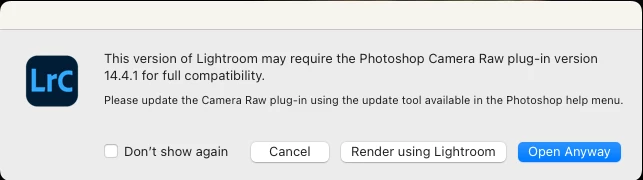
Just updated Lightroom Classic to 14.4.1.  Tried to send a raw file fr LRC to Photoshop 23.4.1 and got a popup window saying I should install Camera Raw 14.4.1.  I opened up Creative Cloud and checked that I have the latest Camera Raw 14.4 installed and there's no 14.4.1 update.  So is this a new bug?


This topic has been closed for replies.
Correct answer Rikk Flohr_Photography

With the August releases of Camera Raw and the Lightroom Desktop/Classic, this should no longer be an issue. Update these applications as soon as they are available in your Creative Cloud App.


This is actually an LrC bug.  Classic should be recognizing (Mac) CR 14.4 as compatible with (Mac) LrC 11.4.1. It isn't so we've logged a bug against LrC for future instances where there is an X.y.z vs X.y mismatch. 

Workarounds:

For now, the error message appearing is a mistake. Until the LrC bug is fixed or until the next release when the ACR and LrC versions will be in sync again, you have a few options:

  1. There is no harm in choosing the 'Open Anyway" option as the versions are actually compatible.
  2.  In the event of large volume processing, it is probably best to check the "Do not show this again" option in the dialog. 
  3.  For Mac customers only, you can choose to revert to the 11.4 version via your Creative Cloud app and this will eliminate the mismatch dialog. 

 

29 replies

TheDigitalDog
Inspiring
July 1, 2022
quote

OK. Millions of folks have hit this problem and they post here and I see their posts.


Millions? 

"Extraordinary claims require extraordinary evidence."-Carl Sagan


Adobe will release a fix. In the meantime, there are at least two ways to circumvent the bug, already outlined here. Which you use (or don't) is up to you until the bug fix arrives, which it will. 

Author “Color Management for Photographers" & "Photoshop CC Color Management/pluralsight"
Participant
July 1, 2022

Adobe help line had me do a few things which didn't solve the problem. I'll just wait for an update.

brucekorb
Inspiring
July 1, 2022

OK. Millions of folks have hit this problem and they post here and I see their posts. The *ONLY* reply I'm interested in is the announcement that Adobe will *finally* release a fix. I don't see an obvious way to quiet this thread until then. Is that possible?

susanl7866380
Inspiring
July 1, 2022

Yes, that is where I logged the bug first but it got moved to the Camera Raw section.

TheDigitalDog
Inspiring
June 30, 2022

As a (volunteer) pre-release tester for this product and the Photoshop suite, please accept my apologies for this bug. Oops! Sorry about that.

Author “Color Management for Photographers" & "Photoshop CC Color Management/pluralsight"
Rikk Flohr_Photography
Community Manager
Community Manager
June 30, 2022

With the August releases of Camera Raw and the Lightroom Desktop/Classic, this should no longer be an issue. Update these applications as soon as they are available in your Creative Cloud App.


This is actually an LrC bug.  Classic should be recognizing (Mac) CR 14.4 as compatible with (Mac) LrC 11.4.1. It isn't so we've logged a bug against LrC for future instances where there is an X.y.z vs X.y mismatch. 

Workarounds:

For now, the error message appearing is a mistake. Until the LrC bug is fixed or until the next release when the ACR and LrC versions will be in sync again, you have a few options:

  1. There is no harm in choosing the 'Open Anyway" option as the versions are actually compatible.
  2.  In the event of large volume processing, it is probably best to check the "Do not show this again" option in the dialog. 
  3.  For Mac customers only, you can choose to revert to the 11.4 version via your Creative Cloud app and this will eliminate the mismatch dialog. 

 

Rikk Flohr: Adobe Photography Org
brucekorb
Inspiring
June 30, 2022

Adobe messed up. First, do not release an update of LrC that requires a Camera Raw version that has not been released. If you mess up and do that anyway, then for crying out loud, publish an "Oops! Sorry about that" message somewhere that one can readily bump into it. Instead, I spent time Googling around before finally getting into a chat session wherein I learned that LrC and CR are out of sync. Not good, Adobe.

TheDigitalDog
Inspiring
June 29, 2022

14.4. is the latest version of ACR for Mac, there was a .1 that is only a fix for one bug under Windows. So it seems LR is confused by this fact and at the time, I don't know there is anything you can do until LR is updated (or ACR for Mac). All the downloads manually for ACR are here: https://helpx.adobe.com/camera-raw/kb/camera-raw-plug-in-installer.html#12_x

Author “Color Management for Photographers" & "Photoshop CC Color Management/pluralsight"
TheDigitalDog
Inspiring
June 29, 2022
Author “Color Management for Photographers" & "Photoshop CC Color Management/pluralsight"
99jon
Genius
June 29, 2022

OK thanks for the suggestion. I think rolling back may cause more problems as I’ve already imported and edited photos in LrC 11.4.1


Won’t that produce an error in v11.4 suggesting the photos have been edited in a higher version of camera raw?


Hopefully Adobe will fix this soon as they have turned a Windows issue into a Mac issue.


99jon
Genius
June 29, 2022

Yes I see the same incompatibility between PS camera raw and LrC camera raw on Mac OS. On Windows both apps are in sync. I checked in Creative Cloud Desktop for updates but no updates are available for ACR on Mac which remains at 14.4. It’s a bit annoying having to click render with Lightroom every time.


Participant
June 29, 2022

typo...I meant Lightroom Classic 11.4.1