


Participant
April 12, 2021
Answered

P: Toolbar [Done] Button has moved to tool bar beneath Histogram

  • April 12, 2021
  • 27 replies
  • 29879 views

Hola, tras la nueva actualizacion a Lightroom Classic 12.0, el botón "HECHO" que se encontraba en la esquina inferior derecha para dar el OK luego de añadir nuevas mascaras, recortes y algunos ajustyes locale.....pues ese botón ha desaparecido de mi programa LrC 12.0,,,,,no se que ha pasado, tengo que dar ENTER en mi teclado o bien doble click fuera de la imagen para aplicar cambios,,,,,,me pueden decir si esta nueva actualizacion se ha cargado ese botón o es que hay alguna forma de activarlo...??... antes se encontraba en este sitio, adjunto imagen de referencia.

 

Correct answer Rikk Flohr_Photography

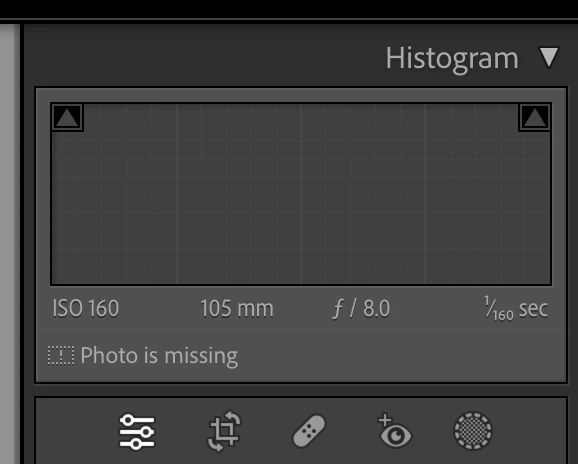
The [Done] button is no longer in the Tool Bar ([ T ]) for the Crop, Mask, Target Adjustment Tools (TAT), White Balance and the Guided Upright tools. It is replaced by the [Return to Edit] button to the left of the Crop tool under the Histogram. The button now applies and exits the active tool.

Note: There is more than one way to commit each of these tools.

Example: Crop Tool


  1. You can click the [Return to Edits] button that replaced [Done] or
  2. You can click the Crop icon again or
  3. You can use the [Enter/Return] key or
  4. You can use the [Esc] key or
  5. Use the Crop KBSC [ R] or 
  6.  Use the [Close] inside the Crop Panel (Thanks MattK - I missed that one)
  7. Simply move to the next image (if you want to maintain the tool between images)


Similar situations exist for the other tools for which the [Done] button was relocated.


27 replies

GoldingD
Legend
December 16, 2023

Moderators


I think we are quite done with having this discussion showing up.

Enough

Can you please please lock it down.


My apology to the other members that may have just received a follow notice on this.


wAIPUFSILUSHIGANLOGERSDF
Participating Frequently
June 30, 2023

The Done button is missing from the cropping menu, please advise how to restore this function

Rob_Cullen
Community Expert
Community Expert
July 1, 2023

This is now the 'Done' button-

Now always conveniently placed beside the other Tools (even when the lower Tool Bar is not visible.)

Or there is at least SIX other ways to be "Done"-

  1. You can click the [Return to Edits] button that replaced [Done] (as in my screen-clip) or
  2. You can click the Crop icon again or
  3. You can use the [Enter/Return] key or
  4. You can use the [Esc] key or
  5. Use the Crop KBSC [ R] or 
  6.  Use the [Close] inside the Crop Panel (Thanks MattK - I missed that one)
  7. Simply move to the next image (if you want to maintain the tool between images)
Regards. My System: Windows-11, Lightroom-Classic 15.0, Photoshop 27.0, ACR 18.0, Lightroom 9.0, Lr-iOS 10.4.0, Bridge 16.0 .
wAIPUFSILUSHIGANLOGERSDF
Participating Frequently
December 16, 2023

This bug is still present, when will the button be brought back? 

Participant
May 17, 2023

Hallo! Kann mir jemand helfen? Bei meinem Lightroom Classic (neueste Version) fehlt im Entwicklungs Modus bei der Freistellung der "fertig" Button. Gibt es den nicht mehr oder wo ist der?

Danke lg Herbert

Rikk Flohr_Photography
Community Manager
Community Manager
May 18, 2023

This is not a bug - moving you to the authoritative post. 

Rikk Flohr: Adobe Photography Org
wAIPUFSILUSHIGANLOGERSDF
Participating Frequently
April 16, 2023

The "Done" button has disappeared in the latest update from the cropping menu, which is obviously a hassle. It should be a simple bug fix though

Sean McCormack
Community Expert
Community Expert
April 16, 2023

It's as designed. Just press R again or Escape. 

Sean McCormack. Author of 'Essential Development 3'. Magazine Writer. Former Official Fuji X-Photographer.
wAIPUFSILUSHIGANLOGERSDF
Participating Frequently
April 16, 2023

As poorly designed - What a terrible UI change, I've been editing with it for as long as I can remember. Wish I could roll back to the last version when the software worked. Hopefully they fix this with the next update...

DdeGannes
Community Expert
Community Expert
January 28, 2023

I am posting this as a thought as to why there is a widespread objection to Adobe removing the "Done" button from many functions in Lightroom Classic.
Many adopters to LrC are former users of Bridge / Camera raw plug-in and when working with a raw image in Camera Raw when opening a raw image in Photoshop it opened in the Camera Raw plug-in and it was necessary to select the Done button to send the adjustments to the file or select the Save button to send the info to the file and pass the rendered image to Photoshop for further edits.

If you select Cancel the adjustments you did in the plug-in were discarded.

In Lightroom the adjustments you make are saved to the Catalog file as you work and are already stored in the Catalog when you move to another function.

Having to select a done button in LrC was never necessary.

Regards, Denis: iMac 27” mid-2015, macOS 11.7.10 Big Sur; 2TB SSD, 24 GB Ram, GPU 2 GB; LrC 12.5,; Lr 6.5, PS 24.7,; ACR 15.5,; (also Laptop Win 11, ver 24H2, LrC 15.0.1, PS 27.0; ) Camera Oly OM-D E-M1.
JayBreezy
Participant
December 25, 2022

What is the intended way to go back to the main editing panels after adjusting a mask or making a heal change? I used to rely on the "Done" button in the bottom right. Easy and straight forward. Why remove the done button?

Inspiring
December 25, 2022

A lot of users did rely on the Done button. However, all that's necessary is to click on the icon used to activate the mask or the healing brush. If you are using the crop tool, just press enter.

Participant
December 23, 2022

bonjour;

je ne retrouve plus le bouton "terminé dans la barre de taches après une éventuelle modif de la photo.

merci pour votre aide.

F. McLion
Community Expert
Community Expert
December 23, 2022

The "Done" button has been removed with the latest release.

To finish, simply select a different tool or the same tool again to terminate its usage. Hitting "d" is also a way

--- Got your issue resolved? Please label the response as 'Correct Answer' to help your fellow community members find a solution to similar problems. ---
Rob_Cullen
Community Expert
Community Expert
December 24, 2022

This is the 'new' [DONE] button, by another name!

It is conveniently located right next to the other Tool icons.

You do not have to run the mouse all over the screen to find [Done] on the Tool Bar. (If the Tool Bar is hidden- where is [Done]?)

The new [Edit] icon saves your tool adjustments and returns you to the normal edit functions.

And there are several ways to invoke 'Done' as in the Correct Answer!


Regards. My System: Windows-11, Lightroom-Classic 15.0, Photoshop 27.0, ACR 18.0, Lightroom 9.0, Lr-iOS 10.4.0, Bridge 16.0 .
christiand92484168
Participant
December 5, 2022

Buon pomeriggio, con l'ultimo aggiornamento di Lightroom Classic alla versione 12 su piattaforma Windows 11 è di fatto scomparso il tasto "CHIUDI" presente nei vari moduli di sviluppo come da foto allegata. 

Si tratta di un problema del mio PC o è una caratteristica ?

Grazie

rrr_hhh
Inspiring
December 6, 2022

No è un innovazione di questa versione. C'è molta gente a cui dispiace, me includa ! Ci sonno molte domande per il suo ritorno. You can add your voice there : 
https://community.adobe.com/t5/lightroom-classic-ideas/p-bring-back-done-button/idi-p/13278079


fred223
Participant
November 24, 2022

Ridiculous change to remove the "Done" button. There's room for it on the toolbar. Even if it was going to be a redundant function to the "Edit" feature.

Please put ut back!


Fred Lingen

Patchogue, NY

charlesm55404668
Participant
February 21, 2023

I want the DONE button back!

Participant
November 16, 2022

the crop tool not working.

the button ''done'' in the corner of the image disappear!


Rob_Cullen
Community Expert
Community Expert
November 16, 2022

Have you actually read many of the posts in this forum thread?

The [Done] button has been removed! (Although, not in every UI screen)

It has been replaced by an (in-appropriately named) [Edit] button on the Tool Bar-

The new [Edit] button 'accepts' your adjustments with the Tool and returns you to the normal Develop screen.

Or, you can simply press the [Return/Enter] key,

Or, you can simply [Click] again on the active Tool (eg. Crop icon)


Regards. My System: Windows-11, Lightroom-Classic 15.0, Photoshop 27.0, ACR 18.0, Lightroom 9.0, Lr-iOS 10.4.0, Bridge 16.0 .