

Problem importing .dcp camera profiles
I have a series of develop presets that are linked to camera profiles. Importing the develop presets works, but I have not been able to load a camera profile so far. My profiles browser looks like this, and does not give me the option of displaying "user" profiles or the "profiles" tab where the camera profiles should appear.
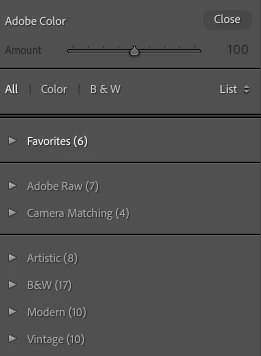
I have tried:
- Deleting the settings folder for Camera Raw and reinstalling lightroom, as suggested here:
- Installing the profiles via the profile browser (this brings up a quick progress bar, which completes, but the profiles are not visible.)
- Installing the profiles via "import develop profiles and presets" menu item (this tells me it failed because the profiles are already present.)
- Manually installing the profiles in the following folders:
/Applications/Adobe\ Lightroom\ Classic/Adobe\ Lightroom\ Classic.app/Contents/Resources/CameraProfiles/Camera/Olympus\ E-M5\ Mark\ II and
/Users/USER/Library/Application\ Support/Adobe/Lightroom/Color\ Profiles /Applications/Adobe\ Lightroom\ Classic/Adobe\ Lightroom\ Classic.app/Contents/Resources/CameraProfiles/Camera/Olympus\ E-M5\ Mark\ II Importing did result in the profiles appearing in the first folder. The second folder contains the "camera matching" profiles that are preinstalled with lightroom, but adding my .dcp files to the folder does not lead to them showing up in the profile browser.
Please help me figure out what to try next?
does result in the profiles being visible in the
 AdChoices