Jules van Iperen
Participant
October 20, 2020
질문

R5 RAW pictures turn out a lot brighter in Lightroom Classic 10

  • October 20, 2020
  • 9 답변들
  • 4869 조회

Hi!

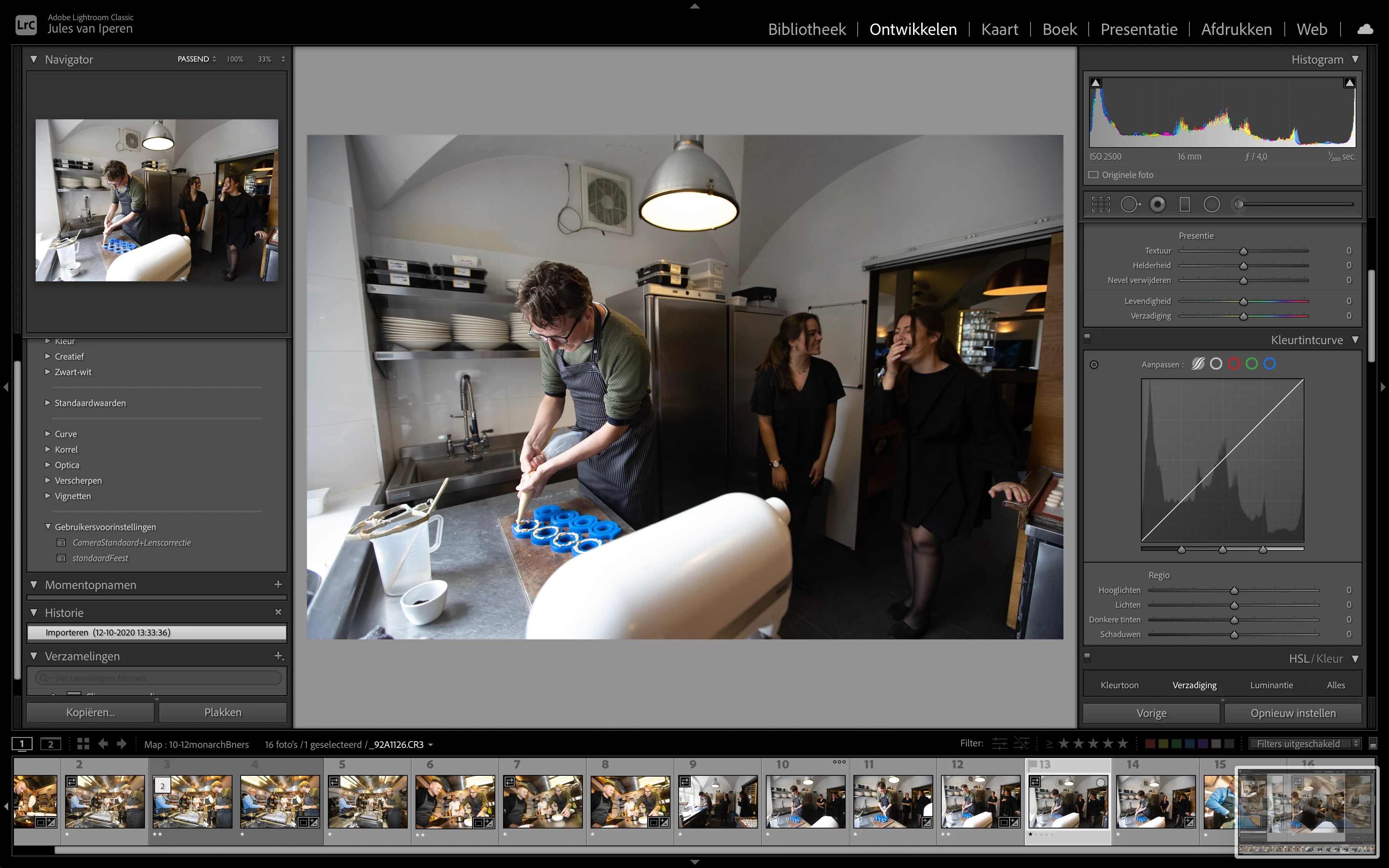
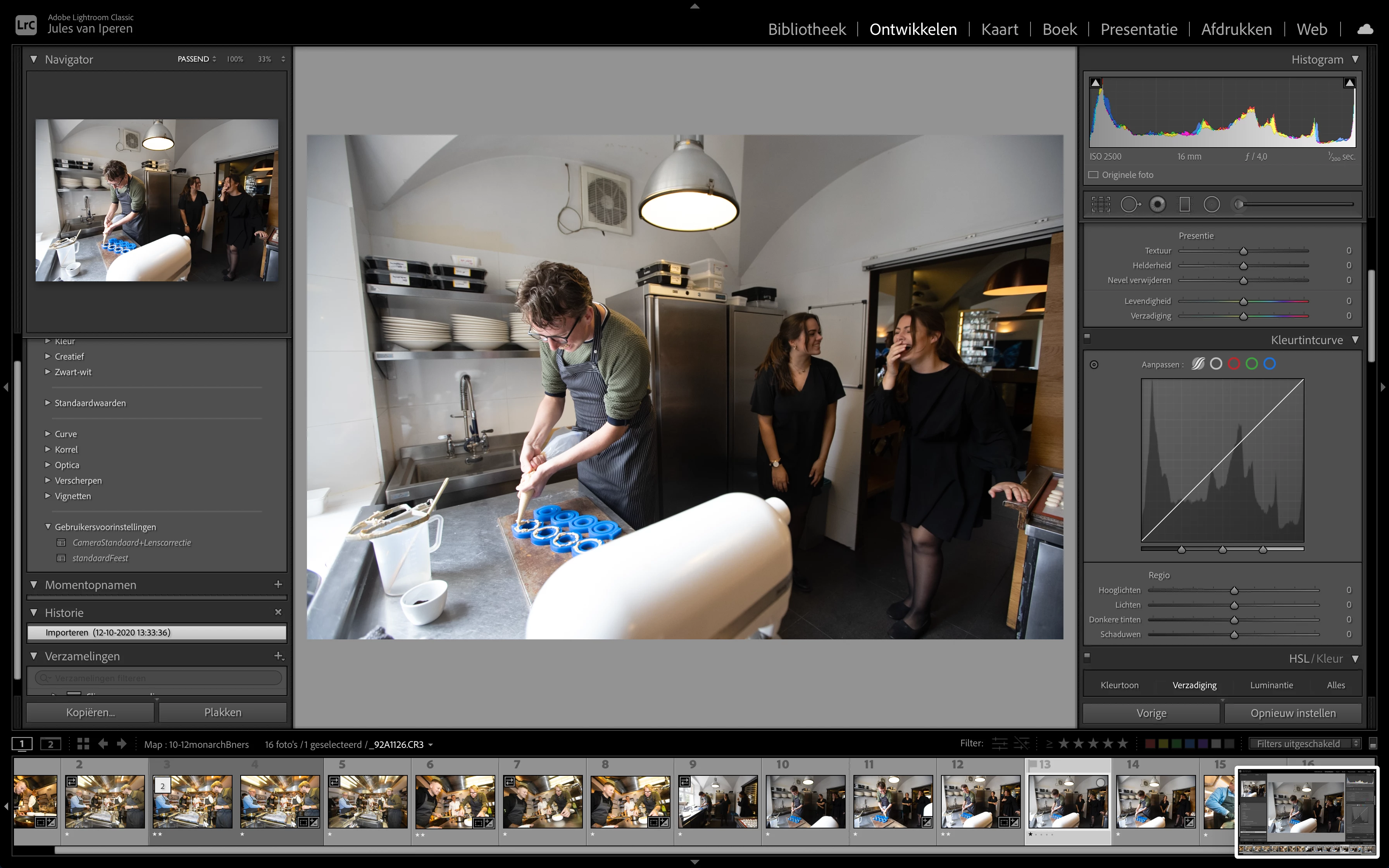
I just updated my lightroom classic to version 10 and all my pictures transformed a lot brighter after opening them in the 'develop module'. First it looks like it is loading the preview in cache (normal exposure in lightroom 9). After that a new preview is made which appears a lot brighter (too bright in my eyes). Also the histogram is chaning. 
I also tried exporting a picture with exactly the same settings, the one exported with lighthroom 10 comes out a lot brighter / overexposed compared to the one exported in version 9.x.

After some research it seems that this is only happening with the photos coming from my R5. But it affects (in a bad way) all my edits I have done in the past weeks. The photo's from my 5d IV and 5d III are not changing. 

Can someone explain how this could happen and if there maybe is a solution. Thanks a lot in advance!
 

이 주제는 답변이 닫혔습니다.

9 답변

Todd Shaner
Legend
December 17, 2020

I can confirm the difference you are seeing in exposure between LrC 9.4 and 10.1.

Embeded Preview vs LrC 9.4 Develop settings                 Embeded Preview vs LrC 10.1 Develop settings


This was apparently due to a problem with the initial camera profiles for the Canon EOS R5 CR3 files that caused about a -2/3 Exposure error. When viewing files in LrC 10.1 that were edited in LrC 9.4 they will appeaer +2/3 over exposed. See the solution offered by Adobe Staff Rikk Flohr at the below report.


https://feedback.photoshop.com/conversations/camera-raw-and-dng/camera-raw-canon-r5-raw-images-are-underexposed/5f5f46294b561a3d42770353


Participant
August 19, 2024

Link is dead. Anyone have info on the said solution?

DdeGannes
Community Expert
Community Expert
August 19, 2024

@james_5675 , the thread is also four years old, and there have been three upgrades with a at least. Dozen updates to LrC.
Are you using the latest version of LrC 13.5 and experiencing the same issues as the Auther of the thread?

Regards, Denis: iMac 27” mid-2015, macOS 11.7.10 Big Sur; 2TB SSD, 24 GB Ram, GPU 2 GB; LrC 12.5,; Lr 6.5, PS 24.7,; ACR 15.5,; (also Laptop Win 11, ver 24H2, LrC 15.0.1, PS 27.0; ) Camera Oly OM-D E-M1.
DdeGannes
Community Expert
Community Expert
December 17, 2020

Ok, so I downloaded the folder with the file and xmp sidecar. Imported into LrC and then exported a jpeg with the selection to add to the Catalog. So the exported jpeg sits alongside the raw file and did a comparison in the Library module and the image looks the same in the screen capture. The view in Library and Develop module also match.

Not sure if you have your monitor manually profiled and calibrated, nor the applications you are viewing the original and exported in. Todd will certainly have his opinion.


Regards, Denis: iMac 27” mid-2015, macOS 11.7.10 Big Sur; 2TB SSD, 24 GB Ram, GPU 2 GB; LrC 12.5,; Lr 6.5, PS 24.7,; ACR 15.5,; (also Laptop Win 11, ver 24H2, LrC 15.0.1, PS 27.0; ) Camera Oly OM-D E-M1.
Rob_Cullen
Community Expert
Community Expert
December 16, 2020

I do not know if you are using a Preset, or not.

Being curious I have looked at your linked image, and note one item-

In the HSL panel there is an increase in Luminance sliders of red/orange/yellow that contributes considerably to the 'lightness' especially skin tones.

Even a zero reset of these sliders makes a positive difference to your image!

@Todd Shaner will have a good answer I am sure. 🙂


Regards. My System: Windows-11, Lightroom-Classic 15.1.1, Photoshop 27.3.1, ACR 18.1.1, Lightroom 9.0, Lr-iOS 10.4.0, Bridge 16.0.2 .
Known Participant
December 16, 2020

SAME ISSUE HERE, I edited with v10 then exported to the client, they turn back and said too bright, then I look at the exported file, WT....

I have downgraded it to 9.4 for now.

When importing the same XMP and CR3, in LRC v10 is much brighter than LRC v9.4, but R6 files do no have this issue.

Todd Shaner
Legend
December 16, 2020

Please upload the raw and XMP file with your settings that exhibits the issue to a file sharing site and I'll take a look at it.

Known Participant
December 16, 2020

Here is the link. thanks a lot https://bit.ly/37ovfPa

Inspiring
October 20, 2020

I'm having this issue too, and it's a real pain! When I first pull up an image, it looks too dark now, and will stay that way unless I zoom into 100% (and wait), then it kicks up to super-bright! But then if I paste something, or go into Soft-Proofing, the dark image will show up again and I have to zoom in again (and wait!) to see the (presumably) correct brighter exposure. It's quite terrible!

Inspiring
October 21, 2020

I ended up purging the cache, which got rid of the misleadingly dark images when zoomed out, and bright images when zoomed in. LR is running extremely slow now, probably rebuilding the previews. There's still the issue of my past edits being overexposed now though, and what will they do about it? If I fix some of the photos, then they try to fix it by making another global change, then they're broken all over again.

ShootingPixelsAndy
Inspiring
October 21, 2020

Clearing the cache and then deleting the previews folder fixed the issue for me. The old edits will stay brighter, that is, unfortunately, the fix.

ShootingPixelsAndy
Inspiring
October 20, 2020

I've just spoken with support and they are investigating. The last bug I reported took 3 years to be fixed so no breath is being held...

lukejc1
Inspiring
October 20, 2020

Yep I'm seeing the same thing.  It seems that 9.4 had an issue where it would read the R5 files as a stop darker than they should be.  When editing, we would compensate by increasing exposure.  Now with version 10 it appears that they have corrected that issue when reading the R5 files.  The problem with the way it was corrected is that all our previous edits are being "corrected" with the increased exposure.


I'm rolling back to 9.4 for now until they have a fix.  I don't want to have to go back and re-edit all my previous files.

ShootingPixelsAndy
Inspiring
October 20, 2020

I'm getting the same thing. New imports don't behave this way but existing images in the catalog do. I also note that when I switch to a different image the previous one gets darker again. It's almost like the code is detecting an R5 image and making it brighter but only whilst it's selected.

Jules van Iperen
Participant
October 20, 2020

I see the 'before' / 'after' is both after in my first post, so here a before after in the develop module