
Participant
April 15, 2022
Question

Re-import into Lightroom after Photoshop adjustment, changing color in image completely

  • April 15, 2022
  • 3 replies
  • 515 views

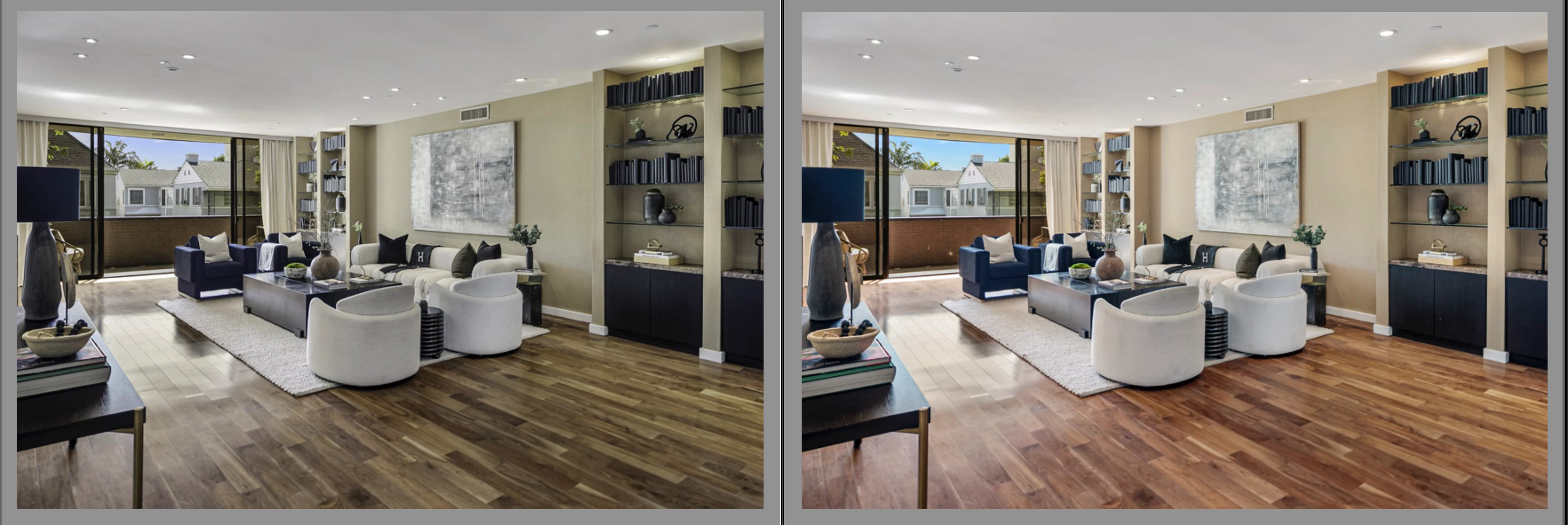
I have been pulling images into Photoshop from Lightreoom since day one. Make adjustments, save, and the image goes back to lightroom. No issues. Same image with adjustments. I updated last night, and now when I pull edited images back into LR, they are dark, and color is way off. It doesn't indictae in the settings that anything has been added. Anyone else experiencing this? Photo for reference...
This topic has been closed for replies.

3 replies

johnrellis
Legend
May 25, 2022
Participant
April 22, 2022

Same issue here. Right after the update.  Has anyone found a fix? Thanks!

D Fosse
Community Expert
Community Expert
April 22, 2022

This is apparently a new bug somewhere in the LrC-PS interaction. Several cases already.


What actually happens here is that the embedded ProPhoto profile from Photoshop is ignored in Lightroom, and the image treated as sRGB. The muted, greenish and slightly darker appearance is a giveaway for ProPhoto viewed without proper color management.


The good news is that resetting your Photoshop preferences will fix it (it has in all the other cases).


Just out of curiosity - did you migrate preferences from the previous PS version, or did you start with fresh preferences? Just trying to figure out why it happens to some users but not others.

Bob Somrak
Legend
April 22, 2022

Reset your Photoshop Preferences.  It solved the issue for me.

M4 Pro Mac Mini. 48GB
JohanElzenga
Community Expert
Community Expert
April 15, 2022

Version numbers? Platform? Are you sure that Photoshop did not assign a different icc-profile? I can't reproduce this on an M1 Mac running Lightroom Classic 11.3 and Photoshop 23.3.0.


-- Johan W. Elzenga
Participant
April 15, 2022

Hi Johan.

(LR Classic 11.3) (PS 23.3)

Mac OS Monterey 12.2.1

Not sure what you mean about Photoshop icc-profile. When I import into Photoshop, it looks the same as in LR. I make the adjustments, and when I come back to LR is when the image looks dark and dull. This just started. Not sure if it's a coincidence since I updated last night?

JohanElzenga
Community Expert
Community Expert
April 15, 2022

When Photoshop opens an image that has a different icc-profile than what is specified as its working profile, it can do two things: convert the image to the working profile or maintain the icc-profile of the image. That's in the Photoshop Color Settings policy. If Photoshop converts the image, then that could lead to (small) changes in the appearance.


-- Johan W. Elzenga