Participating Frequently
November 5, 2022
Question

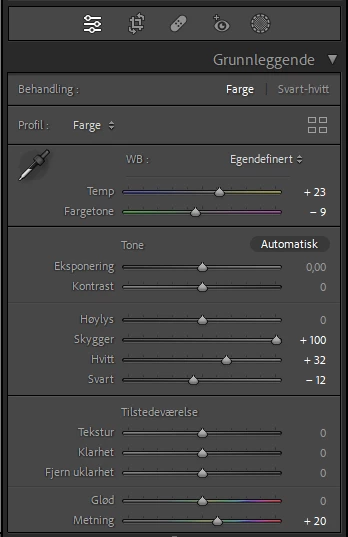
Shadows have moved to +100 on all images

  • November 5, 2022
  • 2 replies
  • 265 views

Is there a quick fix for this bug? i have more then 60000 images and its impossibel for me to adjust evry singel one. Shadows have moved over to right in evry images and the only way for me to fix this is take evry singel images into the develop module and reset everything.
 

This topic has been closed for replies.

2 replies

dj_paige
Legend
November 5, 2022

Yes, you can set all 60000 of them back to zero in one action. Or use a recent backup of your catalog file that was made before this happened.


No one else has reported this, I highly doubt it is a bug. This doesn't look like a bug to me, it looks like a user error, where you accidentally left auto-sync on and then did an edit where the shadows were set to +100.

PanthipAuthor
Participating Frequently
November 5, 2022

Can you please explain how I can set back everything in one go or how I can find the catalog setback

dj_paige
Legend
November 5, 2022

If you are making regular backups of your catalog file (are you?), in your operating system you find the most recent backup (or the backup made just before this problem happened), unzip it, and then move it to a brand new empty folder and double-click on it.

Ged_Traynor
Community Expert
Community Expert
November 5, 2022

Moved to the Lightroom Classic forum from Using the Community