Inspiring
February 13, 2023
Answered

Using Photoshop to Edit Within Lightroom

  • February 13, 2023
  • 3 replies
  • 2671 views

When I am working in Lightroom and choose to edit something in my image using Photoshop, when I complete the Photoshop edit, press Save and return to Lightroom, I get the message "The file could not be found" from Lightroom.


In the past when I did this, the PS-edited version of the file always showed up in Lightroom. Something has changed.


Can anyone tell me how to get this back?
This topic has been closed for replies.
Correct answer Tom 70irving

The next step after resetting preferences and clean reinstalls is to verify permissions for Lightroom and Photoshop: https://community.adobe.com/t5/lightroom-classic-discussions/quick-tips-how-to-give-full-disk-access-to-lightroom-classic-on-macos/m-p/12913413 


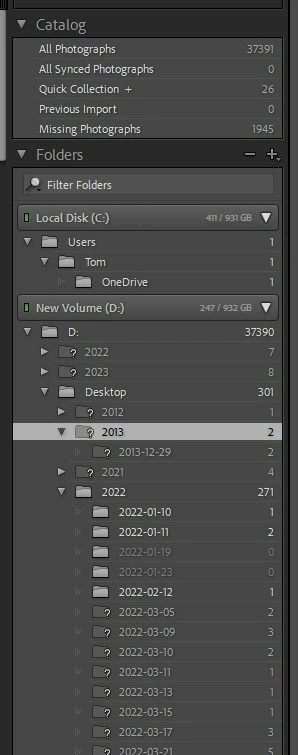
I think I have figured out that the problem is related to my folders, of which I have many hundreds. They are a mess. Many are greyed out in Lightroom with question marks. There is a Catalog called "Missing Photographs" with two thousand.  The problem you have been kindly helping with does not occur if I pull up one of my older photos into Lightroom. Can you guide me to resource where I could fix this whole mess? 

3 replies

TheDigitalDog
Inspiring
February 13, 2023

When the 'link' between Lightroom Classic and Photoshop has issues, one of the first things to try is this:
1. Use the Adobe Creative Cloud application to uninstall both Photoshop and Lightroom Classic and when asked, keep preferences. 
2. Install Photoshop first, then Lightroom Classic. The order is what is very important here.
Better? 

Author “Color Management for Photographers" & "Photoshop CC Color Management/pluralsight"
Inspiring
February 13, 2023

I just tried that (thank you very much) and the nature of the problem changed. Now when I return to Lightroom after completing the PS edit, I get the message "No photo selected." When I use Windows to search in the folder where PS has saved the new .TIF copy of the image, it is there. But Lightroom does not "see" it.

JohanElzenga
Community Expert
Community Expert
February 13, 2023
quote

I just tried that (thank you very much) and the nature of the problem changed. Now when I return to Lightroom after completing the PS edit, I get the message "No photo selected." When I use Windows to search in the folder where PS has saved the new .TIF copy of the image, it is there. But Lightroom does not "see" it.


By @Tom 70irving


I believe the explanation is as follows. In the filmstrip you can see that you are in the 'Previous Imports' special collection. That is not a folder but a special collection listing the images of your last import. If you send an image from that collection to Photoshop, and you select an option that creates a new image (and that is what you do when you select 'Edit a copy with Lightroom adjustments'), then the returned image will not return into that collection because it is not one of the images you imported. That is why Lightroom can't show it as long as you are still in this special collection, and so it says that no image is selected. It should show the image if you go to 'All Photographs'. 


-- Johan W. Elzenga
Inspiring
February 13, 2023

Some more details (thank you Johan):

Latest Creative Cloud version of all apps

Windows 10

While editing an individual photo which I have imported into Lightroom Classic from a folder on my PC, I click Photo, Edit In, Edit in Adobe Photoshop 2023, edit a copy with Lightroom adjustments. The photo then opens in Photoshop, I make my edits and click Save. When I return to Lightroom the screen is grey with the message "The file could not be found."

GoldingD
Legend
February 13, 2023

In that screen capture notice in the filmstrip, that the selected image appears to have a ! in upper right corner of the thumbnail. a bit hard to read your screen capture on this iPad, could it not be a ! mark? If so, that indicates a missing photo. A edit in Photoshop needs access to the photo.


Consider:

https://www.computer-darkroom.com/lr2_find_folder/find-folder.htm


Inspiring
February 13, 2023

It seems to me that PS is saving the edit as a TIF but Lightroom cannot see TIF files?


Thanks for the insert/attachment tip

JohanElzenga
Community Expert
Community Expert
February 13, 2023

You need to provide more information. Which versions of Lightroom Classic and Photoshop? Mac or Windows? Which version? What do you have selected as source when you send the image from Lightroom to Photoshop? A folder? A collection? A smart collection? Anything else that might be relevant?


-- Johan W. Elzenga