Participant
March 29, 2024
Answered

Deleting lightroom preset in cloud based

  • March 29, 2024
  • 2 replies
  • 298 views

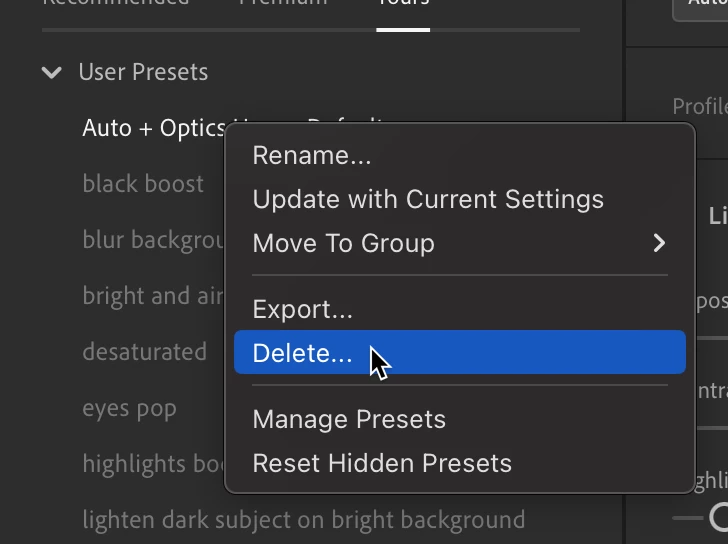
How do I delete my own self created preset in Lightroom cloud? The info here says there should a "delete" option in the preset manager, but not on my version.  I'm using a Mac. I can delete them on the copy of LR on my Widows machine 

This topic has been closed for replies.
Correct answer melissapiccone

Right click on a preset and select delete:

2 replies

melissapiccone
Community Expert
melissapicconeCommunity ExpertCorrect answer
Community Expert
March 29, 2024

Right click on a preset and select delete:

Melissa Piccone | Adobe Trainer | Online Courses Author | Fine Artist
Participant
March 29, 2024

How do I delete my own self created preset in Lightroom cloud? The info here says there should a "delete" option in the preset manager, but not on my version.

Ged_Traynor
Community Expert
Community Expert
March 29, 2024