
Participating Frequently
December 13, 2024
Answered

P: Lightroom Crashing when Exporting Images (10252973)

  • December 13, 2024
  • 14 replies
  • 1093 views

hello, Whenever i export images even if it's just one lightroom freezes and then i see the following:
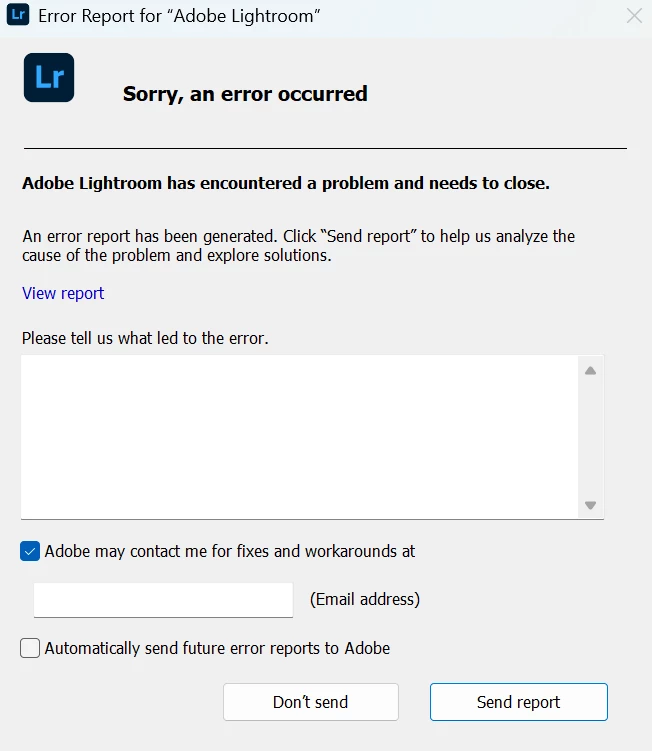
After this is just closes. I've tried uninstalling, doing a clean uninstall etc. I think the problems started when i updated windows or when i updated lightroom.. not sure. Is anyone else having this problem? I can also send the crash report if that's needed. I don't think it's an issue with the ram, i have 32gb's of DDR5 ram and a 4060 for my gpu. 


Thanks in advance for your help!


Correct answer JulieKmoch

One more idea, and I would actually try this first. 

  1. Quit Lightroom desktop.
  2. In Windows Explorer, go to \Program Files\Adobe\Adobe Lightroom CC.
  3. Find the file "adobe_c2pa.dll" and rename it - add "-xxx" on the end. This will cause Content Credentials to not work. I know you said you're not using it, but from what we can see, that's where the crash appears to be happening. 
  4. Relaunch Lightroom and try exporting again. 


Please let us know if that works.

14 replies

Rikk Flohr_Photography
Community Manager
Community Manager
May 15, 2025

This crash has been investigated and has been found to be caused by a 3rd party application.  The application Astrill VPN is the issue with the file AProxy64.dll. If you have the ability to tell this application to ignore Lightroom then that should solve the issue.  Otherwise, you will have to remove or disable the application.

Moving from Bugs to Discussions. 

Rikk Flohr: Adobe Photography Org
Participant
May 15, 2025

thanks for follow up - i was using astrill at that time - now no longer and all has been fine since i posted

Participating Frequently
January 12, 2025

Thank you! Yes i can't remember which but that worked, sorry for the late reply, i wasn't able to reply before for some reason. Lightrooms been working fine since.

Participant
January 12, 2025

thanks this fix from JulieKmoch WORKED for me i am so happy i can edit all my xmas / holiday pics now

Participant
January 11, 2025

Can anyone help: 

Dell XPS15 2022. Nvidia 3050TI GPU. win11.

No joy so far with Adobe help.

In last month: 

  • LR crashes whenever i save a picture or if i try to open preferences.
  • LRC crashes on catalog selection page.
  • PS and PP seem to be ok.

I tried updating all drivers, reseting PC (windows) twice. one to remove all apps and files.

But no joy.

HP laptop works ok...

Anyone got any ideas!

cheers Andy

JulieKmochCorrect answer
Adobe Employee
December 16, 2024

One more idea, and I would actually try this first. 

  1. Quit Lightroom desktop.
  2. In Windows Explorer, go to \Program Files\Adobe\Adobe Lightroom CC.
  3. Find the file "adobe_c2pa.dll" and rename it - add "-xxx" on the end. This will cause Content Credentials to not work. I know you said you're not using it, but from what we can see, that's where the crash appears to be happening. 
  4. Relaunch Lightroom and try exporting again. 


Please let us know if that works.

Adobe Employee
December 16, 2024

I'm checking with engineers on this. Meanwhile, a few other paths to try to get your files out:

1. Sign into https:\\lightroom.adobe.com and try exporting from there. Options on the web are limited to small or full size JPEGs, though.

2. Lightroom mobile has export options similar to the desktop app.

3. If you have access to Photoshop, you could try right-clicking the photos and choosing Edit in Photoshop, where it preserves edits by creating a new TIFF file. I don't know whether that would hit the same roadblock.

4. If this is new to 8.1, you could try an earlier build of Lightroom.

Participating Frequently
December 15, 2024

I've tried that and it's still not working, are there any other options?

I appreicate the speedy replied and impressed with adobes customer service as i really do need to be able to export my images for my photography

Participating Frequently
December 15, 2024

yeah thanks. I'm already doing that

Arnold-Norway
Known Participant
December 14, 2024

I think export without credentials is unchecking the checkbox for include credentials in the export window.

RegardsArnold Hoddevik
Participating Frequently
December 14, 2024

I don't use content credentials and have only used them once so i don't think they're the issue. Do you mean disable them completely somewhere in settings? Thanks