Participant
Mar 5, 2023 12:15 AM UTC
Answered

P: Lightroom launch mfc140u.dll missing file on Windows

Error message, mfc140u.dll file not found when launching, tried reinstalling with no sucess 

Sameer K
Sameer KCorrect answer
Community Manager
Mar 6, 2023 7:54 PM UTC

Welcome to the Lightroom Community. I'll help you figure this out. The mfc140u.dll is part of Microsoft Visual Studio.


Please try these steps & let me know how it goes.

  •  In the Creative Cloud app, press CTRL + ALT + T (Win) to launch Creative Cloud Troubleshooter & select 'Close Creative Cloud and related processes' > click on Go.
  • Go to 'Add or Remove programs' in Windows search & find all the installations of Microsoft Visual C++ Redistributable (all years).
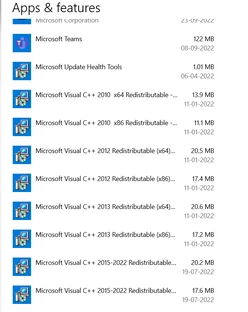
     

  • Uninstall them completely. Even if there is an option to repair them, please uninstall all the existing MSVC++ packages.
  • Download a fresh package of installers for MSVC++ from this link: Microsoft Learn: Latest Support VC Redist.
  • Right-click the downloaded file and select Extract All.
  • Reinstall all packages (32bit & 64bit) & then restart the computer.

Let me know how it goes from here. Thanks!

Sameer K

53 replies

Participant
May 21, 2026 11:20 PM UTC

I can not open Lightroom Classic. Note" The code execution cannot proceed because mfc140.dll was not found."  

Translate
MAP1737
Participant
Apr 28, 2026 6:09 PM UTC

Thanks, this worked for me 👍

Translate
PHc
Participant
Apr 11, 2026 11:07 AM UTC

J’utilise windows 1, depuis le 28/02/2026 lightroom classic ne s’ouvre plus avec mfc140u.dll missing.

J’ai corrigé le problème de C++  en le reinstallant. Mais le n’arrive plus à ouvrir lightroom.

Il n’y a aucun message.

J’ai voulu reinstaller lightroom classic . Le fichier télechargé ouvre une page internet

je n’y trouve pas comment installer sur mon PC lightroom classic.

comment faut il faire ?

Translate
schdlera
Participant
Apr 7, 2026 1:20 AM UTC

It didn’t work for me :(

Translate
anthonyfoote
Participant
Mar 30, 2026 11:33 AM UTC

code mfc140u.dll the code keeps coming up and will not let me open

Translate
schdlera
Participant
Apr 7, 2026 1:20 AM UTC

I’m having the same issue, did you figure it out?

Translate
Sameer K
Community Manager
Community Manager
Apr 21, 2026 11:32 AM UTC

Please follow the correct answer in this post and check if it helps.

Thanks!
Sameer K

Translate
Hynciik
Participant
Feb 23, 2026 9:40 PM UTC

Unfortunately, now there are even more files that are missing :((

Translate
Kony Mendiola
Participant
Feb 27, 2026 2:34 AM UTC

Hola, tengo el mismo problema, iba hacer lo que señala sameer k pero vi tu comentario y me eche para atras. Nose si ya pudiste con alguna solucion?

Translate
Xhuxha Ambrocio
Participant
Mar 17, 2026 5:55 AM UTC

El comentario de GujaratiKanudo, me funcionó. 

Translate
Gabi-Muc
Participant
Feb 11, 2026 9:44 PM UTC

Beim Aufruf kommt die Meldung: Die Ausführung des Codes kann nicht fortgesetzt werden, da MSVP140_CODECVT_IDS.dll” nicht gefunden wurde. Was ist zu tun? Bis gestern funktioniere alles einwandfrei.

Translate
Participant
May 23, 2025 6:14 PM UTC

Simply Update your VC Runtime files by going here VC_Runtimes and download both x32-x64 Runtime adn apply update..

(restart if needed) and you are Done.

Translate
Xhuxha Ambrocio
Participant
Mar 17, 2026 5:53 AM UTC

Thanks a lot, It works for me. 😃

Translate
esavarese
Participant
Aug 23, 2023 10:00 AM UTC

Thank you... It worked...


You just saved my bacon with this info!!!


Much appreciated

Translate
Participant
Jul 18, 2023 8:10 AM UTC

I can't open lightroom on my laptom, reinstalled probably x10 times, could somebody helo please?

Translate


