


Participant
August 5, 2026
Question

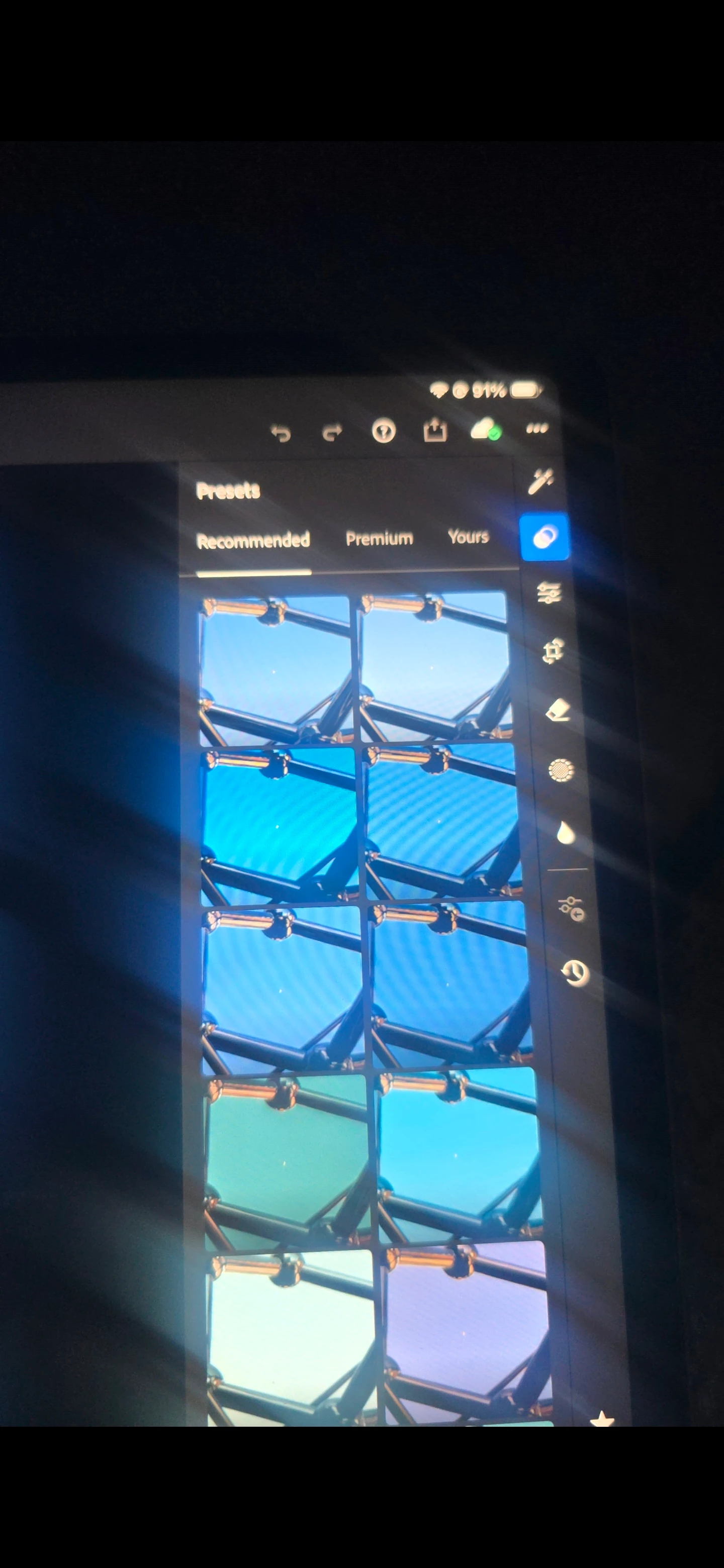
P: (Mobile) Presets panel, under Recommended, I do not see the preset categories (Warm, Dark, Bright, Cinematic, HDR, etc.)

  • August 5, 2026
  • 61 replies
  • 715 views

In the Presets panel, under Recommended, I do not see the preset categories (Warm, Dark, Bright, Cinematic, HDR, etc.) that appear in Adobe's documentation and other users' screenshots. The app is fully updated, I've already compared it with Lightroom on my phone, and the feature is missing only on my iPad. I'd like to know if this is a bug, a staged rollout, or an account-specific issue.

 

    61 replies

    dj_paige
    Legend
    August 9, 2026

    Questions about Lightroom Mobile should be posted in the Lightroom Ecosystem forum, and not in the Lightroom Classic forum.

    Participant
    August 9, 2026

    Nope unfortunately zero answers or responses 

    ricky_9785
    Participant
    August 9, 2026

    Same here , the feature missed after update to 11.5.

    Please restore that good feature for us!!!! Thanks 


    Participant
    August 8, 2026

    I am having the same issue. Found anything to fix it or gotten any answers from Adobe?

    Participant
    August 8, 2026

    Lightroom mobile when I went to edit a picture on my phone I could go to presets and it would have different categories such as subtle strong warm cool b&w and others now they are gone and I want to know why and how to get them back.

    Participant
    August 8, 2026

    After the latest Lightroom Mobile update, the style/category filters under Presets → Recommended have disappeared.

    Previously, when opening Recommended Presets, there was a row of selectable style categories including Cool, Warm, Dark, Bright, Cinematic, HDR, and others. Selecting one of these categories would generate recommended presets specifically for that style.

    Now, the Recommended tab still generates presets, but the entire style/category row is missing. There does not appear to be another way to select these categories.

    Steps to reproduce:

    Open a photo in Lightroom Mobile.

    Open Presets.

    Select Recommended.

    Previously, the style/category filters appeared above the recommended presets.

    After the update, those filters no longer appear.

    I am currently running Lightroom Mobile 11.5.0 on Android (Samsung Galaxy S24 Ultra). I have also experienced the same missing functionality on my iPad.

    I have attached before-and-after screenshots showing the difference. The older screenshot clearly shows the style filters, while the current version shows the same Recommended section without them.

    Could Adobe please confirm whether this was an intentional change or a bug? If it was intentionally removed, I would strongly request that the style filters be restored. Being able to choose a specific style before browsing Recommended Presets was an extremely useful part of my workflow.


    Participant
    August 14, 2026

    as someone who only sed the “dark” presets.. my recommended is nothing but bright and fake color options and has zero “dark” presets. so this is not a reliable solution sadly. 

    JustZee
    August 6, 2026

    @Sameer K Hello, thank you for your reply. 
     

    It is the latest version of the app. Even installed the update that followed that claimed it was to fix bugs (v11.5.1) But the problem still persisted. 
     

    Having trouble generating the logs. Adobe does not make it easy to navigate & interact with these forums on an iPhone. You click on support in the app and it drags you to this webpage but one wrong swipe and the whole things resets

    Participant
    August 6, 2026

    Here is an example from my phone which does show the categories 

    Participant
    August 6, 2026

    Hi Claire, thank you for your response. I'm actually using Adobe Lightroom on an iPad Pro, not Lightroom Classic on a Mac or Windows PC. Because of that, I don't have a Help > System Info menu or the option to reset Lightroom preferences as described.

    My phone shows these categories, but my iPad does not, even though both devices are signed into the same Adobe account and are running the latest version of Lightroom.

    I have already cleared the Lightroom cache, restarted the iPad, and confirmed that Lightroom is fully up to date, but the issue still persists.

    Is this a known issue with the iPad version of Lightroom, or is there another troubleshooting step I can try? If it would help, I'm happy to provide my iPad model and iPadOS version.

    Claire H.
    Community Manager
    Community Manager
    August 5, 2026

    Hi @realistic_days9390, Welcome to the Lightroom Community forum! To better help you with this issue, we would like a few more details. Can you send your system info? You can find your system info by going to Help > System Info, copying and pasting it into a text file, and attaching it here.


    In the meantime, I would recommend clearing your cache and try resetting your Lightroom Preferences

    https://adobe.ly/4o7JADQ. I hope this helps! ^CH