

photopoeth
Inspiring
May 23, 2024
Answered

Sync doesn't stop although there are no currently synced images!?

  • May 23, 2024
  • 11 replies
  • 6113 views

Before I switch to LrC 13.3, I wanted to heed the tip that all syncs should be completed first. Unfortunately, Lightroom (Desktop) shows that a synchronization is in progress, but it never comes to an end. When I filter for the images that are currently being synchronized, none are displayed. There is no synchronization showing in the smartphone app and in LrC, only in Lightroom (desktop).
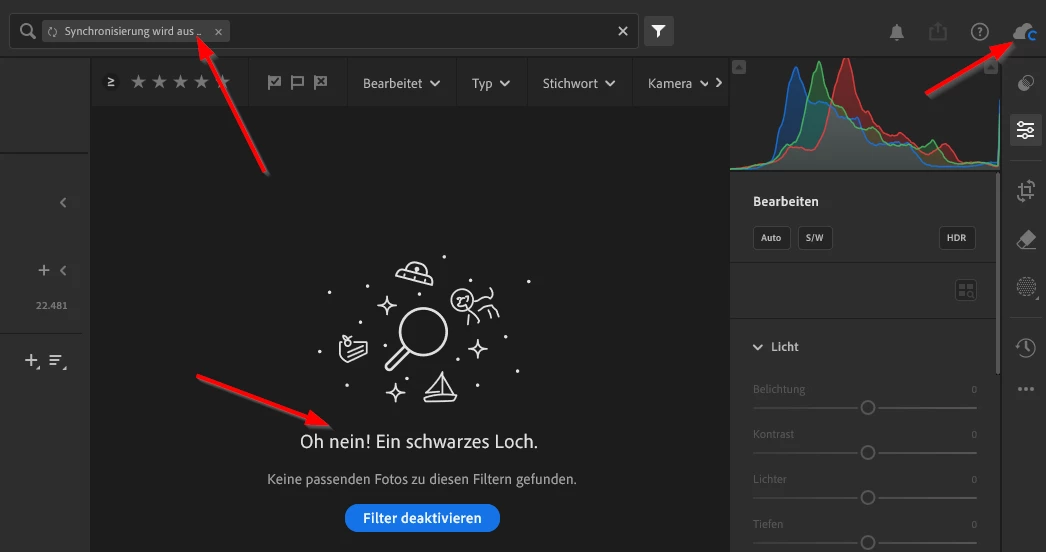
 

How can I find out what the problem is and how can I fix the situation?

This topic has been closed for replies.
Correct answer photopoeth

I've just got a call from Adobe support and they fixed the issue of the stuck sync process. Before the call there were 6 images syncing forever... Here's the solution:
1. Generate diagnostic report from Lightroom Classic Sync preferences tab
2. Unzip the diagnostic report to extract the contents
3. Double click on lrsync_log.html file to open it in a browser & Select "Lightroom Classic Diagnostic Logs"
4. Select "Binary Uploader"
5. If there are files in needsBinaryUpload section with binaryType as proxy, get the filename(s) from this section
6. Edit the develop settings of the file(s) in Classic and wait for some time. This should resolve the issue. 


...and it did! Thumbs up! No pending syncs at the moment. 


11 replies

photopoeth
photopoethAuthorCorrect answer
Inspiring
June 13, 2024

I've just got a call from Adobe support and they fixed the issue of the stuck sync process. Before the call there were 6 images syncing forever... Here's the solution:
1. Generate diagnostic report from Lightroom Classic Sync preferences tab
2. Unzip the diagnostic report to extract the contents
3. Double click on lrsync_log.html file to open it in a browser & Select "Lightroom Classic Diagnostic Logs"
4. Select "Binary Uploader"
5. If there are files in needsBinaryUpload section with binaryType as proxy, get the filename(s) from this section
6. Edit the develop settings of the file(s) in Classic and wait for some time. This should resolve the issue. 


...and it did! Thumbs up! No pending syncs at the moment. 


Participant
June 13, 2024

I had 2 stuck but fixed it thanks to you taking the time to post the solution👍👍

photopoeth
Inspiring
May 31, 2024

It's getting crazier and crazier. Something new every day!


Today I realised two things:

1. the 7 pictures I deleted from ‘All syncchonised Photos’ during my last post (where I played detective) are still visible in the cloud. This can also be seen from the fact that there are 7 more pictures in LrW's ‘All Photos’ than in LrC's ‘All synchronised Photos’. In my understanding, this should not be the case. The images would have to be removed from the cloud collection if I no longer synchronise them.

2. the collection that contains all 24.754 photos that appear in LrW's ‘All Photos’ contains 25.405 photos after it appears in LrC under ‘From Lightroom’. That's 658 more photos (in a synchronised collection) than the total number of photos synchronised. WTF? How can the images appear in a synchronised collection if they are missing under ‘All synchronised photos’?


Victoria Bampton LR Queen
Community Expert
Community Expert
May 31, 2024
quote

2. the collection that contains all 24.754 photos that appear in LrW's ‘All Photos’ contains 25.405 photos after it appears in LrC under ‘From Lightroom’. That's 658 more photos (in a synchronised collection) than the total number of photos synchronised. WTF? How can the images appear in a synchronised collection if they are missing under ‘All synchronised photos’?

By @photopoeth


Are they all images or could some be videos? LrC doesn't include videos in its sync counts whereas the cloud does. 


Or they're historical random orphans and explain why you're having sync issues!

Victoria - The Lightroom Queen
photopoeth
Inspiring
May 31, 2024

🙊 Before answering I wanted to find out which 658 were missing. So in LrC I created a collection with these photos and browsed through to find out more about them. I realized that most of them are in synchronized collections. While doing that I realized by accident that the number of my "All synchonized photos" had changed in the meantime to the corrrect number. I am really lost! This is crazy.

One could argue, that they were missing in LrC because they had to be downloaded from the cloud. But since they're all photos omade with my "real" cameras, they have never been to the cloud as originals. So this cannot be the case here.
On top this also wouldn't answer the question why they showed up in a synchronized collection first, but not in the "All synchronized images".

I more and more get the feeeling that the new sync engine is buggy as hell.

photopoeth
Inspiring
May 28, 2024

I am still investigating and here are some odd news. At the moment it is no longer just 1 single photo that is stuck, but 3. And as if by coincidence, the number of "All synchronized photos" in LrC (25,707 photos) and "All photos" in LrW and LrD (25,704) differs by exactly 3. BINGO! 

So I have created a new album with all the photos. This was synced down to LrC and so I was able to find out which pictures are in "All synchronized photos" but not in this collection.

Turns out these are 3 (7 year old) RAW files. In the same folder there is 1 more RAW file and 6 virtual copies of the 3 problematic photos. These 7 images have been synchronized, only the 3 RAW originals have not.


Here is the screenshot from LrC with 10 all images:


Here is the screenshot from LrW with only 7 images:


So I thought that if I remove the 3 images from the sync the stuck sync process should stop and not try to sync these 3 images anymore.


Unfortunately, this was not successful. Although the synchronized content in LrC and LrW are now identical, the sync process is still stuck. Even if I remove all 10 images (and thus also the virtual copies) from the synchronization, nothing changes.


As before, 3 images are supposedly synchronized. So it is obviously not the 3 images that I identified as missing. I am really at a loss...


Victoria Bampton LR Queen
Community Expert
Community Expert
May 28, 2024

That was a good bit of detective work even if it didn't fix it!! Hopefully the engineers will get to look at your logs sooner than later. 


I might have asked this before, I'm losing track now, but if you float over the cloud icon, are the 3 uploading or downloading?

Victoria - The Lightroom Queen
photopoeth
Inspiring
May 28, 2024

I am nearly losing track myself. 😉 The 3 images are uploading (which would have made sense by looking at the numbers).
Since I have now "desynced" the 10 images there are now lesser images in "All synchronized photos" than in "All Photos" in the cloud. So it doesn't make sense anymore.

photopoeth
Inspiring
May 27, 2024

Now I did another test and created a new album in LrM that contains the 3 images that are missing in LrC. 2 minutes later the album showed up in LrC as a collection inside of "From Lightroom" with the 3 that were missing the whole time.
I'd say the new sync engine needs some tuning. 😉

photopoeth
Inspiring
May 27, 2024

After investigating/testing a bit longer, I would say that the sync process (at least on my system) is far from being simpler, more reliable and smoother as Adobe promises with the update. Here is a screenshot of LrC, LrD, LrW and LrM. All should show the same 4 images that I took with my mobile app and then edited on the different platforms. It is about the pictures (1) to (4), which I photographed in this series with the phone. Here is the screenshot:

OK, here's the story to each of the image:
(1) Has been synced to all 4 platforms see (5), (9), (13). After edit in LrD it was synced to LrW, but not to LrC and LrM.
(2)-(4) have been synced to LrD and LrW, but not to LrC. See (6)-(8) and (10)-(12)
(10) and (11) have been edited on LrD and have been synced to LrW (6)&(7) and to LrM (2)&(3)
(8) has been cropped to 1:1 in LrW and the crop has been synced to LrD (12) and LrM (1).


Does anyone else here see through what happens, when, where and how? In any case, prrsonally I find it very difficult. 

The bottom line is this. None of the images are identical on all 4 systems as it sould be. To me the sync process feels more buggy than before the update. I'm sorry to have to say that. Please Adobe do your homework.

Victoria Bampton LR Queen
Community Expert
Community Expert
May 27, 2024

@photopoeth 

Lr Web is what's really in the cloud.

LrD and LrM should match it when fully synced.

Lr Classic All Synced shows photos only, excluding videos. 

Victoria - The Lightroom Queen
photopoeth
Inspiring
May 27, 2024

OK... but what does that mean for my situation where all 4 systems don't show the correct 4 images in question? BTW LrW did show after about 1 hour the missing edit of image 1, too. So at least LrM, LrW and LrD show the same content. But in LrC 3 of the 4 images still are missing. 

photopoeth
Inspiring
May 27, 2024

Addition: I have contacted Adobe support today and they've got my diagnostic report and will investigate on it.. We'll see.

Another fact i noticed today is that numbers of synchronized photos vary in the different apps:
1. Lr Classic: 25.706 synchronized photos
2. Lr Desktop: 25.703 in "All Photos"

3. Lr Web: 25.703 in "All Photos"
4. Lr Mobile: 25.692 in "All Photos"

So what can we see here?
1. LrC is supposed to upload not 1 but 3 photos.

2. LrD and LrW should show the same sync activity, but only LrD shows some and is stuck.

3. LrW should synchronize 14 images form LrC but does none.

🙊🙊😢

photopoeth
Inspiring
May 25, 2024

Things are getting more complicated: I took the plunge today and did the upgrade to LrC 13.3 since the sync process was complete in my LrC 13.2. After upgrading the catalog, I let LrC run for a few hours. The upgrade of the sync information also went through without errors and everything looked good.
However, the synchronization in Lr Desktop was still running without coming to an end. LrC was running in the background while I was doing other things. When I then wanted to do something in LrC, I noticed that the synchronization was running although I hadn't done anything in LrC the whole time. Supposedly a single photo is being synchronized (uploaded) and unfortunately it has been for hours now.


When I call up the info on the web (as it says in the documentation for Sync in 13.3), the result is: NOTHING! No Error, no sync activity going on in Lr Web.


In Lr Desktop it is as it was before:
-  the Sync process is running endlessly
- no images are visible when filtering for the currently synchronized ones


And to make it complete. My iPhone app does not synchronize either.


Now I really don't know how to fix it or even how to find out which single image is uploading to cloud in LrC for hours now and which image(s) are syncing in Lr Desktop.


Does anyone have any tips?


MartinSchlender74
Participating Frequently
May 26, 2024

Welcome to the club. Exactly the same for me though it's 6 photos for me. I contacted Adobe on Friday and gave them diagnostic data. Hope to get a solution soon.

I personally think the new sync is a step back because we as users are no longer able to find out what's wrong.

Hopefully these are only migration problems.

Martin

Victoria Bampton LR Queen
Community Expert
Community Expert
May 24, 2024

Can we just regroup as I'm a bit confused and I don't want to give you the wrong info!


What's your current Desktop version number?

What's your current Classic version number? 

Which app have you been using?

Is Classic sync currently ok, not stuck?

Is Desktop sync still stuck?

Victoria - The Lightroom Queen
photopoeth
Inspiring
May 24, 2024

I think you're right. But just to be sure...

> What's your current Desktop version number?

7.3


> What's your current Classic version number? 

13.2


> Which app have you been using?

I used Lr mobile on my pphone to take pictures. Lr Desktop and LrC


> Is Classic sync currently ok, not stuck?

OK - no syncs are pending.


> Is Desktop sync still stuck?

It's still syncing, but no photos show up when I filter for images currently syncing.


BR

Victoria Bampton LR Queen
Community Expert
Community Expert
May 25, 2024

Thanks. Yep, fine to upgrade.

Victoria - The Lightroom Queen
Victoria Bampton LR Queen
Community Expert
Community Expert
May 23, 2024

You're in Lr Desktop and it seem to be stuck, right? Does everything look ok in Lr Web? If so, you probably have little to lose by going to Classic. If unsure, send a desktop diagnostic log to customer support and get them to figure out what's stuck. 

Victoria - The Lightroom Queen
photopoeth
Inspiring
May 23, 2024

In Lr Web everything is fine. No sync activity going on.

I'm a little hesitant because the last major update got me into a hell of a lot of trouble and kept me busy for weeks. The problem seems to have been fixed for about a month now.

LrC crashing randomly even at startup 

So at the moment I have the famous German ANGST! 😉

On the other hand I have a catalog backup and could go back. But I have to take notes of what I have done in the new catalog in case I have to roll back. It's most of the time organizational things like adding new collections or changing collections. The edits will be in the XMP files, so I would only lose the edit history. 

GoldingD
Legend
May 23, 2024