




Question
September updates to the new Actions panel: Edit view!
Hi everyone,
We're happy to let you know that the latest Photoshop beta update includes further progress made to the new Actions panel experience and new features have been added, you can now:
- Edit your actions!
- Right click an action in the Yours tab of Actions panel or use the 3 dots ellipses menu and choose Edit Action
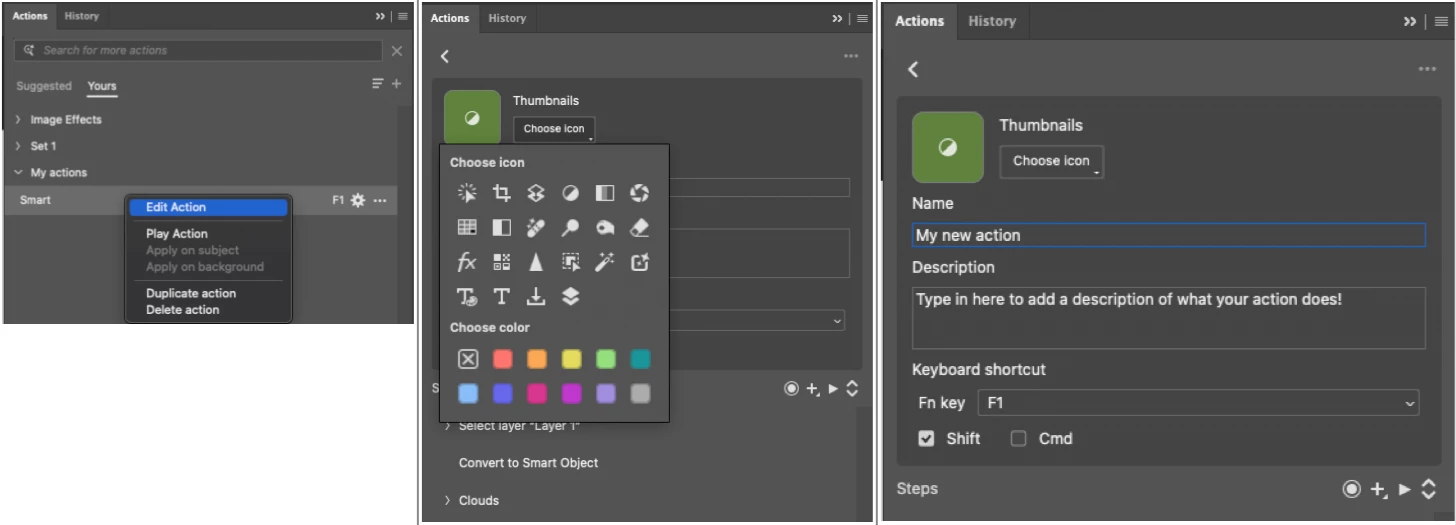
- Right click an action in the Yours tab of Actions panel or use the 3 dots ellipses menu and choose Edit Action
- In the Edit view, you can now customize an action's:
- Name and Description
- Thumbnail icon and color label (updates to display icons in list view coming soon!)
- Keyboard shortcut
- You can also:
- Record new steps
- Insert menu items, conditionals, paths and stops
- Play all or selected steps
- Right click to Delete or Duplicate one or more selected steps
- Click the Checkbox to skip a step from playing in an action
- Click the Pause icon (icon subject to change) to show or hide a step's dialog
- Click the settings icon to modify a step's recorded parameters
- Expand/Collapse steps view to show all or only steps with modifiable parameters
- Saving: Once you've made edits to your action, you can click Save or Back to choose to overwrite or save as a copy.
To see what else has been added to the new Actions experience see the previous posts:
There's lots to try out here, and we'd love to hear your feedback on the Actions Edit view.
 AdChoices