


Participant
October 17, 2023
Answered

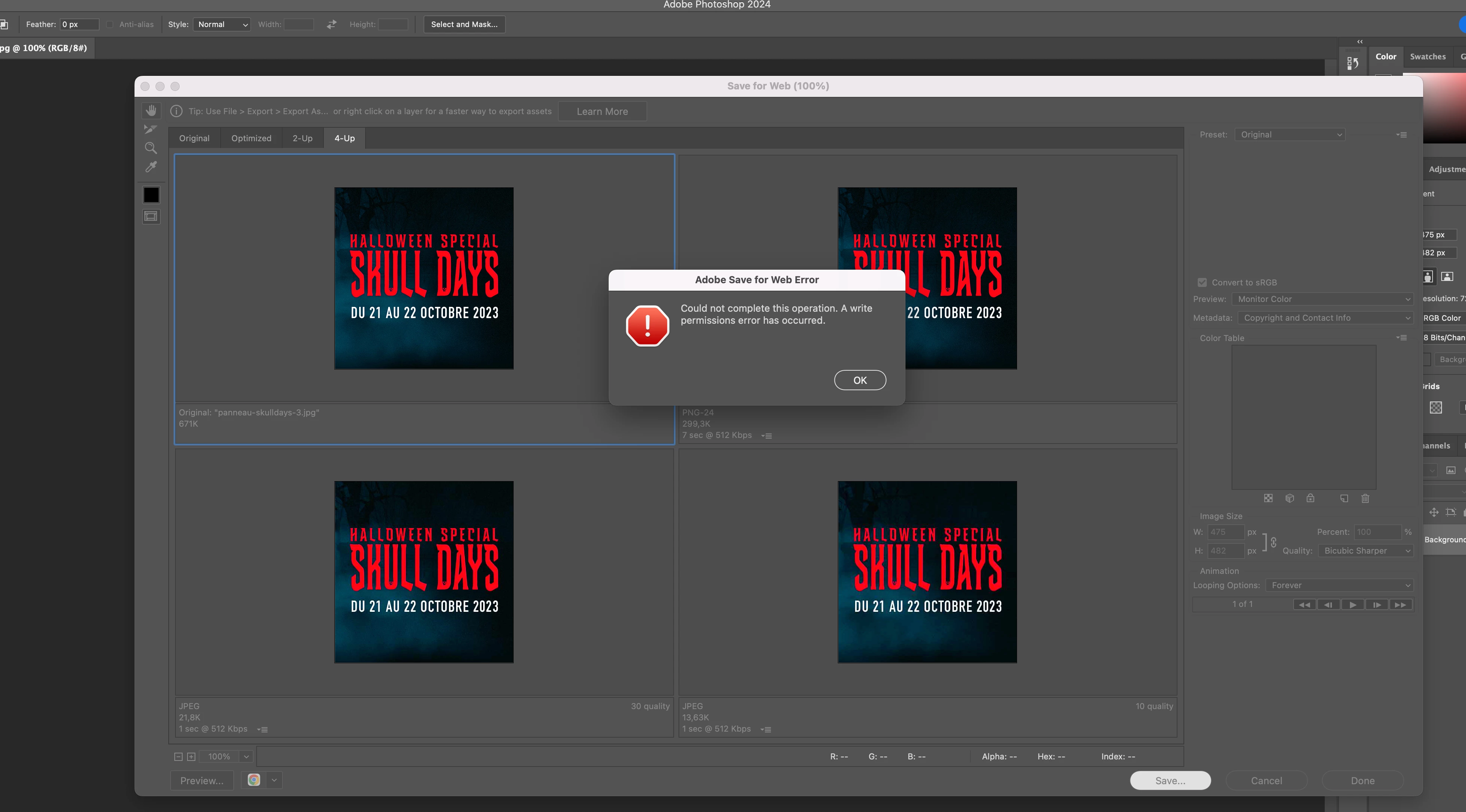
Adobe Save for Web error
  • October 17, 2023
  • 35 replies
  • 22400 views


I have been experiencing this error for a while now. When trying to save for web it stops working and gives the warning "Save for web error" "Could not complete this operation. A writer permissions error has occured."
Everytme I tried the different solutions found online and they worked just fine but not this time. Everything was fine yesterday but today it just does not want to write this file. 
I have tried the following:

1) reset preferences

2) update photoshop

3) Restart photoshop

4) Restart system

5) Give photoshop a complete write access to the disk

6) Checking that file and image sizes are the same

7) Trying different formats


I am on Photoshop 25.0, please help. 

Correct answer christinef71940645

I've got a work around, I run photoshop v25.9 and it's not fixed.


Click on the 'preview optimized image in web browser' (bottom left or your 'save for web') it'll open up a new browser window and it's created the gif. Then drag and drop on to your desktop to send or save where ever it needs to be.


35 replies

Participant
August 26, 2026

I have been having the same issue. I use the latest PS version. Others on my team don’t have the same issue.

Srishti Bali
Community Manager
Community Manager
September 10, 2026

Hi ​@Michael309919763z30 


Sorry to hear you’re experiencing this issue. To better understand what might be causing it, could you please share a few details?

  • Which Photoshop version and operating system are you using? Are you still seeing this error in the latest version of Photoshop (27.10)?
  • Where are you trying to save the file (local drive, external drive, network location, or cloud-synced folder)?
  • Does the error occur with all files and save locations, or only specific ones?

If possible, please also share a screenshot or short screen recording showing your workflow and the error.

In the meantime, please try resetting Photoshop preferences after creating a backup of folders by following the steps here:
https://helpx.adobe.com/photoshop/desktop/get-started/settings-and-preferences/backup-and-restore-preferences.html


Let us know how it goes!

Thanks, Srishti Bali | Community & Engagement Strategist, Digital Imaging | Adobe
Participant
September 11, 2026

Hello Srishti,

I fixed it with some trial & error exercise. I tried turning back my Photoshop version to an earlier update. Did not work. Then I changed these settings.

Thank you for reaching out to me. 

Raymonnnd
Participant
March 10, 2026

Hi, I ran into the same “Save for Web – A write permissions error has occurred” issue on Photoshop 2026 on a MacBook M4 with OneDrive (managed work device).

After some testing I noticed:

  • Preview inside Save for Web worked and opened the exported image in the browser

  • File → Export → Export As… worked normally

This suggested Photoshop could export to a temporary location, but failed during the final save step via the macOS file dialog.

Resetting Photoshop caches, preferences and macOS folder permissions fixed it for me.

I posted the full solution and explanation here:

https://community.adobe.com/questions-712/save-for-web-a-write-permissions-error-has-occurred-after-updating-ventura-photoshop-v24-5-1167823?tid=1167823&fid=712#post7515082 

Hopefully this helps others running into the same issue.

— Raymond Schweers Frontend / UX / Visual Design, Exploring the space between code and craft.
Participant
September 25, 2025

Hi, I have been having the same issues and have been through the same troubleshooting steps. I managed to save a png version by going to File>Export>Export As... which will get the images to save. Hope that works. 


Participant
October 29, 2025

Adobe, do you plan on fixing this issue?
It’s really frustrating to have to rely on workarounds for such a basic feature like “Save for Web.”

Participant
April 8, 2025

Still having this problem in 2025 even though I did everything that was suggested. Please fix Adobe, it's getting annoying! 

Participant
January 9, 2025

Hi, 


I know I'm a bit late to this but I kept getting this on my new work laptop (last week) and thought if other people are still having this issue my fix might be helpful to some. 


I had an export action on my old laptop (MAC) which I moved across, you may have one already if you've been able to export previously or a colleague who has one you can upload to your machine. Running this action fixed the issue, I'm not sure how but I can now run the save for web export. 

Hope this helps anyone else! 

Participant
December 15, 2024

I have also tried everything and have the latest version of Photoshop running on a new MacBook. Apparently the issue somehow has something to do with the DropBox backup of Desktop and Documents Folder. I tried to disable the backup but that means all my backups will be deleted from DropBox which is not ideal. I tried christinef71940645 workaround and for me that seems to be the only way I can save an animated gif!

davidr54254430
Participant
March 24, 2025

I had a / (forward slash) in the name of my slice. As soon as I removed it I was able to Save.

Participant
December 8, 2024

I am on Photoshop 26.1.0 and this happens to me every week. I've tried everything you listed too. The only solution that works for me is resetting preferences... and I have to do this once a week. It's annoying as I'll loose my preferences.
Preferences > General  > Rest Preferences On Quit

Participant
September 19, 2024

Hola! tenía el mismo error, y se solucionó deseactivando la "Metadata" -  tienen que estar en "None".


Espero te sirva!

bert_bulder
Participant
October 1, 2024

Hi, I tried the "no metadata" suggestion.
But I still get the "Could not write the file".

Photoshop 25.12.0, MacBook Pro M3Pro, Debian 12 file server.

bert_bulder
Participant
October 1, 2024

I found out what my specific problem was.

I had disabled in the smb.conf Samba configuration file the creation of those very annoying ._ files.

That is (for some inexplicable reason) why Photoshop refused to save Save-For-Web files. All else worked like "Save" and "Save as" and "Save as Copy". Just "Save for Web" seemed to have a problem with the "Veto ._*" files.

Participant
August 2, 2024

I have the same issue. Running PS 25.11.0 on Sonoma 14.5

Participant
August 2, 2024

I can make optimized JPGs with Export As... Maybe that finally killed the legacy?

christinef71940645Correct answer
Participant
May 23, 2024

I've got a work around, I run photoshop v25.9 and it's not fixed.


Click on the 'preview optimized image in web browser' (bottom left or your 'save for web') it'll open up a new browser window and it's created the gif. Then drag and drop on to your desktop to send or save where ever it needs to be.


Participant
May 28, 2024

This workaround works to save the image as well.  I had to default to "Export As" which allowed me to change the file type and dimensions.  I wasn't able to do an action and batch my process though.  Adobe please fix!  Thanks

I am on mac Sonoma 14.5
Photoshop 25.9.0

veroniquet22924970
Participant
January 27, 2026

Thank you so much! Still isn’t fix in 2026 version but somehow this works.