

Miker2426
Inspiring
November 25, 2018
Answered

After 2019 update, Photoshop icons blank and no longer associated with the program

  • November 25, 2018
  • 1 reply
  • 3649 views

The headline gets to the point. Here's a screen shot of the issue. The Photoshop icon is now blank. In properties, where you can associate the program with the file type, changing it to Photoshop refuses to take. The "Pick an app" icon remains.
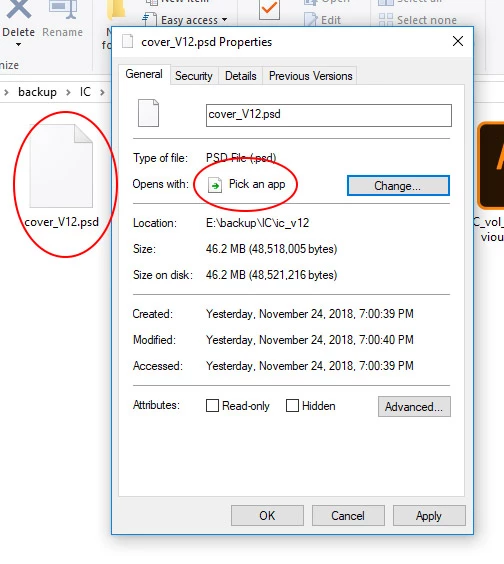
So now, every time I try to open a .psd file, I have to take the extra step of choosing what software I want to use to open the file.

I searched, and found this solution, but unfortunately there was no .psd option in that software (regardless of the instruction), so that was a no-go.

This topic has been closed for replies.
Correct answer Barb Binder

Hi Mike:

Take a look at this page: How to fix broken file type associations for Creative Cloud apps.

~Barb

1 reply

Barb Binder
Community Expert
Barb BinderCommunity ExpertCorrect answer
Community Expert
November 25, 2018
~Barb at Rocky Mountain Training
Miker2426
Miker2426Author
Inspiring
November 25, 2018

Hello again BarbBinder! Thanks for the almost instant response.

And thanks for those solution. As mentioned in my post, Solution 1 didn't work., I had to google Solution 2, as I didn't know about that or how it worked. Unfortunately, that failed in the same way Solution 1 did - I could choose the associated software, but it wouldn't stick.

So now I'm going to uninstall and reinstall (with much grumbling I'll admit). I'll report back to you, and hopefully turn this thing green.

Edit: I uninstalled and reinstalled Photoshop. The icons were still blank, however; this time when I went in and associated the icon with the software, the change stuck and the icons were fixed.

Thanks BarbBinder​!

Barb Binder
Community Expert
Community Expert
November 25, 2018

Hi  again, Mike!

I'm so glad you got it figured out. It sounds like it was an incomplete installation.

~Barb

~Barb at Rocky Mountain Training