
Participant
November 20, 2021
Resuelto

Any way to reset text box scale after transform or image resize?

  • November 20, 2021
  • 2 respuestas
  • 4353 visualizaciones

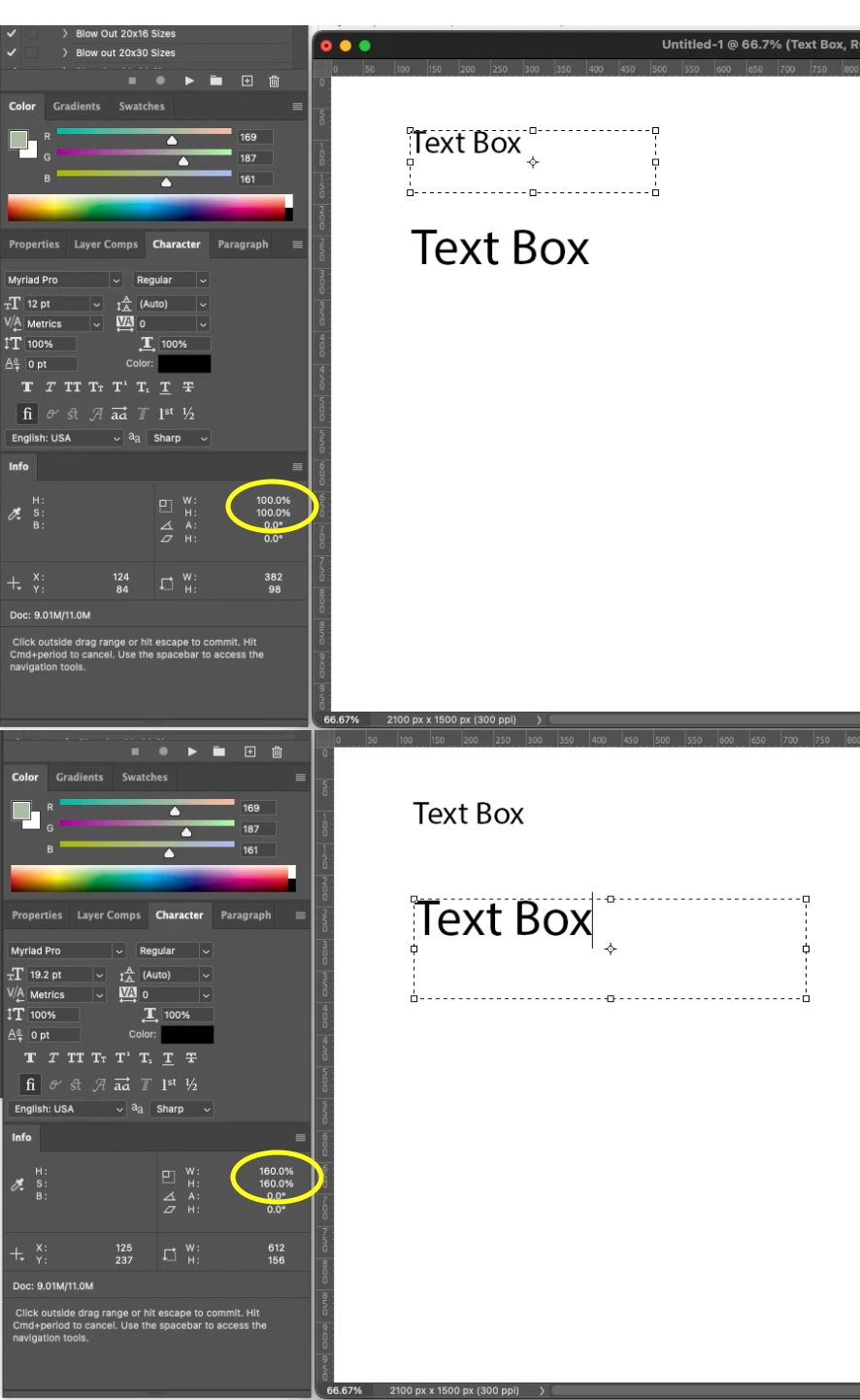
I am trying to find a solution that will reset the scale percentage of a text box after a transformation or image resize. I have a layout that needs to be rolled out to many different sizes and after I take it through all of the image size commands, the scale of the text boxes in all of the files shows the reduction or enlargement value in the info palette.


I have to upload these to an ecom platform (the layouts are ingested into a custom online builder where the customer can personalize the product by adding their own text/typography and images.


Unfortunately, the system will not properly ingest any text box that doesn't have a scale value of 100%. If it sees a scale value, it will reduce or enlarge the type according to that value.


I'm curious if there is a simple solution (scripting or otherwise) to quickly reset the scale value of the text box back to 100%, without affecting the point size. Right now, I have to manually reset the copy in each of the scaled layouts... sometimes hundreds of files.


Here is a snapshot illustrating what scale value i'm referring to.
 

Este tema ha sido cerrado para respuestas.
Mejor respuesta de r-bin

@r-bin @Kukurykus After you transform the text box and commit, activate the cursor in the text box and then hover away from the box. In the info palette, you should see the scale numbers that I'm referring too.


try undeform script

https://www.mightyplugins.cc/magic-scripts


2 respuestas

Legend
November 21, 2021

Maybe I didn't understand something, but I don't see this either on CC2020 or on CS6. After any transformations, resizing, the info-panel is always 100%.

Legend
November 21, 2021

not after, but during 🙂 
(as I understand)

Legend
November 21, 2021
quote

not after, but during 🙂 
(as I understand)


By @jazz-y


Вообще не понял. Во время чего? А тупо нажать Esc ?

Legend
November 20, 2021

The problem is that the increase in the textBox is related to the textShape parameters. We can find out how much the size of the textShape has changed, but when we try to change it, we will automatically receive the change in the textBox.

However, we can find out the transformation ratio and proportionally reduce the current font size. The script does this with the active layer:


#target photoshop
var s2t = stringIDToTypeID;

(r = new ActionReference()).putProperty(s2t('property'), p = s2t('textKey'));
r.putEnumerated(s2t('layer'), s2t('ordinal'), s2t('targetEnum'));

if (executeActionGet(r).hasKey(p)) {
    var textKey = executeActionGet(r).getObjectValue(p),
        shape = textKey.getList(s2t('textShape')).getObjectValue(0),
        styles = textKey.getList(s2t('textStyleRange'));

    scale = 1 / textKey.getObjectValue(s2t('transform')).getDouble(s2t('xx'))

    var l = new ActionList();
    for (var i = 0; i < styles.count; i++) {
        var cur = styles.getObjectValue(i),
            textStyle = cur.getObjectValue(s2t('textStyle'));

        try {
            textStyle.putUnitDouble(s2t('impliedFontSize'), s2t('pointsUnit'), textStyle.getUnitDoubleValue(s2t('impliedFontSize')) * scale);
            textStyle.putUnitDouble(s2t('impliedLeading'), s2t('pointsUnit'), textStyle.getUnitDoubleValue(s2t('impliedLeading')) * scale);
        } catch (e) { }

        cur.putObject(s2t('textStyle'), s2t('textStyle'), textStyle);
        l.putObject(s2t('textStyleRange'), cur)
        $.writeln(l.getObjectValue(i).getObjectValue(s2t('textStyle')).getUnitDoubleValue(s2t('impliedFontSize')))
    }

    textKey.putList(s2t('textStyleRange'), l);
    (r = new ActionReference()).putEnumerated(s2t('layer'), s2t('ordinal'), s2t('targetEnum'));
    (d = new ActionDescriptor()).putReference(s2t('null'), r);
    d.putObject(s2t('to'), s2t('textLayer'), textKey);
    executeAction(s2t('set'), d, DialogModes.NO);
}

function objToDesc(o) {
    var d = new ActionDescriptor();
    for (var k in o) {
        var v = o[k];
        switch (typeof (v)) {
            case "number": d.putDouble(s2t(k), v); break;
        }
    }
    return d;
}


(run it only once on one layer, as it will resize each time).


This is a fairly simplified example (I do not work much with text and have not tested it on many layers, only checked basic things), however, it may be able to help solve your problem.