


Participating Frequently
Jul 22, 2024 7:36 AM UTC
Answered

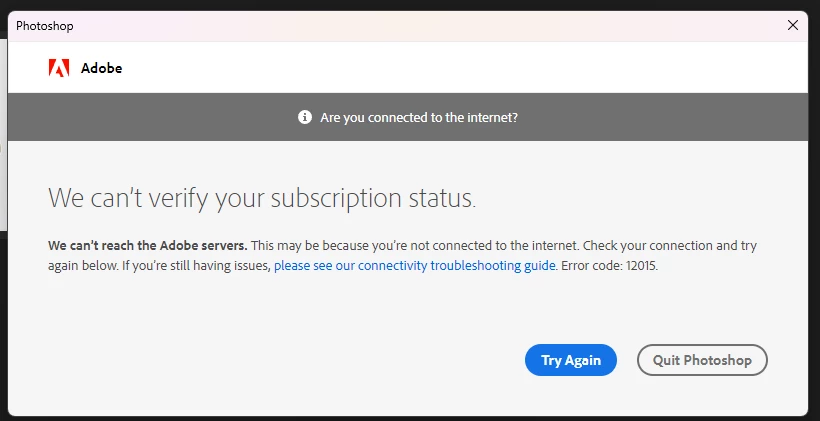
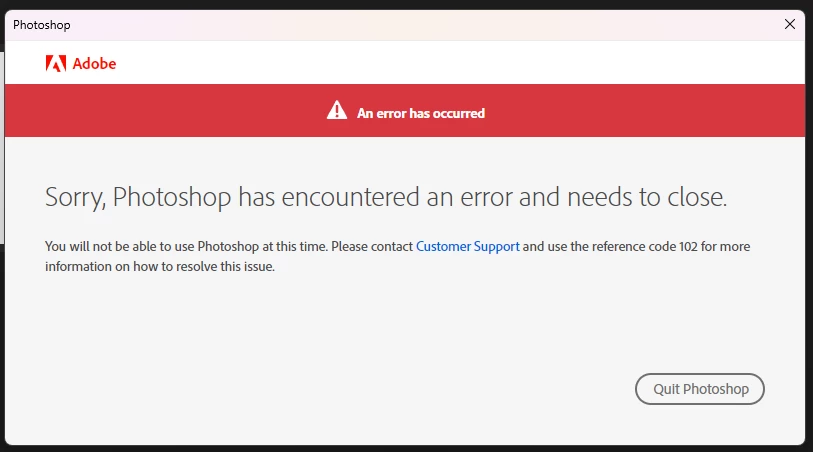
App cannot be verified and give an error, first 12015 and then 102

Photoshop and other applications from my plan cannot find an internet connection. They cannot be verified and give an error, first 12015 and then 102. After that, the application closes. The Internet is available, the subscription is paid. I have a windows 11 64x
 

OlindoThiagoCorrect answer
Participant
Jan 3, 2025 5:05 PM UTC

antes de tudo, feche todos os processos da adobe e creative cloud logo depois - Execute o bloco de notas como ADM e abra o arquivo (horts)  no local  C:\Windows\System32\drivers\etc 

apague tudo que está relacionado a adobe e salve

22 replies

Participant
May 18, 2025 11:33 PM UTC
LukaErk
Participant
Jun 10, 2026 5:53 PM UTC

Дуже дякую!!!

Translate
Participant
May 6, 2025 3:57 AM UTC

Thank you! Fixed it 

Translate
OlindoThiagoCorrect answer
Participant
Jan 3, 2025 5:05 PM UTC

antes de tudo, feche todos os processos da adobe e creative cloud logo depois - Execute o bloco de notas como ADM e abra o arquivo (horts)  no local  C:\Windows\System32\drivers\etc 

apague tudo que está relacionado a adobe e salve

Translate
Participant
Nov 3, 2024 10:03 PM UTC

HOW DID YOY FIX IT? Pls explain with more ifo? id really appreciate it


Translate
Participant
Oct 30, 2024 10:49 PM UTC

I don't know if you still need it, but for someone else who has the same problem:
1) open a notepad as Administrator
2) in notepad go to file, open and open the host file (C:\Windows\System32\drivers\etc\hosts)
(for me, when i used a notepad to open the file I couldnt see the hosts, if you have the same thing just open the file explorer and there open the file with hosts in the notepad (also make sure you can see the hidden files), after this run a notepad as Administrator and your host file will be there)
3) delete everything that related to adobe (for example,
0.0.000 adobe.com or
0.0.000. adobe.io)
(i deleted like 15 lines)
4) save file and restart the adobe
P. S. big thanks to Янн32783576eo4h, he gave me a good hint how to fixit. I spent 2 hours just trying to understand what was going on and why the subscription was paid but the programm couldnt verified it and had some connection error.

Translate
Participant
Aug 21, 2025 10:33 PM UTC

may god bless you in every step of your life, I have tried so many things, this is the only solution that worked.

Translate
Participant
Sep 26, 2024 12:58 PM UTC

hey, can you do a tutorial? i am facing the exactly same problem, although i have no clue how you solved it

Translate
Kevin Stohlmeyer
Community Expert
Community Expert
Jul 24, 2024 12:29 PM UTC

How are you installing the software? Editing a host file is not authentic.

Translate
Participating Frequently
Jul 24, 2024 6:37 AM UTC

I have found a solution. For some reason, data about the adobe verification server was entered in the host file. I deleted them and everything worked.

Translate
Kevin Stohlmeyer
Community Expert
Community Expert
Jul 23, 2024 12:31 PM UTC

All of the errors you are indicating are server dropped connection errors. There is nothing wrong on the Adobe server side as noted at status.adobe.com - so we're left troubleshooting your internet connection. What country are you located in? Are you using a VPN?

Translate