angusf38549186
Participant
November 30, 2019
Answered

"Artist Surfaces" Patterns missing. EDIT | FILL | PATTERNS not showing the usual patterns

  • November 30, 2019
  • 3 replies
  • 22930 views

working in Photoshop 2020 , Added a Vector Mask, using EDIT | FILL | PATTERN and the list CUSTOM Patterms is limited to a very small number and "Artist Surfaces" is missing (as referenced in other previous posts).
Can anyone help?

Has Pattern handling or PAT files changed in a recent upgrade ? 

thanks

Angus
This topic has been closed for replies.
Correct answer

Hi

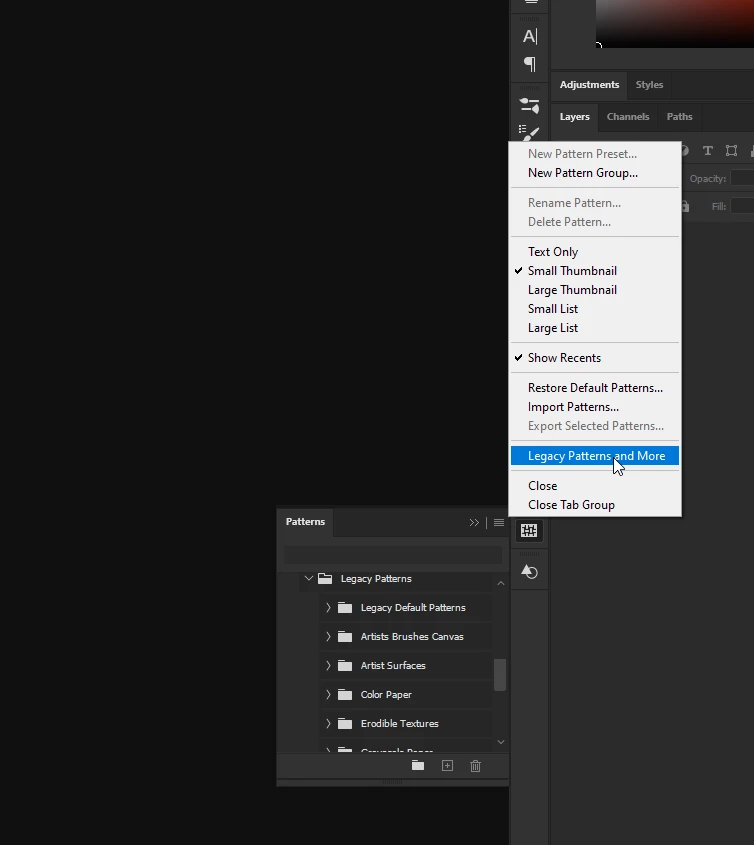
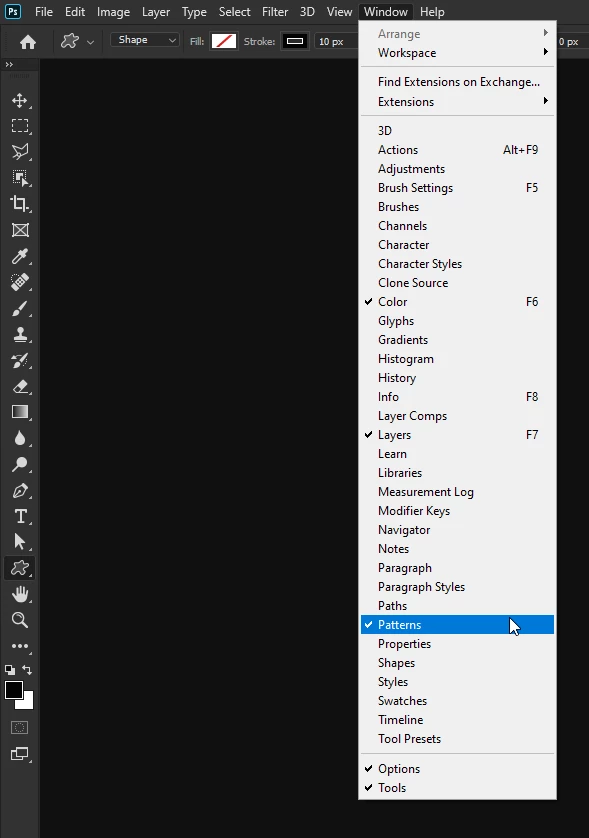
Go to Window > Patterns and from the fly out menu select Legacy Patterns and More

3 replies

PECourtejoie
Community Expert
Community Expert
September 27, 2022

Affected users who think the entries belong also elsewhere than only in the Patterns panel can vote here: https://community.adobe.com/t5/photoshop-ecosystem-ideas/add-legacy-shapes-patterns-gradients-swatches-in-option-bar-contextuals-etc/idi-p/12834769

Correct answer
November 30, 2019

Hi

Go to Window > Patterns and from the fly out menu select Legacy Patterns and More

angusf38549186
Participant
November 30, 2019

Thanks you both for your prompt and accurate answers. Much appreciated

silk-m
Community Expert
Community Expert
November 30, 2019
--Susumu Iwasaki