


MahaB82A
Legend
July 17, 2023
Answered

Blend mode & Filter layer

  • July 17, 2023
  • 1 reply
  • 668 views

This may be a trivial question but I have a curiosity for long time that is why I ask this question. Why Blend mode & filter layer is not written in a text form as like Opacity & Fill? There is enough space to do so.
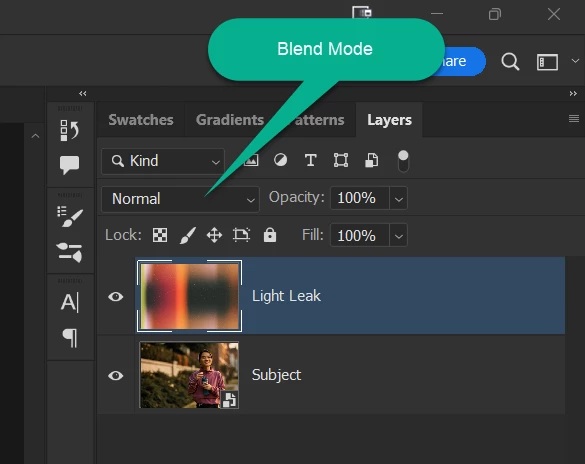


This topic has been closed for replies.
Correct answer c.pfaffenbichler

Not everybody may have the same screen-space you have. 


I am not an Adobe employee, so I am speculating: 

Just »100%« and »100%« might be a bit unclear while the Blend Mode names are fairly clear (at least for Photoshop users with some experience) and the Filter has the loupe-icon anyway, which seems like a fairly popular symbol for searching. 

1 reply

c.pfaffenbichler
Community Expert
c.pfaffenbichlerCommunity ExpertCorrect answer
Community Expert
July 18, 2023

Not everybody may have the same screen-space you have. 


I am not an Adobe employee, so I am speculating: 

Just »100%« and »100%« might be a bit unclear while the Blend Mode names are fairly clear (at least for Photoshop users with some experience) and the Filter has the loupe-icon anyway, which seems like a fairly popular symbol for searching. 

MahaB82A
MahaB82AAuthor
Legend
August 8, 2023

Thanks

c.pfaffenbichler
Community Expert
Community Expert
August 8, 2023

After working with some interface elements long enough I guess one can get used to them and then after a while just assume the way they are is the way they should be … 

But you can post a Feature Request (»Idea«) if you think some Photoshop features could/should be better (no matter whether in basic functionality or interface-wise).