
gargiulo
Participating Frequently
December 20, 2021
Question

Camera Raw filter doesn't Scale with Layer Transformation

  • December 20, 2021
  • 4 replies
  • 1733 views

Although this was answered a few years back, I never saw the response. And since then it's been removed! So...

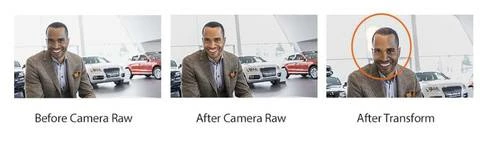
After you do a scale transformation of a Smart Object with an applied Camera Raw filter, the applied Camera Raw edits don't scale with the image. They are still applied, but not in the same area that the edits were applied. For example: I do a Camera Raw edit of a smart layer that is of a face. and use the brush to lighten up the face, and then apply the Camera Raw. I then scale the layer that has the smart object of the person, and the camera raw edit. The scaled version has the Camera Raw edit, but it's no longer isolated to the face.
4 replies

Participant
February 21, 2025

Did you end up resolving this? I'm currently ran into this same issue and no one seems to have a solution. I work with Camera Raw all the time, so I'm not sure what is happening.

c.pfaffenbichler
Community Expert
Community Expert
February 22, 2025

Please read this (in particular the section titled "Supply pertinent information for more timely and effective answers”):
https://community.adobe.com/t5/using-the-community/community-how-to-guide-tips-amp-best-practices/td-p/11601738?page=1


Did you try converting the Smart Object to a Smart Object? 

jimf16377877
Known Participant
August 28, 2023

I worked on an image using masks and the adjustment brush in the camera raw filter. I then resized the image (Image>Image Size) and all the adjustments in the camera raw filter look correct and I can see the masks correctly in camera raw. I then duplicated the layer with the adjustments into a different image of the same resolution and now the masks are off as JJMack describes. So I had to rasterize the layer before duplicating it to have it look correct. What I can't understand is why the masks survived the resampling but not when I duplicated the resampled image?

I'm in Photoshop 24.7.0

c.pfaffenbichler
Community Expert
Community Expert
August 29, 2023
quote

So I had to rasterize the layer

Have you tried converting to a Smart Object instead of rasterizing? 

jimf16377877
Known Participant
August 29, 2023

It was already a smart object when I duplicated the layer. I had converted the image to a smart object so that I could apply the camera raw filter and make adjustments non-destructively. Then I resized it and all looked okay. Then I duplicated the layer into another image and when it arrived in the second image, the masks were off. 

Earth Oliver
Legend
December 20, 2021

Which version of ACR and Ps?

JJMack
Community Expert
Community Expert
December 20, 2021

If you chnge the size of a Smart Object layer with  transform.  Because the  RAW Smart Filter setting  are for a diffent size image your best option is to delete the current RAW Smart Filters and then add a new RAW Smart Filter for the current size image  There is also an additional probem if there is a Filter Mask that is not all White.  It too will be wrong for the changed image size.  Smart Object can not have linked mask the Filter Mask will need to be re-worked for the changed layer size image.

JJMack