


josephl47982360
Participant
Dec 10, 2020 2:12 PM UTC
Answered

Can't start Photoshop

Running on Windows 7. Has been working up until yesterday. Can't run Photoshop due to missing api-ms-win-core-libraryloader-l1-2-0.dll. The rest of the apps run fine. The message displays durring initialization. I've tried uninstalling and reinstalling.
This topic is closed to new replies. Start a new post to keep the conversation going.
Correct answer
Dec 10, 2020 5:24 PM UTC

Try installing an older version of ACR from here, the installer will overwrite the current version

https://helpx.adobe.com/camera-raw/kb/camera-raw-plug-in-installer.html

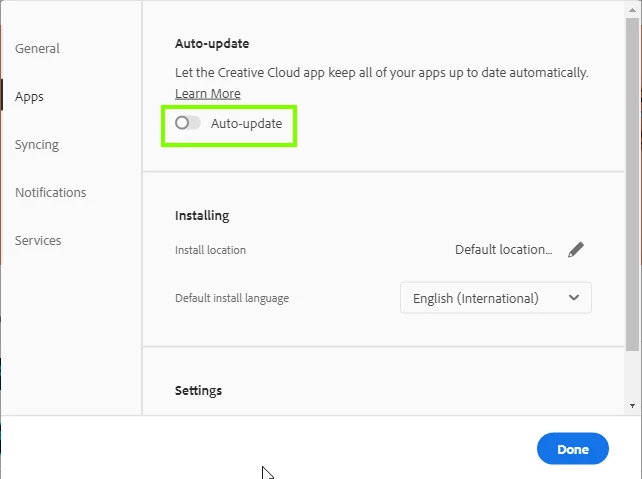
Make sure auto update is disabled in the CC preferences

38 replies

Participant
Jan 1, 2021 6:05 PM UTC

Downloading to CR 12.4 worked for me!

Thank you!

Translate
Participant
Dec 27, 2020 5:47 PM UTC

Same problem. Have been struggling with this for almost 2 weeks. Reinstalled Ps numerous times, wiped out the whole Adobe package, tried at least a dozen solutions, and still nothing. I was already thinking of buying a new Pc:) Until I came across this!

Thanks Ged! You are my Hero of the Day!

Translate
Participant
Dec 25, 2020 12:19 PM UTC

Thank you Ged Traynor I have Photoshop back at last although now it starts up with some Lightroom photo files.

Translate
Participant
Dec 24, 2020 9:59 PM UTC

Thanks!

Translate
Participant
Dec 21, 2020 11:31 PM UTC

oh, dear, it WORKED! I never thought I would be so enthousiastic about reopenning my Photoshop. 
Thanx, that is great you helped. 🙂

Translate
Participant
Dec 18, 2020 10:41 PM UTC

Thanks Ged.
I've experienced the same problem as others after the last update of camera raw. Your solution has worked for me (on window7): i've reinstalled camera raw 12.4 and now no more dll missing error

Translate
Participant
Dec 18, 2020 10:25 AM UTC

I had the same problem. The advice worked for me too. Thanks!

Translate
Participant
Dec 17, 2020 4:45 AM UTC

I wasted a whole day to troubleshoot this problem! And I wait on the great ADOBE chat support for hours only to have them responsed after 4 hours on email, telling me I'm disconnected!!! What's the use of the chat support then? What are we paying them for??? ADOBE can you do your job and stop screwing up???!!!!


Thanks for the solution, Ged Traynor.

Translate
Participant
Dec 18, 2020 7:16 AM UTC

same here, can't agree more and only this community is helpful

Translate
Participating Frequently
Dec 15, 2020 7:45 PM UTC

Same thing here, Windows 7, Photoshop 21.2.4. Been trying to fix this for 3 hours now. Photoshop will not start. 
Started with the api-ms-win-core-libraryloader-l1-2-0.dll
I found that, then it was api-ms-win-core-libraryloader-l1-1-0.dll
After that is was another one, etc.... 

Translate
Participating Frequently
Dec 15, 2020 7:51 PM UTC

Installing an older version of ACR as suggested above worked.

Thank you. 

Translate
Correct answer
Dec 10, 2020 5:24 PM UTC

Try installing an older version of ACR from here, the installer will overwrite the current version

https://helpx.adobe.com/camera-raw/kb/camera-raw-plug-in-installer.html

Make sure auto update is disabled in the CC preferences

Translate
Participant
Dec 10, 2020 5:50 PM UTC

Thank you Ged Traynor - it works. 

Translate
Dec 10, 2020 6:14 PM UTC

You're welcome 🙂

Translate