

Pattie-F
Legend
January 29, 2021
Question

Colorize black and white photos in seconds

  • January 29, 2021
  • 14 replies
  • 15339 views


Colorizing old photos just got a lot easier!


Do you want to colorize an old black and white photo with one click? The Colorize Neural Filters feature in Photoshop uses the power of Adobe Sensei to quickly colorize your photos. If you want different colors than the ones selected, you can simply select areas and pick alternate colors.
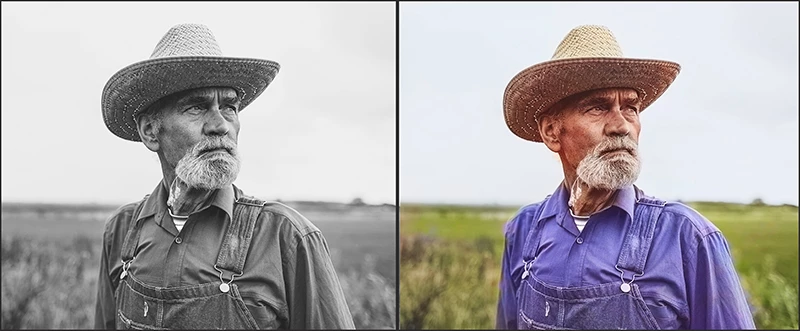


❶ Choose Filter > Neural Filters from the main Photoshop menu 


❷ Download the Colorize filter from the cloud (if you see a cloud icon by the filter name)


❸ Enable the filter and adjust the sliders


❹ Modify the colors (optional)


❺ Select an Output option and save


That's all there is to it! To learn more, see Use Neural Filters to colorize photos quickly

and check out this video: How to Colorize Photos in Photoshop - #PHOMO.


This topic has been closed for replies.

14 replies

Inspiring
June 24, 2022

"Modify the colors (optional)"

I assume in the example given, the colors have actually been modified because if one converts back to black white (using B&W function or desaturate) then there is not a match to the original.  Furthermore if I apply colorise to the original I get duller colors.


A number of articles have mentioned that this function produces colours that are duller than might be expected.  Often when the colourised image is converted back to black and white it doesn't fully match the original.  I have published a Photoshop Action to overcome this but this forum precludes me from giving a link.

Participant
June 23, 2022

I was using neural filters on a photo of a face, worked great.  But I want to colorize landscape photos and use the other filters on artwork but when I try to use neural filter on these I get the error 

This action can't be played. The selected layer doesn't have enough faces detected.  

This is happening on every photo or piece of artwork I'd like to use that doesn't have a face.

Any suggestions?

Trevor.Dennis
Community Expert
Community Expert
June 24, 2022

I have found that Colorize does not work well with a lot of landscapes, but there are other Neural filter options that _usually_ do an OK job.  Something I tried earlier today is the Neural filter Style Transfer, but it repeatedly crashed my computer.  Four times in a row my system shut down at the same point.  I could download Style Transfer and turn it on, but clicking on any of the example images instantly shut me down.

Participant
July 24, 2021

Great feature and I was using it to restore old family photos.  I went back into the program to do a new picture and the Colorize button was gone and said I needed to download again.  Tried but it just goes away and won't allow the download.  Any idea's?  I have the latest version etc. and have been using it fine up to yesterday.   Everything else seems to work fine.  


Participant
August 9, 2021

i am having the same problem

Participating Frequently
April 29, 2021

All photos are beautiful. Thank you for this thread.

Alo GiupViec
Participant
March 16, 2021

easy as. thanks for great tip.

March 12, 2021

I have seen several techniques to convert black and white to color, but this one using a gradient is fantastic. On I have used to make pictures for my site [link removed by moderator]
Thanks!

Jumpenjax
Community Expert
Community Expert
March 8, 2021

I am loving the neural filters! Thanks!

Lee- Graphic Designer, Print Specialist, Photographer
Participant
March 8, 2021

easy as. thanks for great tip.

Nancy 023
Participant
February 22, 2021

Thanks for the information.

Looking For Best Cheap Photoshop Services Work For Your Project ? We are Just Stay Beside You !
Participant
February 9, 2021

yes you can do easily in photoshop.


<link removed by moderator>