
Inspiring
Aug 31, 2023 10:13 PM UTC
Answered

Contextual Task Bar pinned position

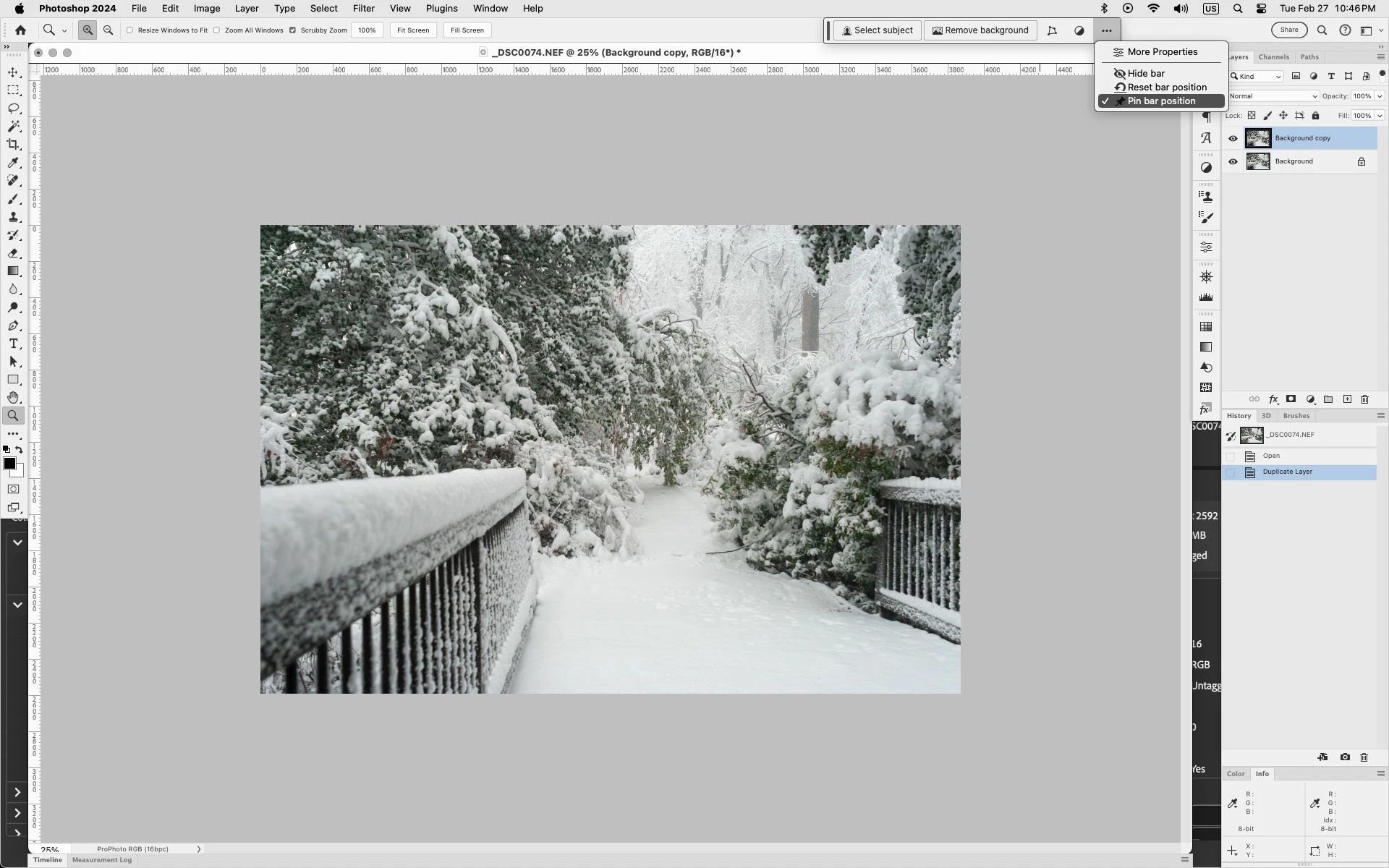
Every time I open up Photoshop (v24.7.0), the Contextual Task Bar is in the middle -- kinda like how someone stands in front of you when you're trying to watch TV. Any option to pin it at the location you say you want it to be ONE TIME and it's always there like a preference setting?

Jeff Arola
Jeff ArolaCorrect answer
Community Expert
Feb 28, 2024 3:49 AM UTC

Yes in the newest Photoshop 2024 (ps ver 25.5) you can pin the Contextual Task Bar by clicking the three small dots on the Contextual Task bar and clicking Pin Bar Postion.


8 replies

Participant
Apr 30, 2024 10:38 PM UTC

Has anyone been able to pin the contextual task bar in InDesign yet? I try pinning it to get it out of the way, because it is always on my working document and in the way, and the next time I click on an object it's back where it was... in the way!

Translate
Jeff Arola
Community Expert
Community Expert
May 1, 2024 1:45 AM UTC

Have you asked in the InDesign forum?

https://community.adobe.com/t5/indesign/ct-p/ct-indesign

Translate
jane-e
Community Expert
Community Expert
Aug 31, 2023 10:49 PM UTC

@gee eee 

You can use the options button on the far right to pin the Contextual Task Bar for the current session. If you close it, you can find it at the bottom of the Window menu. It can't be pinned permanently (yet).


Jane

Translate
Trevor.Dennis
Community Expert
Community Expert
Sep 1, 2023 4:11 AM UTC

It would be so much nicer to have the Pinned option as the default.  The thing is always in the way as it is.

Translate