
Participant
August 3, 2018
Answered

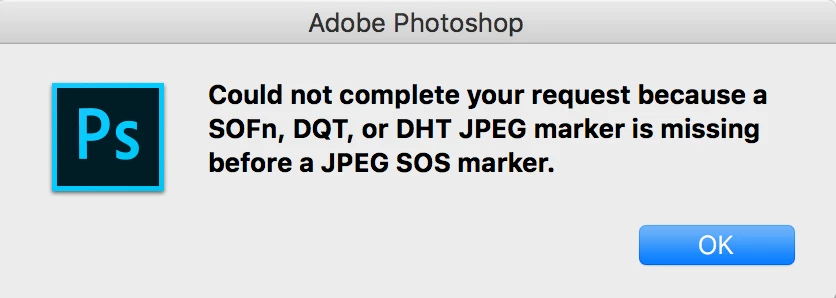
Could not complete your request because a SOFn, DQT ...
  • August 3, 2018
  • 34 replies
  • 309923 views

This is a weird message from Photoshop, could not open an image !!?

Could not complete your request because a SOFn, DQT or DHT JPEG marker is missing before a JPEG SOS marker.

what is that mean at first place !!! ... Im using MacBook and its up to date, photoshop version is 19, and it was working perfectly, I use it everyday to edit photos and so on.

Now I have one way to avoid this message by take a screenshot of the image and open it, but this is not a solution at all !

I don't know why this message is thrown by Photoshop.

is there anyone have a solution of this error !!!!!!

THANKS

Correct answer Rafael Osipov

I have created a free and open-source tool to fix these issues with images. It is easy to use and fast.

Application works for Windows and MacOS as well.

Source code and binaries are available here: https://github.com/cdefgah/whatsapp-jpeg-repair

Instructions are displayed on the page link I provided above (check README.md file).

34 replies

Participant
October 20, 2024

I create simple app for windows users, that add to the context menu new option to fix every image/s with this problem.

Here is a link to the app:

https://mendish.com/product/ic-for-adobe-licence/


See image attach:


Participant
July 18, 2024

I encountered the same issue 

here is how i fixed it
i opened the image in Paint 
then saved image as jpeg 

and i worked 

Participant
December 9, 2023

hey there, just open the image with paint, click save it, replace the original. et voilá. worked for me

Stephen Marsh
Community Expert
Community Expert
November 25, 2023

Funny thing is, I have had no issues with images saved from WhatsApp desktop app... I have not tried comparing saving from the phone.

Participant
November 5, 2023

Worked for me too. Thanks for the info. I also have to do this when opening apple's .heic files. Shame on you Adobe for not keeping up with the times.


Inspiring
November 25, 2023

This is just nuts, paint can open a jpg via WhatsApp when the most expensive photo editor cannot. If Adobe were to bother to fix this FUNDAMENTAL issue rather than messa bout with tweaks we dont need, they would have it in the next version of Pshop, make us all upgrade and pay more money per month, so its hopeless waiting for Adobe to do this. I am CS6 and refuse to pay per month, I dont have the money to do so anyway, I own my possessions ! never rent anything. and have been sent images via whatsapp which refuse to open, even if called.heic or .tiff none of that works. Adobe will never back fix an issue so I will never get a fix for .CS6 even if they do ever solve this, which they wont. Why wont they,...has anyone asked them ?


Meanwhile the mspaint is the eaasiest fix. unles someone has a plugin for CS6. also could do wiuth one for .webp images, again another pain in the butt.


Merlin

Inspiring
October 10, 2022

Hi,


I ran into this error tonight for my first time. I have a free photo viewer/editor on my hard drive called XnView and sometimes it can do things that it doesn't advertise it can do.


I had 16 images on my hard drive, recently emailed from someone, that had that error of which you speak when I tried to open them up in Photoshop. I then opened them up in XnView and, one by one, performed Save As on each, then clicked Yes on each, to override the original images on my hard drive with the resaved images from XnView.


Then, in Photoshop, I was able to open all 16 images, no error.


FWIW, I do not make any commission from XnView nor am I connected with them in anyway. 🙂

Participant
August 1, 2023

Does nobody here or anywhere else that I've been able to see even think about asking why Adobe is not fixing this issue? They know about it, that's for sure,  but they just couldn't be bothered.  And it's not a difficult fix,  if paint can do it then I'm pretty sure that Photoshop can do it too,  if only they would get off their lazy backside and really do something for a change instead of implementing useless so-called improvements.  I can never understand adobe's mentality but then again I'm not a  multibillion-dollar company and they are.  So I guess it's probably a good thing that we all have to run around like chickens without heads on trying to figure out workarounds to open lousy JPEG files.  Something even the cheapest piece of freeware can do without any problems but Adobe cannot.  And no one even think to ask why.  I am amazed.

Kang Te.
Participant
January 11, 2022

Is there no solution from Adobe itself such as plug ins or something? or I have to work twice: open another program then do the conversion then open it again in Adobe... wow... how much time rather than open directly from Adobe itself.

Participating Frequently
January 11, 2022

As far as I know there is no such plugin for Adoble product. My tool allows to process thousands of files at once, it is free and open source. As it works in command line/terminal it is possible to setup a pipeline/batch-file to process files before you launch Photoshop. I.e, in a batch/shell file run my tool to process files, and the next command launch Photoshop.

My tool is free and open source and has all proper documentation. Hope it helps 🙂

Stephen Marsh
Community Expert
Community Expert
January 11, 2022

Thank you for the share!


Nobody posted problem files in the topic thread... I downloaded some images from your repo to see the error first hand:

https://github.com/cdefgah/whatsapp-jpeg-repair/tree/master/whatsapp-files


However, Photoshop opens them fine... So are these sample files processed by your app and fixed? Or is that Photoshop 2019 or later has resoved this issue?

Rafael OsipovCorrect answer
Participating Frequently
January 31, 2021

I have created a free and open-source tool to fix these issues with images. It is easy to use and fast.

Application works for Windows and MacOS as well.

Source code and binaries are available here: https://github.com/cdefgah/whatsapp-jpeg-repair

Instructions are displayed on the page link I provided above (check README.md file).

Inspiring
February 7, 2021

Thanks for helping us out,

Does the repair tool identify the faulty jpgs and leave alone the good ones, else it means going through thousands I have trying each one in turn.

Also I dont want their dates changing else modified date column which is what I have all my windows explorer set to, will place them as if they are current files totally messing up my timescale view and wrecking my workflow, confusion will reign. They must display in the order taken. If I am told here to use date creation column, which I have never used since my first computer win 3.1,  all my work will be scattered up and down the screen and I wont see what is most current anymore , chaos.  The tail is wagging the dog, all due to Adobe.  Will this tool keep the original modified date which is crucial ?


Merlin

Participating Frequently
February 8, 2021

Hi, there.

When you unzip application archive, there are two internal folders.

One with name: whatsapp-files

And another folder: fixed-files

You need to place broken files to whatsapp-files folder, then run the application, and take fixed files from

fixed-files folder.

Fixed image files in fixed-files folder will have modification date/time equal to date/time when you run the application.

Broken files you placed to whatsapp-files folder will remain intact as their modification date/times.


Participating Frequently
January 18, 2021

If you have downloaded your jpeg file from WhatsApp, it may result in such errors upon opening this file in Photoshop.

I have created an open source tool for Windows and MacOS, to fix such broken jpeg files. You can check and download it here: https://github.com/cdefgah/whatsapp-jpeg-repair

Participant
June 28, 2020

On Mac, open image with Preview. From File drop-down menu choose Export and choose Jpeg -2000. Save. 

Open in Photoshop. Voilà!