


Known Participant
February 28, 2017
Answered

CS6 - layer effect unique for single layer

  • February 28, 2017
  • 2 replies
  • 430 views

Hi

for example, if I use "bevel and Emboss" on several of my layers and make a change in one of these layers, then automatically changes all the layers that have the same effect.
How can I use "layer effects" on several layers, but without the influence each other, want to use layer effect that use/have  the same function but with different settings.
This topic has been closed for replies.
Correct answer JJMack

steenmikkelsen2  wrote

Hi

for example, if I use "bevel and Emboss" on several of my layers and make a change in one of these layers, then automatically changes all the layers that have the same effect.

How do you do that. ?  That not the way layer  style are rendered.

Layer styles are rendered for the layer they are on not other layers.

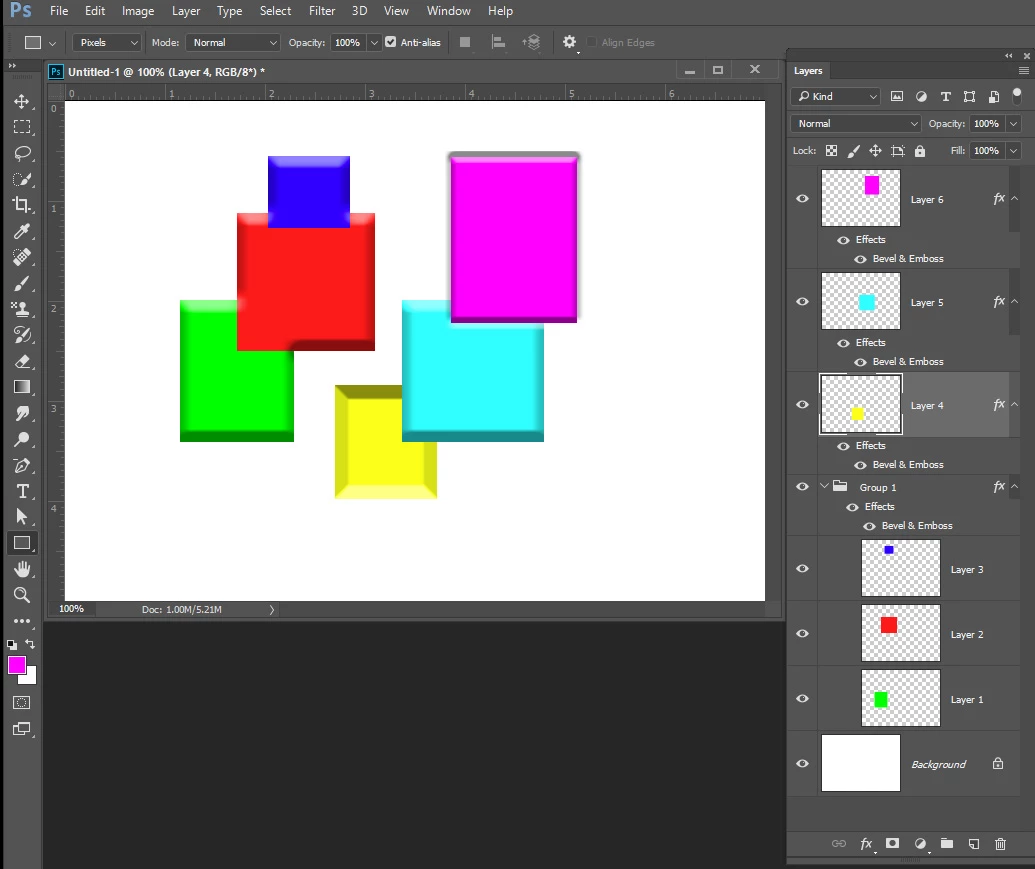
Layer style on a group are rendered for the groups composite not the layers  in the group sometimes it may look like they are rendered for the layers in the group but that is not the case. Look  at this example where the layers contents overlap.  You can clearly see that they are being rendered for the layers composite. If the layers contents do not overlap it would look like there rendered for each layer in the group.

2 replies

Braniac
February 28, 2017

UNcheck Use Global Light

JJMack
JJMackCorrect answer
Braniac
February 28, 2017

steenmikkelsen2  wrote

Hi

for example, if I use "bevel and Emboss" on several of my layers and make a change in one of these layers, then automatically changes all the layers that have the same effect.

How do you do that. ?  That not the way layer  style are rendered.

Layer styles are rendered for the layer they are on not other layers.

Layer style on a group are rendered for the groups composite not the layers  in the group sometimes it may look like they are rendered for the layers in the group but that is not the case. Look  at this example where the layers contents overlap.  You can clearly see that they are being rendered for the layers composite. If the layers contents do not overlap it would look like there rendered for each layer in the group.

JJMack