


Participating Frequently
May 17, 2022
Answered

CS6 Photoshop changing the file name of a jpg when trying to save in a new location/folder

  • May 17, 2022
  • 4 replies
  • 2888 views

Please help - we've just changed from CS3 to CS6 - we used to be able to save a photo (jpg) into a new folder with the same name as the original file - but now as soon as we type 'Save As' and the window opens, when we navigate to the new folder it changes the name of the file automatically. 
This is creating havoc as we're using screencaps, and sometimes will have hundreds of files with similar names, just a different number at the end (i.e. movienamegenericscreencap2489 - but when we try to save that into a different folder, it's changing it to movienamegenericscreencap - and dropping off the number, so then we have no idea which image it was, which is a problem - especially when it does it to several photos, which we then try to put in the same folder after sorting, and suddenly we have seven with the same name as each other, because the numbers have been removed - and it happens automatically every time!
Please - how do we stop it from changing the file name when we change the location for saving it???
We're working on a PC with the most up to date Windows (new machine, hence the change from CS3 to CS6!)
This topic has been closed for replies.
Correct answer Jeff Arola

What version of windows are you using?


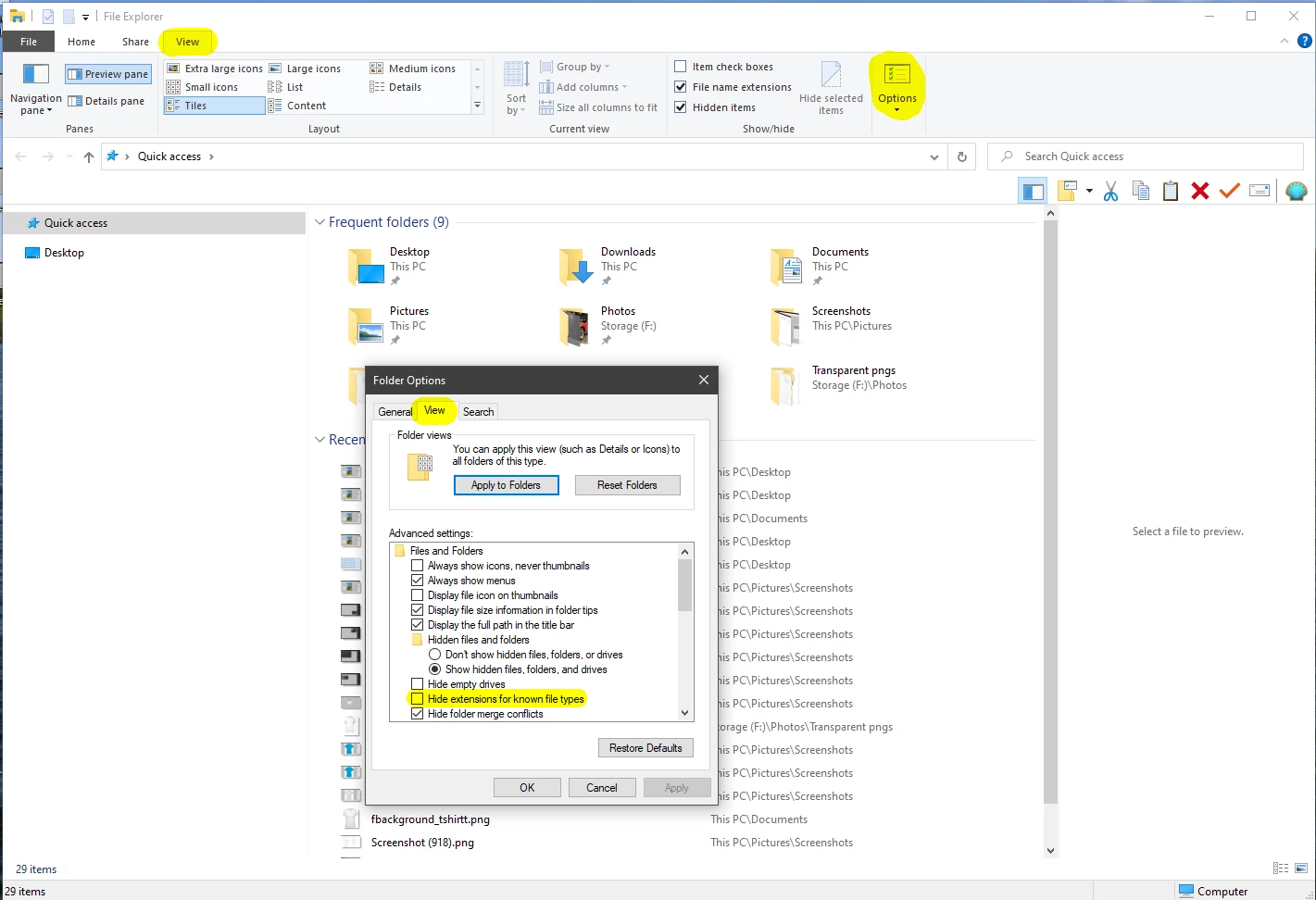
If in Windows Explorer you go to View>Options>Folder Options>View, do you have Hide extensions for known file types checked?


4 replies

Nancy OShea
Community Expert
Community Expert
May 17, 2022

CS6 has been discontinued since 2017.  Are you sure you have legitimate software and not some malware infected counterfeit?  Or maybe you really mean Photoshop CC (Creative Cloud)??  Please open your Help Menu and click on About Photoshop.  Versions matter.  Which version do you have?


Nancy O'Shea— Product User & Community Expert
Participating Frequently
May 17, 2022

Hi Nancy,
Thank you - I have a copy of CS6 that I bought years ago - we never used it because my partner preferred not to deal with the changes. I know, without question, what copy it is, and that it's a legitimate copy - as I have indicated in a response above. The only reason I'm installing it now is because our computer died, and we could no longer re-install CS3 - which I would infinitely have preferred to do - especially considering I paid a considerable amount to own it! (as I did for CS6!) I have CC for my work (it's available on our work laptops), but this is for my desktop at home. I could probably log in to CC at home as well through my work account, but as my partner doesn't like change, the jump from CS3 to CC is going to be too much - hence using CS6 which I bought years ago, but never used.

Nancy OShea
Community Expert
Community Expert
May 18, 2022

Regardless of when you purchased, it's still obsolete software from 10 years ago.  It needs an old machine for which it was intended.  Combining legacy software with new hardware on a brand new OS is not a winning combination.  You're just asking for problems.


If all you use is Photoshop, get PS Elements 2022.  It's modern and way better than CS3 was.

https://www.adobe.com/products/photoshop-elements.html


The other option is to get a Photography Plan for $10/month.  A deeply discounted bundle of all the tools you need to work with digital photographs & more...

  • Photoshop CC and Photoshop on iPad
  • Lightroom on desktop, mobile and the web
  • Lightroom Classic
  • Portfolio website + hosting
  • Creative Cloud Express (free starter plan)
  • Bridge
  • 20 GB cloud storage (upgradable to 1 TB).

https://www.adobe.com/creativecloud/photography.html


Nancy O'Shea— Product User & Community Expert
Jeff Arola
Community Expert
Jeff ArolaCommunity ExpertCorrect answer
Community Expert
May 17, 2022

What version of windows are you using?


If in Windows Explorer you go to View>Options>Folder Options>View, do you have Hide extensions for known file types checked?


Participating Frequently
May 17, 2022

Thank you - it's definitely the full stop in the file name that's causing the problem - I was hoping there's a way to stop it being a probem, but I think I'm just going to have to rename all the files. I'll try removing the full stop in Adobe Bridge (which from what I've googled appears to be possible).

Stephen Marsh
Community Expert
Community Expert
May 17, 2022

It is considered best practice not to use a period character in a filename, apart from the extension. Some software can gracefully handle the period, others don't.

Stephen Marsh
Community Expert
Community Expert
May 17, 2022

You have old software on a new OS. Perhaps something like the attached image may help? Get properties on the Photoshop.exe and see if the compatibility mode settings have any bearing.


Participating Frequently
May 17, 2022

Thank you - I've just tried that, but it only goes up to Windows 8 - we're on 11 (which is horrible, but it is what it is!). Even updating it to 8 it doesn't fix it.


jane-e
Community Expert
Community Expert
May 17, 2022

@wendy238652004rgi 


This is a guess, but since it's truncating the file name, I wonder if it's the old limit for 32 bit apps, which is 260 characters, including the path.

https://docs.microsoft.com/en-us/windows/win32/fileio/maximum-file-path-limitation


Can you test by using a folder with a very short name and path and let us know if the file name still gets truncated?


The article from Microsoft tells how to get around the limitation, but test first to see if that is the issue.


Jane


D Fosse
Community Expert
Community Expert
May 17, 2022

Er...how did you obtain CS6? It hasn't been legally available, anywhere, for many many years. Any copy you find now will be pirated and quite likely infested with malware.

Participating Frequently
May 17, 2022

Completely legally - we own a copy of it, bought it (as you observed) years ago, but never used it (not big fans of change in this house). So it's sat in a drawer until we got a new computer a few weeks ago and discovered we could no longer re-install CS3 - which we'd prefer. But since we can't, we've now installed CS6.
So, no, not infested with malware (unless it was installed by Adobe prior to purchase, which I'm going to assume is unlikely!).
Please feel free to help me with the query I posted though, because I genuinely have a huge issue with this, and would very much appreciate some constructive assistance, rather than the assumption that I obtained the program illegally, then was stupid enough to post in the forums of the owners of the program. (Spoiler alert - not that dumb!)


D Fosse
Community Expert
Community Expert
May 17, 2022

Ok, but you have no idea how many get burned by illegal CS6 copies. It's a very prudent warning to put out there.


You need to show us an actual example of a file name that gets truncated. Is there a period so that the OS thinks it's the file extension? Any setting to limit file name characters?


Can't say I ever heard of this before.