Inspiring
August 23, 2017
Answered

Delete preferences in mac photoshop

  • August 23, 2017
  • 2 replies
  • 5678 views

I am a pc user and reasonably proficient at Photoshop. That said, I have a friend who uses a mac and has described a problem to me that may be solved by deleting preferences and he does not have a clue how to accomplish that, nor do I. How does one go about deleting preferences in a Mac? Probably the easiest way, for my friend is not the most computer savvy person. Not sure on the OS, but the computer is less than two years old.

Thanks,

Joe

This topic has been closed for replies.
Correct answer Jeff Arola

Do you know what version of photoshop is being used?

The legacy way of deleting the photoshop preferences is to

Press and hold the Shift+Option+Command keys just after starting the launch of photoshop

Keep holding the keys down until a dialog appears that says Delete the Adobe Photoshop Settings File

Press Yes

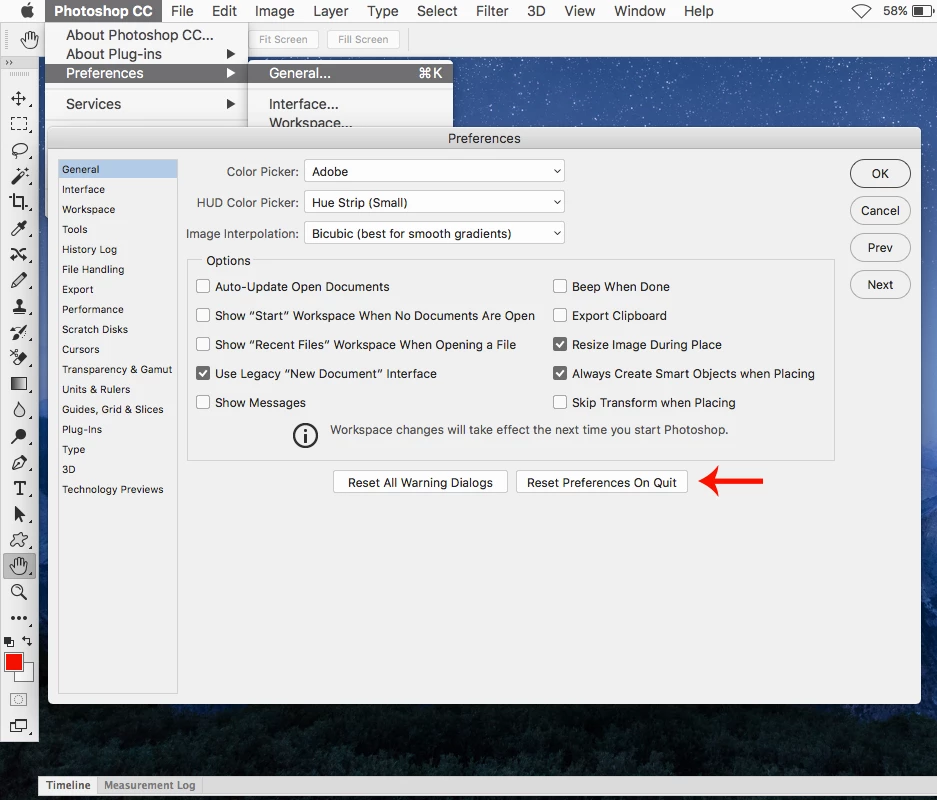
With photoshop cc versions one can go to Photoshop CC>Preferences>General>Reset Preferences on Quit

and then restart photoshop.

2 replies

gener7
Community Expert
Community Expert
August 23, 2017

In the Mac, press and hold Cmd-Opt-Shift, then launch Photoshop. A "Delete Settings" dialog pops up. Click Yes, and allow Photoshop to finish loading.

Participating Frequently
March 21, 2018

Yes and be sure to do this at least every time you save a file. The delete prefs, then you can open another image. save and then restart photoshop. Yes each time for each image. This is a known issue that Adobe refuses to address.

Jeff Arola
Community Expert
Jeff ArolaCommunity ExpertCorrect answer
Community Expert
August 23, 2017

Do you know what version of photoshop is being used?

The legacy way of deleting the photoshop preferences is to

Press and hold the Shift+Option+Command keys just after starting the launch of photoshop

Keep holding the keys down until a dialog appears that says Delete the Adobe Photoshop Settings File

Press Yes

With photoshop cc versions one can go to Photoshop CC>Preferences>General>Reset Preferences on Quit

and then restart photoshop.