
Known Participant
November 15, 2017
Answered

Disable Popups for Photoshop [not Adobe Dimension?]

  • November 15, 2017
  • 18 replies
  • 14487 views

Hey all,

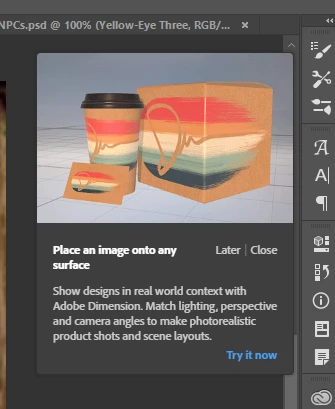
Forgive me if I am overlooking something obvious, but I am trying to figure out how to disable this pop-up ad for Adobe Dimension that shows up after I use the transform tool. It pops up pretty regularly, and is just the worst. I am running CC 19.0
This topic has been closed for replies.
Correct answer epaulodas

Oh Sweet Jesus! I so do hate this pop-up so badly! I ve seen it every single day 3 times a day for the last 3 years... I ve searched internet up and down, high and low, shalow and deep... there s no help people. They made it to make you suffer... it like the alt key that need to be pressed twice in orde to be used as a shortcut, otherwise it make an annoying sound... You have to learn to live with that! They made it intentionally to hurt us... and it does!!

18 replies

Participant
June 13, 2023

Your eyes should be cut out. Grilled...
This is so damn annoying. Still no solution.

epaulodas
epaulodasCorrect answer
Participant
October 2, 2019

Oh Sweet Jesus! I so do hate this pop-up so badly! I ve seen it every single day 3 times a day for the last 3 years... I ve searched internet up and down, high and low, shalow and deep... there s no help people. They made it to make you suffer... it like the alt key that need to be pressed twice in orde to be used as a shortcut, otherwise it make an annoying sound... You have to learn to live with that! They made it intentionally to hurt us... and it does!!

Participant
June 12, 2019

Pete.Green Is this still not resolved? I avoid updating Adobe products as much as I can, but I might actually do it if they get rid of these annoying popups. So ridiculous that years later there is no resolution to such a simple and intrusive problem.

Pete.Green
Adobe Employee
June 12, 2019

Hi Bennet,

If I recall correctly, the current behavior (after an update) is for the tooltip to pop up once (first time), then not after.

Let me know if this is not the case for you.

Regards,

Pete

OMS_Designer1
Participant
April 30, 2019

Yup, STILL the annoying pop-up while trying to use Perspective Warp. Um, yeah, I know how the tool works. I've been using it for years now.

HELLO ADOBE. Your subscribers do exist you know.

Participant
July 26, 2018

It's just the worst. Please just disable this with your next so frequently placed updates dear Adobe!!!

Participant
January 22, 2018

Frustrating and annoying don't begin to address this. It's outrageous that paying customers like me are hounded, yes hounded, by something like this. It covers my workspace and cannot be moved to the side or closed. Get rid of it! It leaves a very bad taste for the product, Adobe Dimension, and for its host PSCC 2018

robinsonwood
Participant
January 10, 2018

+1. This is madness — I've turned off rich tool tips and still no luck. Absolutely horrible.

Trevor.Dennis
Community Expert
Community Expert
January 10, 2018

robinsonwood  wrote

+1. This is madness — I've turned off rich tool tips and still no luck. Absolutely horrible.

Can you show us a screen shot?  grab the entire workspace when one of the pops is visible, and paste here with Ctrl v.

[EDIT]  Just seen Pete's post, so don't worry if it is relevant to your particular issue. robinsonwood

robinsonwood
Participant
January 11, 2018

I found a solution in another thread: reset preferences, quit photoshop. Turn off all tool tips, then quit photoshop again. Open it a third time and the "rich" tool tips don't pop up anymore.

Seeing this once didn't bother me. Seeing it 15 times was a bad experience. Thanks for the reply!

chlorinesea
Participant
January 8, 2018

Just replying to bump this up again I guess. I do pretty much do perspective transforms/free transforms/etc day in and day out while making storyboards, and this ugly orange palm tree cup popup thing covers up my frickin layers and will not go away.

I've been using Photoshop for like 20 years I don't need helpful tips. I don't control what my company does and does not purchase, I don't need ads. Please let me turn this off!

Participant
January 6, 2018

Adobe, I get why you're advertising Dimension in Photoshop; it makes sense to introduce *specific* customers to a new app that *may* improve their workflow. But offering your paying customers no opt-out to obtrusive pop-ups in the workspace is not appreciated.

Pete.Green
Adobe Employee
January 3, 2018

Sorry all, for the trouble with this popup showing too frequently.
We are aware of it and are working on fixing when it shows up.

Currently it'll pop up if you do a perspective transformation. So if you do that day in and day out, this would be likely become annoying for you.

Please add your vote and voice on this thread to be notified of when we provide an update to this: Is Photoshop becoming Adware? | Photoshop Family Customer Community

Again, sorry for the annoyance, we're working on it.

Regards

Pete

Known Participant
January 3, 2018

It is indeed something I do a lot of, so I end up seeing that thing quite a lot. It's rather off-putting that I should see ads at any point in my workspace, let alone every time. At the very least these should be toggleable, and more preferably they ought to be off by default after the first showing. I get that you folks are excited to show off your new software, but forcing productivity-halting ads into my workspace for a program we pay so much to use is pretty dubious from a marketing ethics standpoint.

Known Participant
January 3, 2018

Sorry, that said, I do genuinely appreciate that you folks are looking into it. Thanks.