
Benkitesurfs
Participant
Dec 11, 2019 1:38 AM UTC
Answered

Emoji's aren't working in Photoshop 2020 21.0.1/ Mac OS 10.15.1

Version: 21.0.1 

Mac OS 10.15.1


Trying to insert an Emoji via the glyphs panel, into a text box, and all I get are "Wingdings" in the text box.

The result is the same whether I use the "EmojiOne" pallette, or the "Apple Color Emoji" pallette.

Is anyone else experiencing this?
    justjalen12Correct answer
    Inspiring
    Jun 15, 2021 2:21 AM UTC

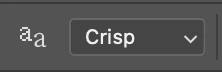
     I was having the same issue and then changed this setting right next to the text size at the top of the window when the type tool is seleected

    8 replies

    justjalen12Correct answer
    Inspiring
    Jun 15, 2021 2:21 AM UTC

     I was having the same issue and then changed this setting right next to the text size at the top of the window when the type tool is seleected

    Translate
    Participant
    Aug 24, 2021 11:23 AM UTC

    OMG THANK YOU!

    Translate
    jane-e
    Community Expert
    Community Expert
    Jan 28, 2021 7:40 PM UTC

    "Is anyone else experiencing this?"


    Yes, three folks have reported it here: 
    https://community.adobe.com/t5/photoshop/apple-emoji-font-no-longer-working-after-update/td-p/11253938?page=1

    Translate
    Participant
    Jan 28, 2021 7:14 PM UTC

    I am also having this issue and have tried everything. The emoji shows up in the layer panel and everything but will not display on the actual design/image.

    Translate
    Akash Sharma
    Legend
    Dec 11, 2019 5:09 AM UTC

    Hi there,


    Sorry that Emojis in the Glyphs panel are not working as expected in Photoshop 21.0.1 on Mac OS 10.15.1.


    Could you try resetting Photoshop's preferences & see if it helps? 
    https://t.co/ulJI7cGn1G

    You may want to backup your settings beforehand: 
    https://t.co/4dX7gkr36D


    Also, please update Photoshop to the latest version 21.0.2 from the Creative Cloud dekstop app. See https://helpx.adobe.com/in/photoshop/kb/uptodate.html


    Thanks,

    Akash


    Translate
    Benkitesurfs
    Participant
    Dec 11, 2019 5:33 PM UTC

    I have updated the software to 21.0.2 and reset the preferences, nothing has changed.

    Translate
    Akash Sharma
    Legend
    Dec 17, 2019 5:02 AM UTC

    Sorry that the issue still persists. 

    Just to be on the right track, are you using the same process of adding Glyphs as mentioned in this article? Link: https://helpx.adobe.com/in/indesign/using/glyphs-special-characters.html


    Thanks,

    Akash


    Translate