

Question
Example of ExtendScript PALETTE and colored BUTTONS (revised)
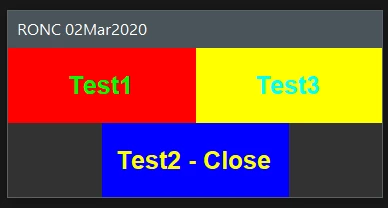
Below is a script for use in Photoshop which uses the window type "palette". It is opened by locating the jsx file in File>Scripts>... It will remain open until closed by the user even while applying operations to an image. The script also demonstrates a way of creating rectangular buttons with colored background and text.
Thanks to r-bin and Kukurykus for supplying the information for building this script.
This script can be used as input for creating a jsxbin file. To create a jsxbin file, remove the last six lines of code (BridgeTalk lines) and run save binary in ESTK. With the jsxbin file, run the code from r-bin below in the thread to run the jsxbin file.
//#script "palette3.jsx"
//@target photoshop
/* this routine is a combined effort based on information supplied
    by r-bin and Kukurykus of Adobe Community.
*/

paletteFunction();
function paletteFunction()
{
    var paletteTitle = "RONC 02Mar2020";

    var winTest, win;
    var bridgeTalk, photoShop;

    var b1, b2, b3;
    var g0, g1, g2, g3;

    try
    {
        winTest = Window.find("palette", paletteTitle);
        if (winTest)
        {
            beep();
            winTest.show();
            return;
        }

        win = new Window("palette", paletteTitle);
        win.spacing = 0;
        win.margins = 0;

        var font = ScriptUI.newFont("Arial", ScriptUI.FontStyle.BOLD, 20);

        g0 = win.add("group");
        g0.orientation = "row";
        g0.alignment = "center";
        g0.spacing = 0;
        g0.margins = 0;


        g1 = g0.add("group");
        g1.spacing = 0;
        g1.margins = 0;
        g1.preferredSize = [150, 60];

        g1.graphics.backgroundColor = g1.graphics.newBrush(g1.graphics.BrushType.SOLID_COLOR, [1, 0, 0, 1]);
        b1 = g1.add("statictext", undefined, "Test1");
        b1.justify = "center";
        b1.alignment = ["fill", "fill"];
        b1.graphics.foregroundColor = b1.graphics.newPen(b1.graphics.PenType.SOLID_COLOR, [0, 1, 0, 1], 1);
        b1.graphics.font = font;
        b1.onClick = function () { alert(this.text); };

        g3 = g0.add("group");
        g3.spacing = 0;
        g3.margins = 0;
        g3.preferredSize = [150, 60];

        g3.graphics.backgroundColor = g3.graphics.newBrush(g3.graphics.BrushType.SOLID_COLOR, [1, 1, 0, 1]);
        b3 = g3.add("statictext", undefined, "Test3");
        b3.justify = "center";
        b3.alignment = ["fill", "fill"];
        b3.graphics.foregroundColor = b3.graphics.newPen(b3.graphics.PenType.SOLID_COLOR, [0, 1, 1, 1], 1);
        b3.graphics.font = font;
        b3.onClick = function () { alert(this.text); };


        g2 = win.add("group");
        g2.spacing = 0;
        g2.margins = 0;
        g2.preferredSize = [150, 60];

        g2.graphics.backgroundColor = g2.graphics.newBrush(g2.graphics.BrushType.SOLID_COLOR, [0, 0, 1, 1]);
        b2 = g2.add("statictext", undefined, "Test2 - Close");
        b2.justify = "center";
        b2.alignment = ["fill", "fill"];
        b2.graphics.foregroundColor = b2.graphics.newPen(b2.graphics.PenType.SOLID_COLOR, [1, 1, 0, 1], 1);
        b2.graphics.font = font;
        b2.onClick = function () { alert(this.text); win.close(); };

        win.show();
    }
    catch (e)
    {
        alert(e);
    }
}


bridgeTalk = new BridgeTalk();

var photoShop = BridgeTalk.getSpecifier("photoshop");

if (!photoShop) photoShop = "photoshop-60.064"; // need redone
bridgeTalk.target = photoShop;

bridgeTalk.body = "var f=" + paletteFunction.toSource() + ";f();";
bridgeTalk.send();
This is what the "palette and colored buttons" should look like:
RONC


 AdChoices