justnickrich
Known Participant
January 6, 2025
Answered

Exporting Carousels Ruined!!!

  • January 6, 2025
  • 4 replies
  • 2932 views

I create Instagram carousels DAILY for myself and my clients, some are minimal but most are creative and have seamless designs to make them unique.  This update limited the sizing for exports to 8192px, absolutely destroying my workflow.    Please reverse this or fix it.  Instagram increased carsouel from 10 posts to 20, my canvases are 10800 or 21600, 8192 isn't going to cut it.  

Correct answer Stephen Marsh

@justnickrich 


I have created a custom script to save PNG, JPEG, or WEBP "slices" of an Instagram carousel image at 1080px wide,

without relying on the slice tool or Save for Web (Legacy) export functions.
/*
Save Instagram 1080px Carousel Images v1-3.jsx
Stephen Marsh
v1.0, 8th January 2025
v1.1, 14th January 2025 - Added doc height checking in addition to the previous width checks
v1.2, 23rd March 2025 - Added a check if the final parent layer is an artboard. Added a check for the folder selection on OK.
Info: This script saves PNG, JPEG, or WEBP "slices" of an Instagram carousel image at 1080px wide,
without relying on the slice tool or Save for Web (Legacy) export functions.
Inspired by
https://community.adobe.com/t5/photoshop-ecosystem-discussions/exporting-carousels-ruined/td-p/15073529
*/

#target photoshop

    (function () {

        // Check if there is an active document
        if (!app.documents.length) {
            alert("Error: No document is open.\nPlease open a document and try again.");
            return; // Abort script
        }

        // Set the active document
        var doc = app.activeDocument;

        // Check if the active document is saved
        try {
            doc.path;
        } catch (err) {
            alert("Error: The document must be saved before running this script.\nPlease save the document and try again.");
            return; // Abort script
        }

        // Check document width and height requirements
        var docWidthPx = doc.width.as('px'); // Explicitly convert to pixels
        var docHeightPx = doc.height.as('px'); // Explicitly convert to pixels

        // Check width requirements
        if (docWidthPx < 2160) {
            alert("Error: Document width must be at least 2160 pixels (2 frames).\nCurrent width: " + docWidthPx + "px");
            return; // Abort script
        }
        if (docWidthPx % 1080 !== 0) {
            alert("Error: Document width must be divisible by 1080 pixels.\nCurrent width: " + docWidthPx + "px");
            return; // Abort script
        }

        // Check document height requirements - don't use || because it will always evaluate to true!
        if (docHeightPx !== 1080 && docHeightPx !== 1350) {
            alert("Error: Document height must be either 1080 pixels or 1350 pixels.\nCurrent height: " + docHeightPx + "px");
            return; // Abort script
        }

        // Selected layer check, based on code by jazz-y
        s2t = stringIDToTypeID;
        (r = new ActionReference()).putProperty(s2t('property'), p = s2t('targetLayers'));
        r.putEnumerated(s2t("document"), s2t("ordinal"), s2t("targetEnum"));
        if (!executeActionGet(r).getList(p).count) {
            alert('A layer must be selected!');
            return; // Abort script
        }

        // Store all information needed for artboard check
        var layerInfo = collectLayerInfo();

        // Check if any parent is an artboard
        if (checkForArtboardParent(layerInfo)) {
            alert("Script aborted!\nPlease select a layer or group that is not within an Artboard and try again.");
            return; // Abort script
        }

        // Create the dialog window
        var dialog = new Window("dialog", "Save Instagram 1080px Carousel Images (v1.2)");
        dialog.orientation = "column";
        dialog.preferredSize.width = 500;
        dialog.alignChildren = "fill";

        // Create a panel for the GUI elements
        var panel = dialog.add("panel", undefined, "");
        panel.orientation = "column";
        panel.alignChildren = "left";

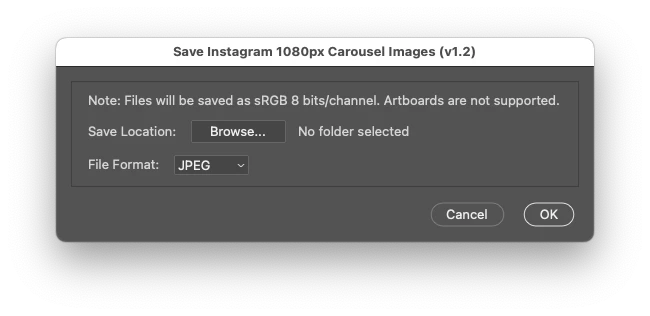
        var infoText = panel.add("statictext", undefined, "Note: Files will be saved as sRGB 8 bits/channel. Artboards are not supported.");
        infoText.alignment = "left";

        // Save location button and field
        var locationGroup = panel.add("group");
        locationGroup.add("statictext", undefined, "Save Location:");
        var browseButton = locationGroup.add("button", undefined, "Browse...");
        var locationInput = locationGroup.add("statictext", undefined, "No folder selected", { truncate: "middle" });
        locationInput.characters = 30;

        browseButton.onClick = function () {
            var selectedFolder = Folder.selectDialog("Select Save Location");
            if (selectedFolder) {
                locationInput.text = selectedFolder.fsName;
            }
        };

        // Create a conditional file format dropdown
        var formats = ["JPEG", "PNG"];
        if (parseFloat(app.version) >= 23) {
            formats.push("WEBP");
        }

        // File format dropdown
        var formatGroup = panel.add("group");
        formatGroup.add("statictext", undefined, "File Format:");
        var formatDropdown = formatGroup.add("dropdownlist", undefined, formats);
        formatDropdown.selection = 0; // Default to the first format

        // OK and Cancel buttons
        var buttonGroup = dialog.add("group");
        buttonGroup.alignment = "right";
        var cancelButton = buttonGroup.add("button", undefined, "Cancel", { name: "cancel" });
        var okButton = buttonGroup.add("button", undefined, "OK", { name: "ok" });

        okButton.onClick = function () {
            if (locationInput.text === "No folder selected") {
                alert("Error: No folder selected.\nPlease select a folder and try again.");
                return;
            }
            dialog.close(1);
        };

        cancelButton.onClick = function () {
            dialog.close(0);
        };

        // Show the dialog
        if (dialog.show() != 1) {
            return; // User canceled
        }

        // Get user input
        var selectedFormat = formatDropdown.selection.text;
        var saveLocation = new Folder(locationInput.text);

        // Function to save slices
        function saveImages() {
            var originalWidth = doc.width;
            var frameWidth = 1080;
            var frameCount = Math.floor(originalWidth / frameWidth);
            var docName = doc.name.replace(/\.[^\.]+$/, ''); // Remove file extension

            for (var i = 0; i < frameCount; i++) {
                doc.duplicate(false);
                var duplicateDoc = app.activeDocument;

                // Bitmap mode input
                if (activeDocument.mode == DocumentMode.BITMAP) {
                    activeDocument.changeMode(ChangeMode.GRAYSCALE);
                    activeDocument.changeMode(ChangeMode.RGB);
                    activeDocument.convertProfile("sRGB IEC61966-2.1", Intent.RELATIVECOLORIMETRIC, true, false);
                    activeDocument.bitsPerChannel = BitsPerChannelType.EIGHT;
                    // Indexed Color, CMYK or Lab mode input
                } else if (activeDocument.mode == DocumentMode.INDEXEDCOLOR || activeDocument.mode == DocumentMode.CMYK || activeDocument.mode == DocumentMode.LAB) {
                    activeDocument.changeMode(ChangeMode.RGB);
                    activeDocument.convertProfile("sRGB IEC61966-2.1", Intent.RELATIVECOLORIMETRIC, true, false);
                    activeDocument.bitsPerChannel = BitsPerChannelType.EIGHT;
                } else {
                    activeDocument.changeMode(ChangeMode.RGB);
                    activeDocument.convertProfile("sRGB IEC61966-2.1", Intent.RELATIVECOLORIMETRIC, true, false);
                    activeDocument.bitsPerChannel = BitsPerChannelType.EIGHT;
                }

                // Dupe the layer as a brute force metadata removal step
                var s2t = function (s) {
                    return app.stringIDToTypeID(s);
                };
                var descriptor = new ActionDescriptor();
                var reference = new ActionReference();
                var reference2 = new ActionReference();
                reference.putClass(s2t("document"));
                descriptor.putReference(s2t("null"), reference);
                descriptor.putString(s2t("name"), docName);
                reference2.putEnumerated(s2t("layer"), s2t("ordinal"), s2t("targetEnum"));
                descriptor.putReference(s2t("using"), reference2);
                executeAction(s2t("make"), descriptor, DialogModes.NO);

                // Close the original duped doc
                duplicateDoc.close(SaveOptions.DONOTSAVECHANGES);
                // Set the layer duped doc as the new active document
                var duplicateDoc = app.activeDocument;

                var left = frameWidth * i;
                var right = frameWidth * (i + 1);

                // Create a new crop area for each frame/slice
                duplicateDoc.crop([left, 0, right, duplicateDoc.height]);

                var fileName = docName + "_slice_" + (i + 1) + "." + selectedFormat.toLowerCase();
                var file = new File(saveLocation + "/" + fileName);

                switch (selectedFormat) {

                    case "JPEG":
                        var jpgSaveOptions = new JPEGSaveOptions();
                        jpgSaveOptions.embedColorProfile = true;
                        jpgSaveOptions.formatOptions = FormatOptions.STANDARDBASELINE;
                        jpgSaveOptions.matte = MatteType.NONE;
                        jpgSaveOptions.quality = 10; // Low to high quality level: 0-12
                        duplicateDoc.saveAs(file, jpgSaveOptions, true, Extension.LOWERCASE);
                        break;

                    case "PNG":
                        // Use AM code as DOM code doesn't embed the ICC profile!
                        var s2t = function (s) {
                            return app.stringIDToTypeID(s);
                        };
                        var descriptor = new ActionDescriptor();
                        var descriptor2 = new ActionDescriptor();
                        descriptor2.putEnumerated(s2t("method"), s2t("PNGMethod"), s2t("quick"));
                        descriptor2.putEnumerated(s2t("PNGInterlaceType"), s2t("PNGInterlaceType"), s2t("PNGInterlaceNone"));
                        descriptor2.putEnumerated(s2t("PNGFilter"), s2t("PNGFilter"), s2t("PNGFilterAdaptive"));
                        descriptor2.putInteger(s2t("compression"), 1); // High to low quality level: 0-9
                        descriptor2.putEnumerated(s2t("embedIccProfileLastState"), s2t("embedOff"), s2t("embedOn"));
                        descriptor.putObject(s2t("as"), s2t("PNGFormat"), descriptor2);
                        descriptor.putPath(s2t("in"), new File(file));
                        descriptor.putBoolean(s2t("copy"), true);
                        descriptor.putBoolean(s2t("lowerCase"), true);
                        descriptor.putBoolean(s2t("embedProfiles"), true);
                        executeAction(s2t("save"), descriptor, DialogModes.NO);
                        break;

                    case "WEBP":
                        // Call the saveAsWebP function
                        saveAsWebP(file);
                        break;
                }

                // Close the temporary document
                app.activeDocument.close(SaveOptions.DONOTSAVECHANGES);
            }

            // End of script notification
            alert("Script completed successfully!\n" + frameCount + " slices saved to:\n" + saveLocation);
        }

        // Save as WebP using AM code
        function saveAsWebP(file) {
            var s2t = function (s) {
                return app.stringIDToTypeID(s);
            };
            var descriptor = new ActionDescriptor();
            var descriptor2 = new ActionDescriptor();
            descriptor2.putEnumerated(s2t("compression"), s2t("WebPCompression"), s2t("compressionLossy")); // "compressionLossy" or "compressionLossless"
            descriptor2.putInteger(s2t("quality"), 75); // 0 Low to 100 high image quality, only valid for "compressionLossy"
            descriptor2.putBoolean(s2t("includeXMPData"), false); // boolean
            descriptor2.putBoolean(s2t("includeEXIFData"), false); // boolean
            descriptor2.putBoolean(s2t("includePsExtras"), false); // boolean
            descriptor.putObject(s2t("as"), s2t("WebPFormat"), descriptor2);
            descriptor.putPath(s2t("in"), file);
            descriptor.putBoolean(s2t("copy"), true);
            descriptor.putBoolean(s2t("lowerCase"), true);
            descriptor.putBoolean(s2t("embedProfiles"), true); // boolean
            executeAction(s2t("save"), descriptor, DialogModes.NO);
        }

        function collectLayerInfo() {
            var info = [];
            var currentLayer = doc.activeLayer;
            // Store information about the active layer and its ancestry
            while (currentLayer && currentLayer !== doc) {
                try {
                    info.push({
                        name: currentLayer.name,
                        id: currentLayer.id
                    });
                    currentLayer = currentLayer.parent;
                } catch (e) {
                    break; // Exit if we can't go further up the layer hierarchy
                }
            }

            return info;
        }

        function isArtboard(layerId) {
            try {
                var s2t = function (s) {
                    return app.stringIDToTypeID(s);
                };
                var ref = new ActionReference();
                ref.putIdentifier(s2t("layer"), layerId);
                var desc = executeActionGet(ref);
                // Check if this layer has the artboard property
                return desc.hasKey(s2t("artboard"));
            } catch (e) {
                return false;
            }
        }

        function checkForArtboardParent(layerInfo) {
            for (var i = 0; i < layerInfo.length; i++) {
                if (isArtboard(layerInfo[i].id)) {
                    return true;
                }
            }
            return false;
        }

        // Run the main function to save the slices
        saveImages();

    }());


  1. Copy the code text to the clipboard
  2. Open a new blank file in a plain-text editor (not in a word processor)
  3. Paste the code in
  4. Save as a plain text format file – .txt
  5. Rename the saved file extension from .txt to .jsx
  6. Install or browse to the .jsx file to run (see below)

https://prepression.blogspot.com/2017/11/downloading-and-installing-adobe-scripts.html

 

4 replies

Stephen Marsh
Community Expert
Community Expert
January 8, 2025

While on the topic of Instagram carousel template creation, I have created a script to create variable width templates from 2-10 slices for either square or portrait layouts. The slice tool will automatically create the required number of slices and a warning will be presented if the canvas size is greater than 8192px.


/*
Instagram Carousel Template Creator v1-0.jsx
Stephen Marsh
v1.0, 8th January 2025
Info: This script creates a new Photoshop document with guides and slices for an Instagram carousel template
Inspired by
https://community.adobe.com/t5/photoshop-ecosystem-discussions/exporting-carousels-ruined/td-p/15073529
*/

#target photoshop

// Create the dialog window
var dlg = new Window('dialog', 'Instagram Carousel Template Creator (v1.0)');
dlg.orientation = 'column';
dlg.alignChildren = 'fill';

// Add radio buttons for format selection
dlg.formatGroup = dlg.add('panel', undefined, 'Select Format');
dlg.formatGroup.orientation = 'row';
dlg.formatGroup.square = dlg.formatGroup.add('radiobutton', undefined, 'Square (1080px x 1080px)');
dlg.formatGroup.portrait = dlg.formatGroup.add('radiobutton', undefined, 'Portrait (1080px x 1350px)');
dlg.formatGroup.square.value = true; // Default to square format

// Add dropdown menu for frame multiplier selection
dlg.framesGroup = dlg.add('panel', undefined, 'No. of Frames');
dlg.framesGroup.orientation = 'row';
//dlg.framesGroup.add('statictext', undefined, 'frames:');
var framesDropdown = dlg.framesGroup.add('dropdownlist', undefined, ['2', '3', '4', '5', '6', '7', '8', '9', '10']);
framesDropdown.selection = 0; // Default to 2

// Add Cancel and OK buttons and align them to the right
dlg.buttonsGroup = dlg.add('group', undefined, '');
dlg.buttonsGroup.orientation = 'row';
dlg.buttonsGroup.alignment = 'right';
dlg.buttonsGroup.add('button', undefined, 'Cancel', { name: 'cancel' });
dlg.buttonsGroup.add('button', undefined, 'OK', { name: 'ok' });

// Show the dialog
if (dlg.show() == 1) {
    var frames = parseInt(framesDropdown.selection.text);
    if (isNaN(frames) || frames < 1) {
        alert('Invalid frames value. Please select a valid number.');
    } else {
        var baseWidth = 1080;
        var baseHeight = dlg.formatGroup.square.value ? 1080 : 1350;
        var docWidth = baseWidth * frames;
        var docHeight = baseHeight;

        // Create the new document
        var newDoc = app.documents.add(docWidth, docHeight, 72, 'New Document', NewDocumentMode.RGB, DocumentFill.WHITE);

        // Add vertical guides and slices
        for (var i = baseWidth; i < docWidth; i += baseWidth) {
            // Add the vertical frame guides
            newDoc.guides.add(Direction.VERTICAL, i);

            // ActionDescriptor and ActionReference string to type ID conversion functions
            var s2t = function (s) {
                return app.stringIDToTypeID(s);
            };

            // Create slices at each 1080px interval
            if (i + baseWidth <= docWidth) {  // Ensure slices do not exceed document width
                var descriptor = new ActionDescriptor();
                var descriptor2 = new ActionDescriptor();
                var descriptor3 = new ActionDescriptor();
                var reference = new ActionReference();
                reference.putClass(s2t("slice"));
                descriptor.putReference(s2t("null"), reference);
                descriptor2.putEnumerated(s2t("type"), s2t("sliceType"), s2t("user"));
                descriptor3.putUnitDouble(s2t("top"), s2t("pixelsUnit"), 0);
                descriptor3.putUnitDouble(s2t("left"), s2t("pixelsUnit"), i);
                descriptor3.putUnitDouble(s2t("bottom"), s2t("pixelsUnit"), docHeight);
                descriptor3.putUnitDouble(s2t("right"), s2t("pixelsUnit"), i + baseWidth);
                descriptor2.putObject(s2t("at"), s2t("rectangle"), descriptor3);
                descriptor.putObject(s2t("using"), s2t("slice"), descriptor2);
                executeAction(s2t("make"), descriptor, DialogModes.NO);
            }
        }
    }

    // Add guides to the canvas edges
    newDoc.guides.add(Direction.HORIZONTAL, 0); // Top edge
    newDoc.guides.add(Direction.HORIZONTAL, newDoc.height); // Bottom edge
    newDoc.guides.add(Direction.VERTICAL, 0); // Left edge
    newDoc.guides.add(Direction.VERTICAL, newDoc.width); // Right edge

    // Check if the document width exceeds 8192px
    if (docWidth > 8192) {
        alert('Warning: Document width exceeds 8192 px!' + '\n' + 'Saving slices via "Save for Web" will incorrectly reduce the exported slice size.');
    }
}


  1. Copy the code text to the clipboard
  2. Open a new blank file in a plain-text editor (not in a word processor)
  3. Paste the code in
  4. Save as a plain text format file – .txt
  5. Rename the saved file extension from .txt to .jsx
  6. Install or browse to the .jsx file to run (see below)


https://prepression.blogspot.com/2017/11/downloading-and-installing-adobe-scripts.html

Stephen Marsh
Community Expert
Stephen MarshCommunity ExpertCorrect answer
Community Expert
January 8, 2025

@justnickrich 


I have created a custom script to save PNG, JPEG, or WEBP "slices" of an Instagram carousel image at 1080px wide,

without relying on the slice tool or Save for Web (Legacy) export functions.
/*
Save Instagram 1080px Carousel Images v1-3.jsx
Stephen Marsh
v1.0, 8th January 2025
v1.1, 14th January 2025 - Added doc height checking in addition to the previous width checks
v1.2, 23rd March 2025 - Added a check if the final parent layer is an artboard. Added a check for the folder selection on OK.
Info: This script saves PNG, JPEG, or WEBP "slices" of an Instagram carousel image at 1080px wide,
without relying on the slice tool or Save for Web (Legacy) export functions.
Inspired by
https://community.adobe.com/t5/photoshop-ecosystem-discussions/exporting-carousels-ruined/td-p/15073529
*/

#target photoshop

    (function () {

        // Check if there is an active document
        if (!app.documents.length) {
            alert("Error: No document is open.\nPlease open a document and try again.");
            return; // Abort script
        }

        // Set the active document
        var doc = app.activeDocument;

        // Check if the active document is saved
        try {
            doc.path;
        } catch (err) {
            alert("Error: The document must be saved before running this script.\nPlease save the document and try again.");
            return; // Abort script
        }

        // Check document width and height requirements
        var docWidthPx = doc.width.as('px'); // Explicitly convert to pixels
        var docHeightPx = doc.height.as('px'); // Explicitly convert to pixels

        // Check width requirements
        if (docWidthPx < 2160) {
            alert("Error: Document width must be at least 2160 pixels (2 frames).\nCurrent width: " + docWidthPx + "px");
            return; // Abort script
        }
        if (docWidthPx % 1080 !== 0) {
            alert("Error: Document width must be divisible by 1080 pixels.\nCurrent width: " + docWidthPx + "px");
            return; // Abort script
        }

        // Check document height requirements - don't use || because it will always evaluate to true!
        if (docHeightPx !== 1080 && docHeightPx !== 1350) {
            alert("Error: Document height must be either 1080 pixels or 1350 pixels.\nCurrent height: " + docHeightPx + "px");
            return; // Abort script
        }

        // Selected layer check, based on code by jazz-y
        s2t = stringIDToTypeID;
        (r = new ActionReference()).putProperty(s2t('property'), p = s2t('targetLayers'));
        r.putEnumerated(s2t("document"), s2t("ordinal"), s2t("targetEnum"));
        if (!executeActionGet(r).getList(p).count) {
            alert('A layer must be selected!');
            return; // Abort script
        }

        // Store all information needed for artboard check
        var layerInfo = collectLayerInfo();

        // Check if any parent is an artboard
        if (checkForArtboardParent(layerInfo)) {
            alert("Script aborted!\nPlease select a layer or group that is not within an Artboard and try again.");
            return; // Abort script
        }

        // Create the dialog window
        var dialog = new Window("dialog", "Save Instagram 1080px Carousel Images (v1.2)");
        dialog.orientation = "column";
        dialog.preferredSize.width = 500;
        dialog.alignChildren = "fill";

        // Create a panel for the GUI elements
        var panel = dialog.add("panel", undefined, "");
        panel.orientation = "column";
        panel.alignChildren = "left";

        var infoText = panel.add("statictext", undefined, "Note: Files will be saved as sRGB 8 bits/channel. Artboards are not supported.");
        infoText.alignment = "left";

        // Save location button and field
        var locationGroup = panel.add("group");
        locationGroup.add("statictext", undefined, "Save Location:");
        var browseButton = locationGroup.add("button", undefined, "Browse...");
        var locationInput = locationGroup.add("statictext", undefined, "No folder selected", { truncate: "middle" });
        locationInput.characters = 30;

        browseButton.onClick = function () {
            var selectedFolder = Folder.selectDialog("Select Save Location");
            if (selectedFolder) {
                locationInput.text = selectedFolder.fsName;
            }
        };

        // Create a conditional file format dropdown
        var formats = ["JPEG", "PNG"];
        if (parseFloat(app.version) >= 23) {
            formats.push("WEBP");
        }

        // File format dropdown
        var formatGroup = panel.add("group");
        formatGroup.add("statictext", undefined, "File Format:");
        var formatDropdown = formatGroup.add("dropdownlist", undefined, formats);
        formatDropdown.selection = 0; // Default to the first format

        // OK and Cancel buttons
        var buttonGroup = dialog.add("group");
        buttonGroup.alignment = "right";
        var cancelButton = buttonGroup.add("button", undefined, "Cancel", { name: "cancel" });
        var okButton = buttonGroup.add("button", undefined, "OK", { name: "ok" });

        okButton.onClick = function () {
            if (locationInput.text === "No folder selected") {
                alert("Error: No folder selected.\nPlease select a folder and try again.");
                return;
            }
            dialog.close(1);
        };

        cancelButton.onClick = function () {
            dialog.close(0);
        };

        // Show the dialog
        if (dialog.show() != 1) {
            return; // User canceled
        }

        // Get user input
        var selectedFormat = formatDropdown.selection.text;
        var saveLocation = new Folder(locationInput.text);

        // Function to save slices
        function saveImages() {
            var originalWidth = doc.width;
            var frameWidth = 1080;
            var frameCount = Math.floor(originalWidth / frameWidth);
            var docName = doc.name.replace(/\.[^\.]+$/, ''); // Remove file extension

            for (var i = 0; i < frameCount; i++) {
                doc.duplicate(false);
                var duplicateDoc = app.activeDocument;

                // Bitmap mode input
                if (activeDocument.mode == DocumentMode.BITMAP) {
                    activeDocument.changeMode(ChangeMode.GRAYSCALE);
                    activeDocument.changeMode(ChangeMode.RGB);
                    activeDocument.convertProfile("sRGB IEC61966-2.1", Intent.RELATIVECOLORIMETRIC, true, false);
                    activeDocument.bitsPerChannel = BitsPerChannelType.EIGHT;
                    // Indexed Color, CMYK or Lab mode input
                } else if (activeDocument.mode == DocumentMode.INDEXEDCOLOR || activeDocument.mode == DocumentMode.CMYK || activeDocument.mode == DocumentMode.LAB) {
                    activeDocument.changeMode(ChangeMode.RGB);
                    activeDocument.convertProfile("sRGB IEC61966-2.1", Intent.RELATIVECOLORIMETRIC, true, false);
                    activeDocument.bitsPerChannel = BitsPerChannelType.EIGHT;
                } else {
                    activeDocument.changeMode(ChangeMode.RGB);
                    activeDocument.convertProfile("sRGB IEC61966-2.1", Intent.RELATIVECOLORIMETRIC, true, false);
                    activeDocument.bitsPerChannel = BitsPerChannelType.EIGHT;
                }

                // Dupe the layer as a brute force metadata removal step
                var s2t = function (s) {
                    return app.stringIDToTypeID(s);
                };
                var descriptor = new ActionDescriptor();
                var reference = new ActionReference();
                var reference2 = new ActionReference();
                reference.putClass(s2t("document"));
                descriptor.putReference(s2t("null"), reference);
                descriptor.putString(s2t("name"), docName);
                reference2.putEnumerated(s2t("layer"), s2t("ordinal"), s2t("targetEnum"));
                descriptor.putReference(s2t("using"), reference2);
                executeAction(s2t("make"), descriptor, DialogModes.NO);

                // Close the original duped doc
                duplicateDoc.close(SaveOptions.DONOTSAVECHANGES);
                // Set the layer duped doc as the new active document
                var duplicateDoc = app.activeDocument;

                var left = frameWidth * i;
                var right = frameWidth * (i + 1);

                // Create a new crop area for each frame/slice
                duplicateDoc.crop([left, 0, right, duplicateDoc.height]);

                var fileName = docName + "_slice_" + (i + 1) + "." + selectedFormat.toLowerCase();
                var file = new File(saveLocation + "/" + fileName);

                switch (selectedFormat) {

                    case "JPEG":
                        var jpgSaveOptions = new JPEGSaveOptions();
                        jpgSaveOptions.embedColorProfile = true;
                        jpgSaveOptions.formatOptions = FormatOptions.STANDARDBASELINE;
                        jpgSaveOptions.matte = MatteType.NONE;
                        jpgSaveOptions.quality = 10; // Low to high quality level: 0-12
                        duplicateDoc.saveAs(file, jpgSaveOptions, true, Extension.LOWERCASE);
                        break;

                    case "PNG":
                        // Use AM code as DOM code doesn't embed the ICC profile!
                        var s2t = function (s) {
                            return app.stringIDToTypeID(s);
                        };
                        var descriptor = new ActionDescriptor();
                        var descriptor2 = new ActionDescriptor();
                        descriptor2.putEnumerated(s2t("method"), s2t("PNGMethod"), s2t("quick"));
                        descriptor2.putEnumerated(s2t("PNGInterlaceType"), s2t("PNGInterlaceType"), s2t("PNGInterlaceNone"));
                        descriptor2.putEnumerated(s2t("PNGFilter"), s2t("PNGFilter"), s2t("PNGFilterAdaptive"));
                        descriptor2.putInteger(s2t("compression"), 1); // High to low quality level: 0-9
                        descriptor2.putEnumerated(s2t("embedIccProfileLastState"), s2t("embedOff"), s2t("embedOn"));
                        descriptor.putObject(s2t("as"), s2t("PNGFormat"), descriptor2);
                        descriptor.putPath(s2t("in"), new File(file));
                        descriptor.putBoolean(s2t("copy"), true);
                        descriptor.putBoolean(s2t("lowerCase"), true);
                        descriptor.putBoolean(s2t("embedProfiles"), true);
                        executeAction(s2t("save"), descriptor, DialogModes.NO);
                        break;

                    case "WEBP":
                        // Call the saveAsWebP function
                        saveAsWebP(file);
                        break;
                }

                // Close the temporary document
                app.activeDocument.close(SaveOptions.DONOTSAVECHANGES);
            }

            // End of script notification
            alert("Script completed successfully!\n" + frameCount + " slices saved to:\n" + saveLocation);
        }

        // Save as WebP using AM code
        function saveAsWebP(file) {
            var s2t = function (s) {
                return app.stringIDToTypeID(s);
            };
            var descriptor = new ActionDescriptor();
            var descriptor2 = new ActionDescriptor();
            descriptor2.putEnumerated(s2t("compression"), s2t("WebPCompression"), s2t("compressionLossy")); // "compressionLossy" or "compressionLossless"
            descriptor2.putInteger(s2t("quality"), 75); // 0 Low to 100 high image quality, only valid for "compressionLossy"
            descriptor2.putBoolean(s2t("includeXMPData"), false); // boolean
            descriptor2.putBoolean(s2t("includeEXIFData"), false); // boolean
            descriptor2.putBoolean(s2t("includePsExtras"), false); // boolean
            descriptor.putObject(s2t("as"), s2t("WebPFormat"), descriptor2);
            descriptor.putPath(s2t("in"), file);
            descriptor.putBoolean(s2t("copy"), true);
            descriptor.putBoolean(s2t("lowerCase"), true);
            descriptor.putBoolean(s2t("embedProfiles"), true); // boolean
            executeAction(s2t("save"), descriptor, DialogModes.NO);
        }

        function collectLayerInfo() {
            var info = [];
            var currentLayer = doc.activeLayer;
            // Store information about the active layer and its ancestry
            while (currentLayer && currentLayer !== doc) {
                try {
                    info.push({
                        name: currentLayer.name,
                        id: currentLayer.id
                    });
                    currentLayer = currentLayer.parent;
                } catch (e) {
                    break; // Exit if we can't go further up the layer hierarchy
                }
            }

            return info;
        }

        function isArtboard(layerId) {
            try {
                var s2t = function (s) {
                    return app.stringIDToTypeID(s);
                };
                var ref = new ActionReference();
                ref.putIdentifier(s2t("layer"), layerId);
                var desc = executeActionGet(ref);
                // Check if this layer has the artboard property
                return desc.hasKey(s2t("artboard"));
            } catch (e) {
                return false;
            }
        }

        function checkForArtboardParent(layerInfo) {
            for (var i = 0; i < layerInfo.length; i++) {
                if (isArtboard(layerInfo[i].id)) {
                    return true;
                }
            }
            return false;
        }

        // Run the main function to save the slices
        saveImages();

    }());


  1. Copy the code text to the clipboard
  2. Open a new blank file in a plain-text editor (not in a word processor)
  3. Paste the code in
  4. Save as a plain text format file – .txt
  5. Rename the saved file extension from .txt to .jsx
  6. Install or browse to the .jsx file to run (see below)

https://prepression.blogspot.com/2017/11/downloading-and-installing-adobe-scripts.html

 

Fuzzbass2000
Known Participant
November 10, 2025

Hi - I've been gratefully running this successfully for a couple of months now. The last time was three days ago.

For some reason the script now returns a "0 Slices Saved".  Maybe I've started doing something differently but I can't think what.

Any ideas?

Stephen Marsh
Community Expert
Community Expert
November 11, 2025

The template canvas is 20 4x5 panels - so 21600 x 1350 px 
The header to the script tells me I'm running 23/3/25 v1.2
Tried JPGs and PNGs with the same error message.
It's weird - as I mentioned I used this maybe three days ago successfully - same version (latest) of PS using the same script and template.
I'm mystified as to what might have changed.


What exact version of Photoshop and OS?


Have you rebooted and or reset preferences/settings in Photoshop? Backup any unsaved actions or presets before resetting.

Jeff Arola
Community Expert
Community Expert
January 6, 2025

There is also File>Export>Export As

Stephen Marsh
Community Expert
Community Expert
January 6, 2025
quote

There is also File>Export>Export As


By @Jeff Arola


Which from memory, should be noted as having a 15K px limit.


EDIT: Selecting the layers or groups and then contextually clicking "Export As" from the Layers panel would overcome the size limitation if the layer content is less than 15K on the longest edge.

jane-e
Community Expert
Community Expert
January 6, 2025

@justnickrich 


The dimension limitations for Save for Web (legacy) are 8192 × 8192 pixels. This old code is from ImageReady, last released with CS2 in 2005. Don't use it if you don't want its limitations.


What happens when you use either File > Save As or File > Save a Copy?


Jane

justnickrich
Known Participant
January 7, 2025

Thanks for the reply, I believe it came in this most recent update.  I haven't had any issues at all prior to this update and I've had Photoshop since CS2.  Save as options seem to have been removed.  I always "Save for web" because it cuts up the slices for me at full size.  The legacy option seems to be the only option now. I don't know if I have a bugged version or I clicked something by accident but my normal save for web is gone.  Mac Studio and Macbook Pro 


Stephen Marsh
Community Expert
Community Expert
January 7, 2025
quote

Thanks for the reply, I believe it came in this most recent update. 


By @justnickrich


No, as @jane-e correctly replied, it's always been this way. You can search the forum or internet for "Save for Web 8192 px limit" or similar keywords and see this previously reported by others.


What is the canvas size in px for your carousel and the slice size?


You can either temporarily crop the canvas to under 8192px to retain 100% size slices or use custom scripts to save slices to files or layers: