
Participant
Jan 5, 2021 10:55 PM UTC
Question

Free Transform Not Selecting All Selected Layers [2021]

Occasionally when I have multiple layers selected in my Layers window and I try to manually resize/move/rotate all selected layers using Command+T (Free Transform), the bounding box will only select some of the layers. For example, currently I have 5 layers selected in my Layers window: One layer of header text, two individual rectangles and two sets of smaller text placed over the two rectangles, but Free Transform is only selecting the two rectangles and the two smaller texts layers, and NOT the header text even though all 5 are selected in the Layers window. I've attached a screenshot to reference the layers selected in my layers window versus the layers that are given the Free Transform bounding box. Even though the "A Budding Romance" text layer is selected, it is not included in the bounding box and is not affected by any Free Transform actions like resizing, rotating or moving.  
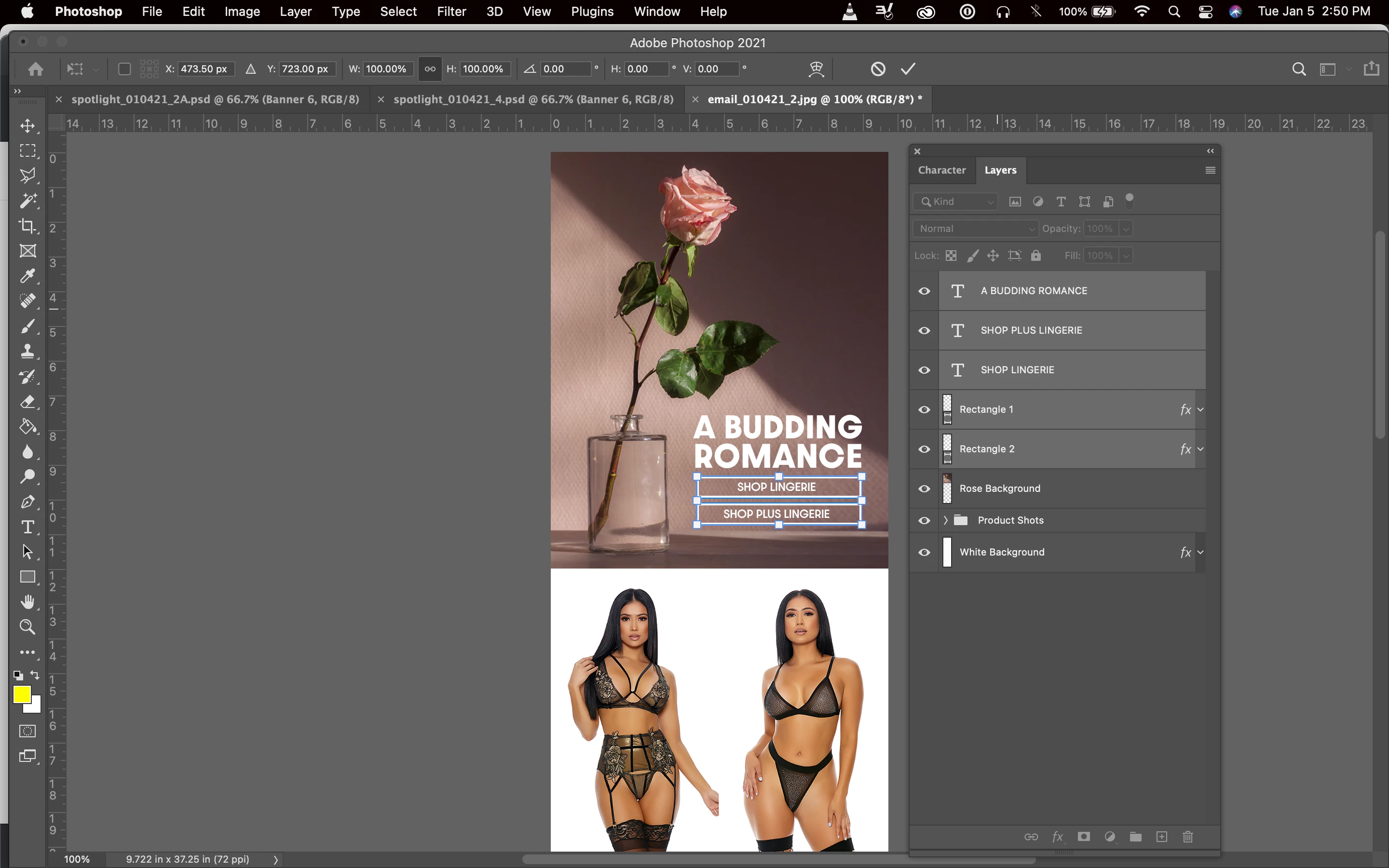
10 replies

Inspiring
Jun 30, 2025 3:42 PM UTC

In case it helps anyone, I've found that the problem occurs when groups are included in the mix.


Let's say if you want to move absolutely everything (all layers) upwards a bit to perhaps centre things better. You might click the top layer in the Layers panel and then shift click the bottom layer so that they're all highlighted. Then do a Ctrl-T and off you go. But that's when you find not everything is moving as it should.


Check if you have any group layers in the selection. If you do, you have to...and this is spectacularly annoying... expand the groups and select the layers within too. Then they move along with everything else. In other words, you can't content yourself with selecting just the unexpanded group layer. This is doubly confusing because if you just wanted to move that one group, you could do so by just selecting the group layer, expanded or not. Go figure.


I'm sure this is not an exhaustive answer. I've had text layers and vector layers or masks that steadfastly refuse to move when the layer selection includes other types of layer, I'm sure of it. But certainly the expand-and-select-group-contents process above will resolve the issue for some.

Translate
Participant
Dec 12, 2024 10:54 PM UTC

i have same issue. only way i could get around it was to group into 2 seperate folders the just chain link them and select one of the folders that didn't have the shape layers (or layers it kept transforming) and then it would work. Hope this helps and hope they get this bug fixed!


Translate
Community Manager
Dec 13, 2024 2:20 PM UTC

Hey @patrick_3272! Does this issue happen all the time or just sometimes? The next time it happens, please share a screenshot of the entire Photoshop screen so we can narrow down the issue.

Another thing you can try when this issue comes up is resetting your preferences. You can find out how to do that here: https://adobe.ly/4gplZLC.

Thanks!
Alek

Translate
*(If you mention me with an @, like @Aleke, I’ll get a notification and can respond faster.)*
Rubber Johnny
Known Participant
Sep 28, 2023 2:28 PM UTC

Photoshop 2023
MacOS Ventura 13.5  

I run into this issue often, and it's highly annoying, disrupting my workflow.  
When I need to select all of the layers and resize them together(via Free Transform..and even the Scale tool), not all layers are selected in the bounding box.(see screenshot). 
As you'll see, in the Layers Window, all of the layers I need to resize are selected. (boxes and balloons)
But you'll see that only the boxes are selected to resize on the canvas layout.  So when I resize, only the boxes are resized...and the balloons stay in their original position, unsizeable.  
Even if I link all of the layers together, it's the same result.  Same thing if I unlink every layer.  
Why?

Translate
melissapiccone
Community Expert
Community Expert
Sep 28, 2023 2:50 PM UTC

Have you tried resetting the preferences?

Translate
Melissa Piccone | Adobe Trainer | Online Courses Author | Fine Artist
Participant
May 8, 2024 5:30 PM UTC

I have the same issue when selecting multiple layers to Free Transform, the selected text layers within shape layers won't resize.  In the video I changed the font color to show that the text layers were indeed selected.


Haven't been able to find a solution other than workaround by adding steps to the workflow (selecting manually, resizing and aligning), hopefully it's a setting I haven't been able to find. Any help is welcome.


Thanks in advance.

Translate
Rubber Johnny
Known Participant
Sep 28, 2023 2:13 PM UTC

Really?  NOBODY answered your question?  Not even a certified Adobe mod here?  That's pathetic.  
Sorry you've been ignored for so long.  I came here with the same question.  

Translate
c.pfaffenbichler
Community Expert
Community Expert
Sep 28, 2023 2:38 PM UTC

Please keep your attitude in check, read this and act accordingly:
https://community.adobe.com/t5/using-the-community-discussions/adobe-support-community-guidelines/td-p/4788157


Please post screenshots with the pertinent Panels (Toolbar, Layers, Options Bar, …) visible. 

Does the actual transformation include the elements that are disregarded in the bounding box? (Edit: That was the case for the OP but please elaborate on your exact case.)

Translate