
Participant
March 14, 2026
Answered

Gemini 3 Missing in Photoshop

  • March 14, 2026
  • 3 replies
  • 87 views

Hello,


I have a Creative Cloud Pro plan, but I cannot see all of the partner AI models in Adobe Photoshop 27.0.0 release.


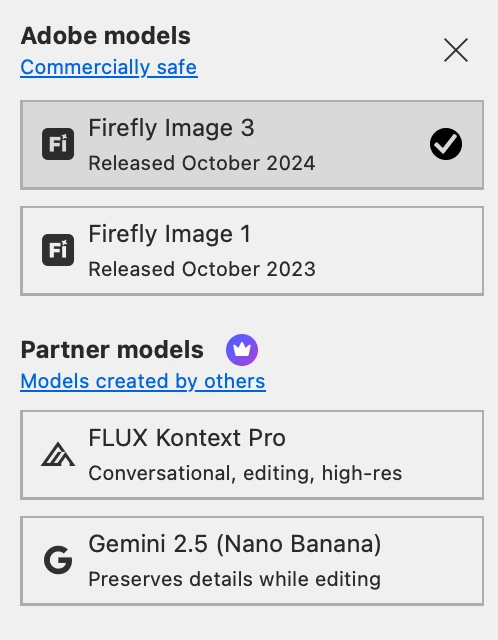
Currently, the only models available in my account are:


  • Firefly Image 3

  • Firefly Image 1

  • FLUX Kontext Pro

  • Gemini 2.5


However, I understand that other partner models such as Gemini 3 should also be available. Could you please explain why these models are not visible in my account and whether they need to be enabled?


    Correct answer LAMY2017

    Sign Out of Creative Cloud and sign back in.


    I regularly experience issues like: new versions of Adobe apps not displayed; apps continue to be displayed as downloadable even though I’ve installed when notified. PS 27.5 reminded me to install three times, finally marked as Updated after the third install. I sign out/in to CC at least once/month.

    3 replies

    Inspiring
    March 15, 2026

    same here 3pm  nyc  march 15th 2026


    creative explorer
    Community Expert
    Community Expert
    March 15, 2026

    @sinand61512473 what version and OS are you using?

    m
    Participant
    March 15, 2026

    macOS Tahoe Version 26.3.1

    Legend
    March 15, 2026

    27.4.0 is the current version; its Adobe models:


    Larry
    Participant
    March 15, 2026

    27.4.0 is the current version; its Adobe models:


    Version 27.0.0 was the one available to me, but after downloading the 27.5 beta version, I can now see all of the partner AI models in beta. So I guess that was the problem.

    Legend
    March 15, 2026

    27.4.0 is the official, released version of Ps. 27.5 is Beta, meant for testing not production. Not running Beta was not the problem; not downloading the public, tested version was.


    Larry