


Generative Upscale returns solid black layer — Desktop only, Web works
# Generative Upscale returns solid black layer — Desktop only, Web works
## Summary
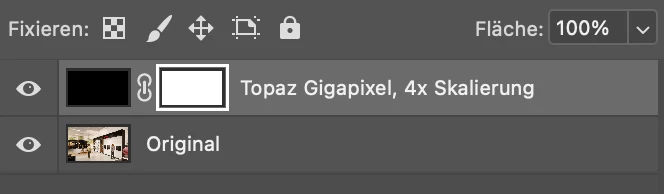
Generative Upscale in Photoshop 27.9.1 (macOS) always produces a solid black pixel
layer*with a white layer mask. The "Original" layer is fine. Affects all models
(Firefly Upscaler, Topaz Gigapixel, Bloom).
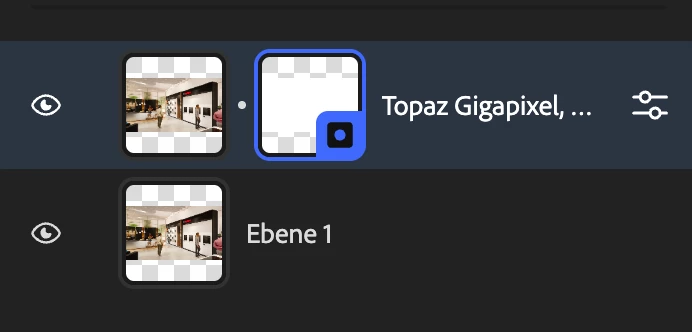
The exact same account, image and scale factor works correctly on
photoshop.adobe.com — so the cloud service, the account and the generative credits
are demonstrably fine. The defect is in the desktop application.
Generative Fill works perfectly in the same desktop app (both Firefly and Nano
Banana). Only Generative Upscale is broken. The relevant difference: Generative Fill
works inside the existing document, Generative Upscale creates a **new document**.
## Environment
| | |
|---|---|
| Photoshop | 27.9.1 — build 20260803.r.1 65900e1 |
| macOS | 26.3 (build 25D125) |
| Hardware | MacBook Pro, Apple M2 Pro, 19 GPU cores |
| GPU | Metal 4, 12.713 MB GPU-accessible RAM |
| Displays | tested on built-in XDR, LG, Dell — identical failure |
## Steps to reproduce
1. Open any RGB 8-bit image (e.g. 960×540 PNG, sRGB IEC61966-2.1)
2. Image > Image Size > Generative Upscale, 4x, any model
3. Result: new document, "Original" layer correct, upscale layer = solid black
## What has been ruled out
- **Cloud / account / credits** — identical operation succeeds on photoshop.adobe.com
- **Network** — no proxy, no VPN, no firewall, no system extensions;
firefly.adobe.io, sensei.adobe.io, image.adobe.io all reachable at ~200 ms
- **GPU** — disabling "Use Graphics Processor" + restart: no change
- **Preferences** — full reset performed, no change
- **Installation** — full reinstall performed, no change
- **Model** — Firefly Upscaler, Topaz Gigapixel, Bloom all identical
- **Image format** — PNG, JPG, 8-bit, 16-bit, RGB, CMYK all identical
- **Alpha channel** — tested with and without alpha, identical
- **File location** — tested on local disk and on OneDrive path, identical
- **Display / HDR** — tested on built-in XDR (dynamic range 0–16), LG and Dell
(SDR), identical
- **Content Credentials state** — `~/Library/Application Support/Adobe/CAI`
moved aside, folder recreated empty by Photoshop: no change
- **Scale factor / size** — source is only 960×540, far below any model limit
## Log evidence
`PSErrorLog.txt` records **no error at all** for the failing operation. Photoshop
considers the upscale successful.
The UXP log shows the same pattern on **every single upscale attempt**, and never on
Generative Fill or on normally opened documents:
```
[2026-08-07_09-58-51][Warn] [console] [CAI:handleNewDocument] timer retry 2/150: doc 64 not yet available, rescheduling
[2026-08-07_09-58-53][Warn] [console] [CAI:handleNewDocument] timer retry 3/150: doc 64 not yet available, rescheduling
... continues to retry 13/150 and beyond
```
The Content Authenticity module waits for the newly created upscale document, which
never becomes queryable. This reproduces with a **completely empty, freshly created
CAI folder**, so it is not stale local state — the new document genuinely never
materialises correctly.
Occurrences: 2026-08-06 13:32, 15:01 · 2026-08-07 09:40, 09:42, 09:58 — one per
upscale attempt.
## Note
Content Credentials are **not** enabled in the panel, but per Adobe's own note in that
panel, fully AI-generated content applies them automatically — so the code path runs
regardless of the user setting and cannot be switched off.
 AdChoices