Participant
January 7, 2024
Question

Halftone Issue

  • January 7, 2024
  • 12 replies
  • 2660 views

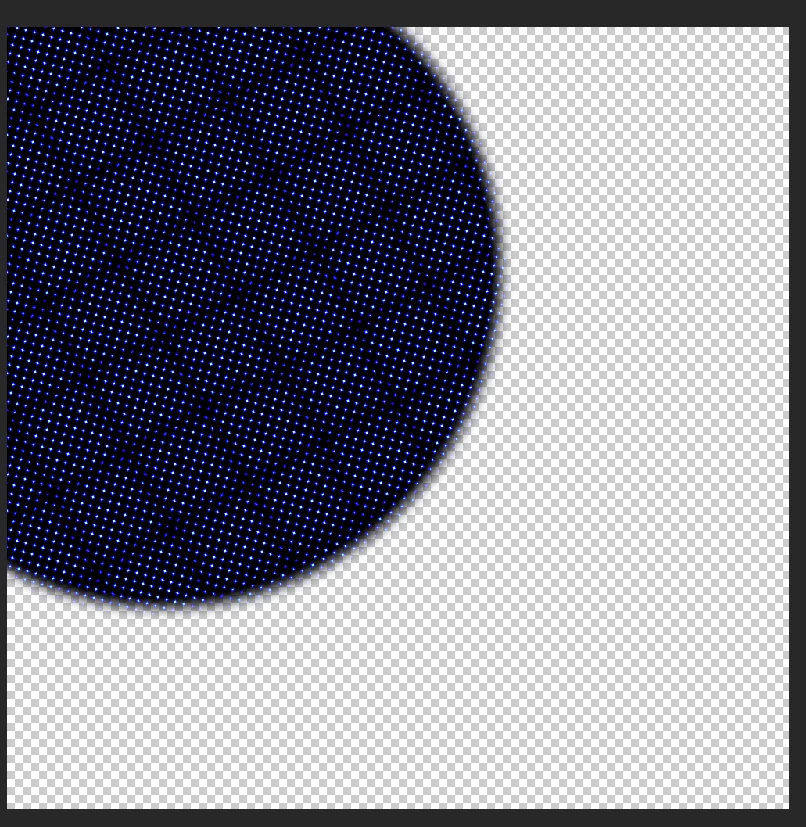
Hi! Would someone be able to help me fix this issue? I want to have a dotted halftone pattern on the blurred circle shown in the photo but instead, this thing happens. 
Note: The version I'm using is Photoshop 2022
 

This topic has been closed for replies.

12 replies

Myra Ferguson
Community Expert
Community Expert
January 11, 2024

There's also the free Comic Kit script that might help:


Trevor.Dennis
Community Expert
Community Expert
January 10, 2024

There's a new halftone effect in Parametric filters, which I think gives you more control.

It's only available in the beta version though.

Semaphoric
Community Expert
Community Expert
January 8, 2024

An alternative approach would to use a circular selection for a mask on a Color Fill layer. Blur the mask, and then apply Color Halftone to the mask. Only the first channel is used.

Stephen Marsh
Community Expert
Community Expert
January 8, 2024
quote

Yes, that's the halftone pattern I want. The 'Filter > Pixelate > Color Halftone' doesn't work and that's the problem I want to fix. My work is on RGB mode and CMYK mode doesn't fix as well. 


By @duckiecomrade


I mentioned CMYK because it's "more correct" in creating a colour halftone than RGB. Even if the image is meant for RGB display, create the Color Halftone filter in CMYK and then convert back to RGB and adjust saturation if needed.


I used Bitmap mode halftone as it creates the best results, but as I mentioned it has to be created at final pixel size (100%) and as @D Fosse mentions, such effects need to be viewed at 100% size where 1 image pixel = 1 display pixel (1:1).

D Fosse
Community Expert
Community Expert
January 8, 2024

I think it looks like moiré from screen resampling on a zoomed out image.


@duckiecomrade Set View at 100% (ctrl+1) and check again.

Stephen Marsh
Community Expert
Community Expert
January 8, 2024

You need to select the halftone conversion method with appropriate screen frequency for the document resolution and screen angle and dot shape.


https://helpx.adobe.com/au/photoshop/using/converting-color-modes.html

Participant
January 8, 2024

For me, it creates a threshold-like effect.

Stephen Marsh
Community Expert
Community Expert
January 8, 2024

The halftone in my example was created from duping the shadow layer to a new doc and converting to bitmap mode at final pixel resolution/size. Then recombining the bitmap shadow doc back to the original.

Participant
January 8, 2024

Yes, that's the halftone pattern I want. The 'Filter > Pixelate > Color Halftone' doesn't work and that's the problem I want to fix. My work is on RGB mode and CMYK mode doesn't fix as well. 

Stephen Marsh
Community Expert
Community Expert
January 7, 2024

OK, so the blurred pixel layer is in a separate layer, just like my example... Is the halftone effect in my animated example what you are looking for? Should the halftone be a single-plate "stipple" or a four-plate CMYK "rosette" halftone pattern?


There are multiple methods and all have different results:


  • Filter > Pixelate > Color Halftone (RGB or CMYK mode)
  • Filter > Filter Gallery > Sketch > Halftone Pattern (RGB mode only)
  • Converting to Bitmap mode using a halftone (most realistic results but takes more work)
