
Ken Nielsen
Legend
June 30, 2023
Answered

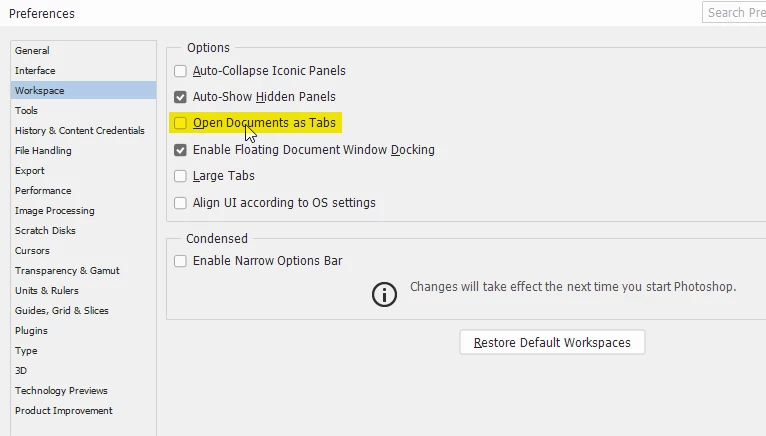
How do I get new open documents not to 'join with' documents already open?

  • June 30, 2023
  • 2 replies
  • 1130 views

Still trying to bring Photoshop back to normal after having to do a new install... Now, a new annoyance, every time I open a document it 'joins with' documents already open. I want to leave documents already open in place on the computer screen but this behavior is moving things around so I have to re-arrange every time I open a new document. How do I get a new document to simpy open and not attach itself to images already open? I'm afraid to experiment with settings as I know very well I will create a bigger mess than I'm already in. Thanks for help you that know how to handle these things.
This topic has been closed for replies.
Correct answer Per Berntsen

To set Photoshop to always open documents in floating windows, go to Preferences > Workspace, and uncheck Open documents as Tabs. Then restart Photoshop.


2 replies

Trevor.Dennis
Community Expert
Community Expert
June 30, 2023

I am not entirely sure what you mean, but I am going to hazzard a guess it is to do with Window > Arrange.  It might be that you float windows, in which case opening a new document will cause it to be tabbed to the active document window like this.  You should be able to get back to your preferred arangment from Menu > Window > Arrange


If not, show us a screen shot of your workspace to help us understand.

Ken Nielsen
Legend
June 30, 2023

Here is the workspace with a photo in place but only after I 'unglued' it from the already open image you see with my signature and then placed it where I wanted it to be 'full screen' so I could work on it.  I also show my choices are default for the workspace as I am working to reconstruct everything back to the way I had set it up for years until needing to re-install Photoshop, all of that has to be re done and your help is another piece of the puzzle that will go into place. 

Semaphoric
Community Expert
Community Expert
June 30, 2023

What are your settings in Window > Arrange?